Fix Drones: A Beginner-Friendly Repair Guide
A practical, beginner-friendly guide to fixing drones: diagnose common problems, replace damaged parts, ensure battery safety, calibrate sensors, and perform safe test flights.


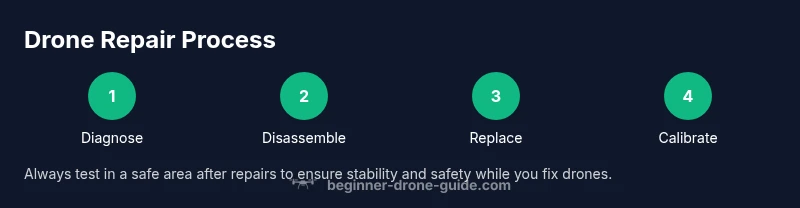
Goal: learn how to safely diagnose and fix common drone issues, from damaged propellers and motors to faulty battery connections and IMU drift. You’ll need basic tools, spare parts, and a clean workspace. This step-by-step guide walks you through diagnosis, careful disassembly, component replacement, firmware updates, and flight tests so beginner pilots can fix drones with confidence and safety.
Safety and Preparation for DIY Drone Repair
According to Beginner Drone Guide, safety comes first. Before touching any moving parts, power down the drone and remove the battery to prevent short circuits. Work in a clean, well-lit area with static-dissipative surfaces if possible. Keep a fire-safe container for damaged LiPo cells and have a small first-aid kit on hand. When you plan a repair, write down the symptoms and note any recent crashes or firmware updates to guide your diagnosis. This prep work reduces guesswork and protects you and your equipment as you fix drones. The goal is to create a repeatable workflow you can rely on, even when a model you own has an unusual build. In 2026, Beginner Drone Guide analysis shows that a systematic approach reduces repair time and increases success rates for beginners.
Common Fixes You Can Do at Home
Most beginner fixes for drones involve tangible, non-destructive components. Damaged propellers are the most common issue and are easy to swap. Loose or detached wiring, battery connector problems, and IMU drift are frequent culprits behind unstable flight. This block explains how to assess each area quickly and decide whether you can repair it safely at home or if you should pause and seek professional help. When you fix drones, you’ll also learn to distinguish reversible wear from dangerous damage, which saves you money and protects your equipment in the long run.
Diagnosing Before You Disassemble
A thorough diagnosis prevents unnecessary disassembly. Start with a visual inspection for cracks, loose screws, or bent frames. Check propellers for chips and ensure all motors spin freely without grinding. Gently wiggle wiring harnesses at the connectors; if you feel play, a fault may be in the connector or solder joints. Use basic diagnostics like motor spin tests on a bench to observe each channel independently. Remember, your goal is to localize the issue with minimal risk to electronics. As you fix drones, you’ll become quicker at spotting telltale signs, especially for propeller and motor problems.
Safe Disassembly: Protect the Electronics
Disassembly should be deliberate and methodical. Remove the outer shell, then disconnect the battery before touching internal components. Use a magnetic tray to keep screws organized and a plastic pry tool to avoid pinching delicate housings. Ground yourself to avoid static damage to sensitive boards. When handling the flight controller or ESCs, work on a non-conductive mat if possible and avoid touching exposed traces. The better you protect the electronics, the easier future maintenance will be and the less likely you’ll cause new issues while fixing drones.
Replacing Damaged Components: Props, Motors, Battery
Start with the simplest replacement—propellers. If a motor shows wobble or resistance, replace it with a known-good unit. When swapping motors, ensure the windings and shaft align with the drone’s design and that you reconnect the wiring in the correct order. Damaged batteries require special care: never puncture or crush a swollen LiPo; instead, isolate and dispose of damaged packs following local guidelines. After replacements, verify that each component is secured with the proper torque and that no wires are pinched by moving parts. This phase directly affects flight performance and safety, so take your time and verify each connection.
Cleaning and Reassembly: Make It Like New
Dust and grime can create resistance and heat buildup. Use isopropyl alcohol and lint-free wipes to clean contacts, connectors, and the interior surfaces. Replace any worn gaskets or seals and reassemble the frame carefully, following your drone’s reverse order of disassembly. Tighten screws in a crisscross pattern to avoid warping the chassis and ensure frame rigidity. As you reassemble, keep track of small parts and ensure no tools remain inside the shell. A clean build reduces vibration noise and improves overall stability when you fix drones.
Calibrating and Re-tuning: IMU and Sensors
Calibrating the IMU and other sensors is essential after any substantial repair. Place the drone on a level surface and perform the built-in calibration routine in the flight controller software. If you notice drift during a hover test, recheck sensor mounts for looseness and ensure the camera and gimbal are balanced if applicable. Proper calibration improves flight stability, responsiveness, and control accuracy, making your Fix Drones efforts more successful for beginner pilots.
Firmware, Calibration, and Flight Controller Checks
Firmware integrity matters. After hardware repairs, flash the latest stable firmware from the manufacturer or open-source alternative if supported by your model. Verify the flight controller settings, sensor orientation, and channel mappings to prevent unpredictable behavior. Keep a log of the firmware version and calibration data to help diagnose future issues. Firmware updates can fix known bugs and optimize motor response, but always back up settings before updating so you can revert if needed. This step helps ensure reliability as you fix drones and return to flight.
Testing in a Safe Flight Environment
Always test in an open, outdoor area with clear space or a large indoor gym. Begin with a tethered hover to observe stability before attempting full flight. Slowly increase throttle and perform gentle climbs and descents to confirm smooth motor response. If there is any abnormal vibration, noise, or heat, land immediately and recheck your work. Testing in safe environments reinforces good habits and reduces the risk of property damage, injuries, or further damage to the drone as you fix drones.
Authority Sources
For authoritative safety and regulatory context, consult:
- FAA UAS information: https://www.faa.gov/uas/
- FAA Part 107 licensing guidance: https://www.faa.gov/licenses_certificates/aircraft_certification/part_107/
- OSHA safety resources: https://www.osha.gov These sources provide practical safety frameworks and legal considerations that complement hands-on drone repair skills when you fix drones.
Final Notes and Next Steps
As you gain experience fixing drones, keep refining your process and documenting what works best for your specific model. The Beginner Drone Guide team recommends practicing in safe environments, using the right parts, and staying current with firmware updates and safety guidelines. With patience and consistent practice, your ability to diagnose and repair drones will grow, and you’ll approach future fixes with greater confidence and safety. Remember, the journey to mastering drone repair is ongoing, so stay curious and keep learning to fix drones effectively.
Tools & Materials
- Precision screwdriver set (Philips #0, #1; Torx T6/T8)(For small drone screws; carry multiple bit types)
- Soldering iron and lead-free solder(Only if you anticipate repairing loose joints or ESC connections)
- Multimeter(Check continuity on power leads and batteries)
- Replacement propellers (set of 4–6)(Use the same size and pitch as the original)
- Replacement motors (as needed)(Only if a motor shows wobble or inconsistent RPM)
- Isopropyl alcohol (70-99%)(For cleaning contacts and residue)
- Lint-free wipes(Use with isopropyl alcohol to avoid fibers left behind)
- Plastic pry tools / spudger(Non-conductive, protects plastic housings)
- Static-free mat or anti-static wrist strap(Helpful for sensitive components)
- Heat sink or temperature-controlled workstation (optional)(Helpful for careful soldering)
Steps
Estimated time: 60-120 minutes
- 1
Power down and remove the battery
Ensure the drone is completely powered off and disconnected from any charging source. Remove the battery by grasping the connectors gently and pulling straight out, not by tugging on wires. This initial action prevents shorts and protects you while you inspect the craft.
Tip: Always disconnect the battery first before touching any internal components. - 2
Inspect for visible damage
Look for cracks, bent frames, loose screws, or propeller damage. Spin each motor manually to feel for resistance or grinding. Note any irregularities and set aside parts that appear compromised for replacement.
Tip: Document damaged areas with photos to guide replacements later. - 3
Remove damaged propellers and replace
If any propellers are chipped or bent, remove them using the correct driver bit and replace with identical spare parts. Ensure the replacement props are oriented correctly (check rotation marks). This step directly impacts stability and safety when you fix drones.
Tip: Use a torque-friendly approach to avoid over-tightening. - 4
Check electrical connections
Inspect harnesses and connectors for corrosion or loose pins. Reseat connectors firmly and clean any corrosion with isopropyl alcohol. Recheck the wiring route to prevent pinching when reassembling.
Tip: Do not tug on wires; grip the connector housing itself. - 5
Replace damaged components
Swap out any defective motors or damaged components with approved replacements. Match the electrical specs and wiring order to reduce rework. Secure components with the proper screws and verify no shorts occur after reassembly.
Tip: Keep track of screws by location to simplify reassembly. - 6
Clean and reassemble the frame
Clean interior surfaces and contacts with isopropyl alcohol. Reassemble the frame in the reverse order of disassembly, ensuring all components sit flush and all cables are routed cleanly away from moving parts.
Tip: Cross-tighten screws to avoid frame distortion. - 7
Reconnect power and test basic motors
Reconnect the battery and perform a low-power bench test to confirm each motor spins in the correct direction without unusual noise. Check for any overheating signs and stop if you notice abnormal heat.
Tip: Test each motor one at a time to isolate issues. - 8
Calibrate sensors
Run the IMU and other sensor calibrations via the flight controller interface. A successful calibration reduces drift and improves flight stability after fixing drones.
Tip: Keep the drone level during calibration and avoid vibrations. - 9
Update firmware and check flight controller
If available, perform a firmware update to the latest stable version. Confirm flight controller settings and rebind any accessories after the update to ensure proper control alignment.
Tip: Back up settings before updating firmware. - 10
Perform a controlled test flight
Take the drone to a safe testing area. Start with gentle hover, then small forward/backward movements before attempting a full flight. Monitor for stability and responsiveness, ready to land if anything feels off.
Tip: Always have a spotter and a safe landing area. - 11
Document results and plan next steps
Record what worked and what didn’t, including any parts changed. Use this log to guide future repairs and to decide if professional service is needed for complex issues.
Tip: Maintain a repair log for long-term reference.
Frequently Asked Questions
Can I fix drones at home, or should I use a professional service?
Many common issues can be fixed at home by beginners with proper safety and the right parts. However, complex electronics or severe frame damage may require professional service. Always assess risk before attempting repairs.
Many fixes are doable at home, but complex damage may need a professional.
What are the most common problems beginners fix themselves?
Damaged propellers, loose motors, battery connections, and IMU drift are typical issues beginners address. Start with the simplest components and progress to more complex repairs as you gain experience.
Most fixes start with props, motors, and battery connections.
Is it safe to work with LiPo batteries while fixing a drone?
Yes, but follow strict safety: use a fireproof container for damaged packs, avoid puncturing, and dispose of swollen batteries per local regulations. Always work away from flammable materials.
Handle LiPo packs with extreme care and follow safety rules.
Do I need to recalibrate the drone after repairs?
Yes. Recalibrating the IMU and sensors after repairs improves stability and control. Verify calibration data and recheck after any significant repair.
Yes, recalibration helps restore stable flight.
What if the drone still won’t fly after repairs?
Revisit each subsystem: power, propulsion, wiring, sensors, and firmware. Use a methodical checklist to isolate the issue and avoid missing a critical step.
If it still won’t fly, go step by step through power, motors, and firmware.
What tools are essential for fixing drones?
A precision screwdriver set, spare props, multimeter, spudger, isopropyl alcohol, and a safe testing area form the core toolkit for DIY repairs.
Essential tools include a precision screwdriver and spare props.
Watch Video
Quick Summary
- Diagnose safely before disassembly to avoid extra damage.
- Use proper tools and parts that match your drone model.
- Calibrate sensors after repairs for stable flight.
- Test flights in safe environments to verify fixes.
- Follow manufacturer guidelines for ongoing safety and care.