DIY Drone Building Guide: A Beginner's Step-by-Step Tutorial
Learn how to build a beginner-friendly DIY drone with hands-on steps, safety tips, and gear guidance. This guide covers essential parts, tools, battery safety, and first-flight basics for new pilots.


You can build a beginner-friendly DIY drone by selecting a frame, motors, ESCs, flight controller, and battery, then assembling and testing with basic safety checks. This concise guide outlines essential components and the assembly flow for a successful first flight. You'll need basic soldering skills and a calm workspace, and starting with a ready-to-fly kit can help.
Introduction to DIY Drone Building
If you're reading this, you're likely curious about how a drone works and how to assemble one from scratch. This guide is designed for beginners who want to understand the nuts and bolts of a diy drone while building hands-on confidence. According to Beginner Drone Guide, building your own drone gives you a practical grasp of lift, stability, and control that no kit alone can teach. You’ll learn what to buy, how to assemble safely, and how to approach first flights with a calm, systematic mindset. Expect to spend a few hours gathering parts, then a focused session assembling the frame, wiring the electronics, and configuring the flight controller. Throughout, you’ll find checklists, safety reminders, and real-world tips to keep costs reasonable while maximizing learning. By the end, you’ll have a working drone that you built yourself and a clearer path to future upgrades.
Core components of a DIY drone
A diy drone is made of seven core groups: frame, motors, ESCs, flight controller, power system, radio link, and payload/optional gear. The frame provides structure and rigidity; the motors and propellers generate lift; ESCs control motor speed; the flight controller interprets sensor data to stabilize the craft; the power system supplies current; and the radio link allows you to pilot the craft. For beginners, start with a simple quadcopter frame that fits standard 5-inch propellers and a basic Betaflight-compatible flight controller. Matching components across the board is essential for safe operation: identical motors, consistent ESCs, and a battery that suits the power draw. As you grow, you can add FPV gear, a GPS module, or a camera payload to increase capability. Always check manufacturer documentation for compatibility and required firmware.
Tools and safety considerations
Building a drone involves sharp tools, quick-spinning props, and high-energy batteries, so safety first. Gather a snug workspace, good lighting, and a static-free area for electronics work. Essential tools include a precision screwdriver set, a soldering iron with lead-free solder, a multimeter, wire cutters, pliers, and heat-shrink; optional but helpful are a hot glue gun and zip ties. When handling LiPo batteries, inspect for swelling, never puncture cells, and store cells in a fireproof bag. Practice safe soldering: clean tips, tinned wires, and avoid short circuits by pre-inspecting connections with a continuity test. Use a bench mat to catch small parts and keep a magnetic parts tray for screws. Finally, always wear eye protection when testing power and stay away from fans or PPE.
Frame selection and motor mounting
Choosing a frame is the first decisive step. For beginners, a sturdy carbon or aluminum frame designed for 4- to 6-inch propellers with a 210-230mm wheelbase is a good starting point. Verify that motor mounting holes align with the frame and that the frame accommodates the propeller clearance you need for safe operation. Mount motors using the correct bolts and thread-lock to prevent vibration or loosening. Connect the motor wires to the ESCs with clean, neat solder joints or dependable plug connections. Maintain equal wire lengths to reduce imbalance, and route cables away from moving parts and potential pinch points. Balance weight distribution by placing heavier components near the center and keep battery orientation consistent for predictable flight characteristics.
Electronics and flight controller setup
Install the flight controller in the center of the frame, using a foam or standoff mount to minimize vibration. Connect ESC signal wires to the FC's motor outputs in the correct order and bind the power rails with a common ground. Load Betaflight or your chosen firmware, configure basic flight settings (sensor fusion, yaw/pitch/roll scale), and calibrate the accelerometer and ESCs. Verify the fail-safes, set the arm switch, and configure a basic flight mode for stable hover. Be mindful of USB power delivery and avoid powering the FC directly from a battery during initial bench tests. Validate USB drivers, then perform a controlled bench test before attempting a real flight.
Power system and battery safety
Select a LiPo battery with a suitable C-rating and capacity for your motor/prop combo. Attach a proper balance plug and battery connector, and use a parallel power distribution setup if needed. When charging, use a LiPo charger with balance mode and monitor for warmth or swelling. Always check that the battery connector polarity matches the power rails, and ensure the battery is strapped securely to prevent movement during flight. If you notice heat buildup during testing, stop and recheck wiring and solder joints. Never puncture or crush LiPos, and store them in a fireproof bag away from flammable materials.
Calibration, bench tests, and first flight planning
Before launch, perform a thorough bench test: verify motor directions with a propeller guard installed, test the flight controller's arming sequence, and confirm that the quad remains level when gently nudged. Calibrate IMU sensors according to the FC documentation and set up a basic level hover profile. Do a small, tethered hover test indoors or in a wide, open space outdoors with a safety spotter. Record data during the first flights to help with tune adjustments. Plan flight boundaries, emergency return procedures, and no-fly zones. Document the build steps for future upgrades.
Troubleshooting and common mistakes
Common early mistakes include mismatched ESC/motor pairs, reversed motor wires, uncalibrated sensors, and underpowered batteries. If you notice drift, recheck the IMU calibration and confirm that all motor directions are correct. A shaky hover often indicates prop balance or vibration; swap or balance props and recheck mounting screws. Always perform a controlled bench test with the propellers removed or covered until you are confident in the setup. Save a simple checklist to avoid skipping steps, and remember to follow safety protocols at all times to protect yourself and bystanders.
Tools & Materials
- Drone frame (FPV quadcopter frame)(Main chassis; choose size (e.g., 210-230mm) and material (carbon/aluminum))
- Motors (4x brushless, 1806–2207 size)(All four should be identical for balanced thrust)
- Electronic Speed Controllers (ESCs) 4x(Rated for motor Kv and battery voltage)
- Flight controller (Betaflight-compatible)(Supports your firmware and sensors)
- Propellers (2-3 spare sets)(Match size and pitch to motors and frame)
- Battery (LiPo, 2S–4S typical)(Check C-rating and capacity for your setup)
- Power distribution board or harness(Distributes power safely to all components)
- Radio transmitter/receiver (optional but recommended)(For manual control beyond basic stability modes)
- Battery charger (LiPo balance charger)(Balanced charging for safety)
- Soldering iron and lead-free solder(For clean electrical joints)
- Multimeter(Verify continuity and correct voltages)
- Wire cutters/pliers(Precise cuts and secure crimping)
- Heat-shrink tubing, electrical tape(Insulation and cable management)
- Zip ties, cable organizers(Cable routing and strain relief)
- Loctite/threadlocker (blue)(Secure mounting hardware)
- LED headlamp or work light(Better visibility in tight spaces)
- Static-free mat(Protects electronics during assembly)
Steps
Estimated time: 2-4 hours
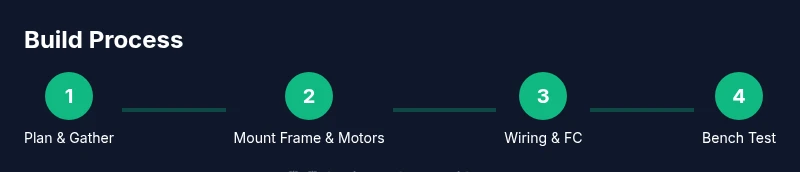
- 1
Plan and gather parts
Outline a bill of materials that fits your budget and intended use. Check compatibility between frame, motors, ESCs, and the flight controller. Collect all tools and create a clean space to work.
Tip: Label components as you lay them out to avoid miswiring later. - 2
Mount frame and secure motors
Attach the motors to the frame using the correct hardware and thread-lock. Ensure all motors are oriented for clockwise/counterclockwise operation according to your flight controller wiring plan.
Tip: Torque screws to the manufacturer’s recommended specification. - 3
Solder ESCs to power distribution
Connect motor leads to the ESCs, and wire the ESCs to the power distribution hub or battery leads as per your schematic. Keep wire length consistent and tidy to minimize interference.
Tip: Test continuity with a multimeter before powering to prevent shorts. - 4
Install flight controller and wire to ESCs
Mount the FC centrally on vibration-damping foam or standoffs. Connect servo/ PWM signal wires from the FC to each ESC in the correct motor order. Ground common power rails as required.
Tip: Double-check motor order on the FC before arming tests. - 5
Configure firmware and calibrate
Flash Betaflight or your chosen firmware, set basic flight parameters, and calibrate accelerometer/gyro and ESCs. Enable fail-safes and arm switch in the configuration.
Tip: Do a bench test with no props installed first. - 6
Attach battery, test power system
Connect battery and verify all systems power on without faults. Confirm voltage readings and ensure no shorts. Recheck wiring if anything feels loose or warm during initial power-up.
Tip: Keep hands clear of prop arcs during power tests. - 7
Install props and perform bench hover
Mount props only after confirming no setup faults. Do a slow, small-scale hover test in a controlled environment with a spotter. Monitor motor temps and stability.
Tip: Use a prop guard during early tests for added safety. - 8
Tune, document, and prepare for flight
Record tune parameters, flight behavior, and any adjustments. Create a simple maintenance log for future upgrades and set boundaries for next flights.
Tip: Take notes on trim adjustments and prop balance for faster iteration.
Frequently Asked Questions
Do I need a license to fly a DIY drone?
Licensing and airspace rules vary by country. In many places, recreational pilots can fly small drones within visual line of sight, but commercial use or larger drones may require registration and proofs of competency. Check your local aviation authority for the latest requirements.
Licensing depends on your country; for many hobby flights you need basic registration, while commercial use often requires more, so verify local rules before flying.
What frame size is best for beginners?
A 210–230mm quadcopter frame with 4- to 6-inch props is a common starting point. It offers forgiving behavior and easy part availability. As you gain experience, you can move to larger or smaller frames based on your goals.
Start with a mid-sized frame like 210 to 230 millimeters for easy handling and parts availability.
Can I reuse parts from an old drone?
Yes, if the components are compatible and in good condition. Match motor KV, ESC ratings, and flight controller support. Older parts may lack updated firmware or safety features, so check compatibility first.
You can reuse parts if they fit your new build and firmware supports them.
Is soldering required for a DIY drone?
Soldering is common for clean, strong connections, especially on power rails and motor leads. If you’re uncomfortable, look for ESCs and connectors with plug-and-play options and practice on scrap wires first.
Soldering is typical, but you can start with plug-and-play parts if you’re new to soldering.
What are the first-flight safety tips?
Fly in an open area away from people and obstacles. Use a spotter, start with stable modes, and perform a gentle hover before attempting advanced maneuvers. Always have an emergency stop plan.
Choose a wide, clear area and hover calmly before any advanced moves.
Watch Video
Quick Summary
- Plan components for compatibility and budget.
- Do not skip safety checks before power tests.
- Calibrate sensors and ESCs for stable flight.
- Test slowly in open space with a spotter.
- Document build steps for future upgrades.