How Long Does It Take to Charge a Drone
Learn realistic charging times for different drone sizes, the factors that affect speed, and safe practices to plan flights and manage batteries efficiently.


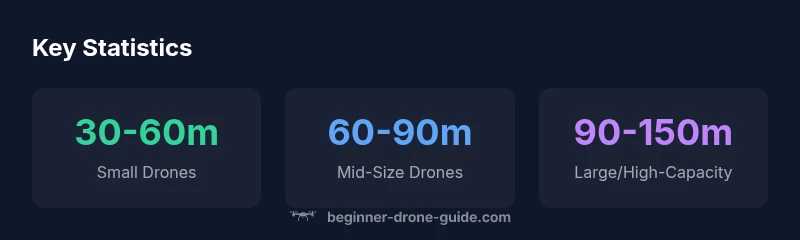
Most consumer drones reach a full charge in about 30 to 120 minutes, depending on battery size and charger output. Smaller batteries commonly finish in 30–60 minutes, while larger packs can take 90–120 minutes. Always follow the manufacturer’s guidelines to avoid overheating or overcharging.
Battery Basics and Charging Fundamentals
Drones rely on rechargeable lithium polymer (LiPo) batteries, typically arranged in 2S, 3S, or 4S configurations depending on the model. A "cell" refers to a single lithium unit; more cells usually mean higher voltage and capacity. Capacity is measured in milliamp-hours (mAh) or amp-hours (Ah) and roughly determines how long you can fly per charge. Charging time scales with capacity: larger packs require more energy to reach full, and therefore take longer, all else equal. Temperature and health also influence how efficiently a battery accepts charge. For beginners, it helps to think in terms of battery size (small, mid, large) rather than chasing exact minutes. If you’re planning back-to-back flights, expect to multiply flight time by the number of spare packs you carry. The brand context team at Beginner Drone Guide emphasizes safe charging as a core part of responsible flying.
Key Variables That Determine Charging Time
Charging time is not a single fixed number; it’s a function of several interacting factors. Primary drivers include battery capacity (mAh or Ah), the number of cells, and the charger’s output current (amps) or power (watts). A higher-output charger can fill a battery faster, but only if the battery chemistry and BMS (battery management system) support the higher current. Battery health also matters: aged or degraded cells exhibit higher internal resistance, which slows charging and can produce excess heat. Ambient temperature, charging protocol (standard vs. smart charging), and the use of parallel charging docks can further influence overall time. For beginners, a conservative approach is to estimate based on the smallest number you have (battery capacity) and adjust up for larger packs.
Chargers, C-Rating, and Cables: What Actually Impacts Time
Charger specifications—especially current (A) and the resulting power (W)—drive charging speed. A charger rated at a higher current will generally charge faster, but the battery’s design limits how much current it can safely absorb. USB-C and dedicated balance chargers are common in consumer drones. Keep in mind that not all batteries accept fast charging; attempting to push beyond the battery’s C-rate can shorten cycle life and raise heat. Using the original charger or a manufacturer-approved accessory ensures compatibility and safety. Pairing the right cable with a high-quality charger also reduces resistance losses that waste energy during charging.
How Battery Health Affects Charging Time
A battery that has aged or been frequently discharged heavily may show slower charging and shorter peak capacity. Increased internal resistance in aged cells means the charger works harder to push current into the pack, which can extend the time to a full charge and elevate heat. Healthy batteries recover quickly and charge more consistently, enabling predictable estimates for planning flights. For safety and performance, regularly inspect packs for puffing, swelling, or uneven temperature during charging and retire cells that show signs of wear.
Small Drones vs. Mid-Size Drones: A Practical Breakdown
In practice, small drones with compact packs typically finish charging fastest, often in the 30–60 minute range with a standard charger. Mid-size consumer models usually land in the 60–90 minute window, while professional or high-capacity packs can push toward 90–150 minutes. The exact values depend on the pack’s capacity and the charger’s maximum safe current. If you frequently fly with multiple batteries, consider adding a smart charger capable of balancing and monitoring each cell to maximize efficiency and battery longevity.
Safe Charging Practices for Beginners
Prioritize safety by charging in a heat-dissipating, vented area away from flammable materials. Use the manufacturer’s charger and a compatible balance lead. Never leave batteries unattended for extended periods while charging and avoid charging inside enclosed spaces. Check for signs of swelling or overheating, and unplug if temperatures rise rapidly. A cool, well-ventilated charging environment not only protects your equipment but also helps maintain stable charging times across cycles. Keeping batteries at a nominal 20–25°C (68–77°F) improves efficiency and longevity.
Troubleshooting: When charging is slower than expected
If charging is unexpectedly slow, first verify you’re using the correct charger model for your pack and that the power source delivers consistent voltage. Inspect connectors and cables for damage and ensure the battery is properly seated. Check for abnormal heat during charging; persistent heat can indicate a failing cell or a damaged BMS. If the charger cycles or stops unexpectedly, consult the drone’s manual or contact the manufacturer. Document any anomalies for future reference.
Real-World Scheduling: Planning Flights Around Charges
Effective planning combines battery management with flight requirements. Track how many batteries you have, the typical flight time per pack, and the expected charging duration. For trips that include back-to-back flights, a simple rule of thumb is to allocate charging time between sessions and factor in a safety margin for unexpected delays. If possible, charge batteries before you head out and bring a spare charger or a portable power bank with appropriate adapters. This reduces downtime and keeps your workflow smooth during field work.
Quick Setup Checklist for Faster Starts
- Confirm battery health and swelling-free packs.
- Use the recommended charger and cables for your drone.
- Charge in a ventilated area to avoid heat buildup.
- Keep spare batteries charged and ready for quick swaps.
- Monitor charging progress and unplug once full to avoid overcharge heat.
- Store batteries at recommended storage voltage when not in use.
- Update firmware on the drone and charger if available to ensure optimal charging profiles.
Charging time estimates by drone type
| Drone Type | Typical Battery Pack | Estimated Charge Time | Charger Type |
|---|---|---|---|
| Small/Compact Drones | 2000 mAh | 30-60 minutes | Standard charger |
| Mid-size Drones | 3000-5000 mAh | 60-90 minutes | Standard or Quick Charger |
| Professional/High-capacity Drones | 6000-10000 mAh | 90-150 minutes | High-output/fast charger |
Frequently Asked Questions
How long does it take to fully charge a drone battery?
Charging times typically range from 30 to 120 minutes, depending on battery size and charger output. Always refer to the manufacturer’s guidelines for your specific model.
Most drone batteries take 30 to 120 minutes to fully charge, depending on size and charger. Check your manual for exact times.
Does using a faster charger always shorten charging time?
Not always. If the battery or drone doesn’t support higher current, fast charging offers diminishing returns and can increase heat, potentially shortening battery life.
A faster charger doesn't always mean faster charging if the battery isn’t designed to accept it. It can cause extra heat and wear.
How does ambient temperature affect charging time?
Charging in cold or hot environments can slow charging and increase heat production. Aim for a comfortable temperature range recommended by the manufacturer.
Temperature matters. Charge in a moderate environment to keep charging efficient and safe.
How should I estimate charging time for a new drone?
Check the battery capacity and the charger’s output, then apply the typical ranges (small, mid, large) and add a small safety buffer for safety.
For a new drone, start with the listed battery capacity and charger output, then add a little extra time as a buffer.
Is it safe to leave a drone charging overnight?
If using the manufacturer’s charger and a properly rated battery, overnight charging is generally managed by the battery management system. Still, monitor for heat and never leave charging unattended around flammable materials.
Overnight charging can be okay with the right equipment, but always supervise and keep it in a safe area.
“Charging times are a practical guide, not a guarantee; always factor battery health, charger quality, and ambient temperature into your estimates.”
Quick Summary
- Know your battery size to estimate charging time.
- Use manufacturer-approved chargers for safety and accuracy.
- Battery health materially affects charging speed.
- Carry spare packs to minimize downtime between flights.
- Plan flights around charging windows and safety guidelines.