Can You Stop the Drone? Safe Stop Methods for Beginners
A practical, beginner-friendly guide that teaches how to safely stop a drone in various scenarios, with step-by-step actions, safety tips, and legal considerations for 2026.


By the end of this guide, you can stop a drone safely using built-in controls, emergency stops, and environment-aware actions. Key requirements: a compliant drone with return-to-home/hover control, a suitable open area, and awareness of local regulations. If you’re unsure, prioritize safety and legality before attempting any stop procedure. This quick answer is designed for beginners.
Can You Stop the Drone? Practical Definitions and Context
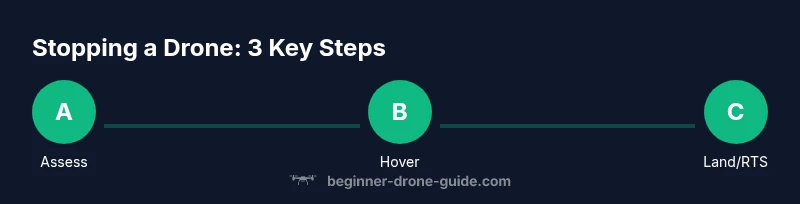
The question can you stop the drone is fundamentally about arresting motion safely, preserving control, and preventing harm. In most consumer and prosumer drones, stopping involves manipulating controls to reduce speed, stabilize attitude, and select a safe landing or hover. According to Beginner Drone Guide, the best approach starts with understanding your drone's safety features and your environment. This means knowing which actions are allowed in your jurisdiction and how your drone responds to throttle, pitch, roll, and yaw inputs during a stop. The core idea is simple: stop movement as safely as possible, while keeping the drone under your visual supervision. When you practice, you’ll learn how different flight modes behave (hover, land, return-to-home, or emergency stop) and how to sequence them for the safest outcome. Can you stop the drone? Yes—when you act deliberately, within the drone’s design, and in a clear space where bystanders won’t be endangered. In this section we’ll outline practical steps and decision points to answer that question with confidence.
tip:
Tools & Materials
- Drone and controller with powered-on safety features(Ensure firmware is up to date and emergency stop/return-to-home is active.)
- Open, clear flying area free of people and obstacles(Clear radius of at least 15–30 meters if possible.)
- Charged batteries and chargers for the drone and controller(Have a spare battery if available for contingencies.)
- Visual observer or spotter(Extra set of eyes helps maintain safety at distance.)
- Notepad or logging app(Record any incident details for later review.)
Steps
Estimated time: 15-25 minutes
- 1
Assess status and environment
Quickly evaluate wind, surface, obstacles, and people nearby. Decide on the safest stop method (hover, land, or return-to-home) based on space and urgency. This minimizes risk before taking action.
Tip: If you’re unsure, pause and switch to hover rather than forcing a rapid stop. - 2
Engage a controlled hover
Gently reduce forward velocity and stabilize the drone in a steady hover at a safe altitude. Maintain line of sight and monitor drift, adjusting sticks small amounts to keep the aircraft level.
Tip: A stable hover buys you time to choose the safest landing option. - 3
Use emergency stop if available
If your model supports it, activate the one-tap emergency stop or switch to immediately cut power to avoid overshoot or collision.
Tip: Know where the emergency control is located on your remote before you need it. - 4
Trigger a safe landing or return-to-home
If the area allows, command a controlled landing or enable return-to-home to a pre-set point. Avoid high-descent maneuvers over people and obstacles.
Tip: If wind shifts or GPS is unreliable, prefer a hover and a direct landing rather than RTH. - 5
Confirm landing and power down
Ensure the drone has landed stably, power off the motors, and disconnect the battery only after the drone is no longer moving. Verify propellers have stopped before approaching.
Tip: Keep hands clear of propellers during power-down. - 6
Log the incident and review
Record what happened, including environment, flight mode, and any anomalies. Review the sequence to improve future stopping procedures.
Tip: Use a checklist for post-flight review to strengthen safety habits.
Frequently Asked Questions
What should I do first if my drone starts behaving unexpectedly?
Pause and assess the situation. Switch to hover if possible, check for GPS signal, and prepare to execute a controlled landing or RTH if it’s safe. Avoid panicked, rapid inputs that could worsen the situation.
Pause, assess, and hover if you can; then land or return home safely.
Can you stop a drone immediately if it’s about to collide with a person or object?
If your drone has an accessible emergency stop, use it to cut the motors quickly. This is a last-resort action and can cause a landing or fall, so be prepared for a hard stop.
Use the emergency stop only as a last resort to avoid a collision.
Is there a universal stop button on all drones?
No universal stop button exists; stopping methods vary by model. Learn your drone’s controls for hover, landing, and emergency stop in your manual or quick-start guide.
There isn’t one universal button; check your model’s controls.
What legal considerations should I know when stopping a drone in public spaces?
Stopping a drone in public spaces should still respect privacy, airspace rules, and local regulations. Avoid flying over crowds and follow FAA or local authority guidance for safe operations.
Be mindful of privacy and airspace rules when you stop in public.
What should I do after stopping a drone?
Power down the motors, disconnect the battery if safe, inspect for damage, and log the incident. Review what caused the stop to improve future safety.
Power down, inspect, and log what happened to learn from it.
Could stopping a drone affect its warranty?
Stopping procedures themselves typically don’t affect warranty, but improper use or repeated crashes can. Always follow manufacturer guidelines and training materials.
Warranties usually aren’t affected by safe stopping, but misuse can void coverage.
Watch Video
Quick Summary
- Stop safely by using hover, land, or RTH based on space and risk
- Know your drone’s emergency stop controls and behaviors
- Maintain line-of-sight and stay mindful of local laws
- Practice in open areas and review incidents afterward
- Document lessons learned for continuous safety