How to Make a Camera Drone: A Beginner's Guide for Safe Flying
Learn how to make a drone with a camera using beginner-friendly parts. Frame, motors, flight controller, and camera setup with safety checks for safe, legal flights.


By the end you will learn how to make a drone with a camera from beginner-friendly parts, wire the power and control systems, and perform essential preflight checks. This guide covers frame selection, motors and ESCs, flight controller setup, camera integration, and basic safety practices to help you fly smarter and safer in a safe, legal, and enjoyable way.
What you’ll learn when you set out to how to make drone with camera
If you are new to DIY drones, this section outlines the practical path to a camera-equipped flyer. You’ll start with a clear plan, choose beginner-friendly parts, and learn how to balance weight, power, and payload. The goal is a simple, safe build that teaches core concepts like frame selection, motor compatibility, and basic wiring. According to Beginner Drone Guide, safety and legality are foundational in any DIY camera drone project, so you’ll see how to respect airspace rules and conduct preflight checks before lifting off. Expect a hands-on path that emphasizes gradual learning, careful testing, and incremental upgrades so you can grow with confidence.
Core Concepts: building blocks for your DIY drone with camera
Your project hinges on selecting compatible components and understanding how they interact. The frame provides the skeleton, the motors & ESCs supply lift and control, the flight controller acts as the brain, and the camera adds the primary payload. You’ll also need a power system that matches the frame’s weight and the camera’s draw. This section introduces the balance between thrust, weight, and stability, and discusses how to plan wire routing, power distribution, and basic telemetry so you can monitor performance during early flights.
Core components you’ll need (overview)
A camera drone needs a few key systems: a sturdy frame, brushless motors, ESCs, a flight controller, a battery, a power distribution board or harness, a receiver/remote, and the camera with a basic video link. Consider a small to mid-size platform for easier handling and longer flight times. You’ll also want a gimbal option or stabilizing method if your camera is not wired to a fixed mount. In this section, you’ll learn how to verify compatibility, quantify payload, and plan a simple wiring diagram.
Choosing beginner-friendly parts
As a learner, you’ll benefit from parts designed for novices: a simple 4- or 6- motor layout, plug-and-play connectors, and clear manuals. Start with a kit or a vetted bundle that includes a flight controller, ESCs, and a camera module with straightforward mounting. Always check weight limits, power needs, and connector types to minimize guesswork. This part of the guide emphasizes compatibility, upgrade paths, and practical budgeting tips so you don’t overspend on early experiments.
Power and battery considerations
Battery choice determines flight time, performance, and safety. For beginners, stick to standard lithium-polymer (LiPo) chemistries with clear labeling and safe charging practices. Consider the frame size and payload when estimating current draw; heavier cameras require more thrust and possibly larger batteries. This section covers basic battery safety, charging routines, and how to plan power distribution so you don’t over-discharge motors or damage the flight controller.
Camera integration and gimbals (optional)
A camera is a key payload, and you can mount it in a fixed position or on a gimbal for stability. Start with a lightweight camera that fits your frame’s payload budget, and ensure the video link is compatible with your controller and FPV setup. If you plan on gimbaling, check weight limits and balance to avoid adverse yaw or vibration. This section explains simple wiring options, frame integration, and reliability considerations for smooth footage.
Build vs buy: when to DIY
DIY can be rewarding when you want learning, customization, and hands-on problem solving. If your priority is quick results or commercial use, a ready-to-fly (RTF) kit with professional support might be better. This section helps you decide based on time, budget, and long-term goals, with practical tips for beginners to experiment safely while gradually taking on more complex builds.
Flight controller and tuning basics
The flight controller is the brain of the drone. You’ll set calibration, sensor checks, and basic PID parameters to achieve stable flight. Start with factory defaults, perform a gentle hover test, and observe behavior. This section provides a gentle roadmap for learning tuning fundamentals and avoiding overfitting while keeping flights safe and predictable.
Preflight checks and flight readiness
Before lifting off, verify prop guards, secure mounts, battery charge, firmware versions, and radio link integrity. Conduct a bench test to confirm motor directions before connecting to the air. This final section outlines a repeatable preflight routine so you can practice consistent safety checks every time you fly.
Tools & Materials
- Drone frame (4- or 6- rotor)(Choose a light to mid-weight frame that fits your camera payload)
- Brushless motors (4 or 6)(Match frame size and propeller type)
- Electronic speed controllers (ESCs)(One per motor; consider BLHeli or similar firmware)
- Flight controller (FC)(Support basic sensors; check firmware options)
- LiPo battery (2S-4S typical)(Ensure compatible discharge rate and connector)
- Power distribution board (PDB) or harness(Simplifies power routing)
- Camera module(Lightweight; consider integration with video link)
- Gimbal (optional)(Improves stability for video; adds weight)
- Radio receiver & transmitter(Ensure range and compatibility with FC)
- Propellers (spares)(Balanced props reduce vibration)
- Cables, connectors, heat shrink(Organizes wiring and safety)
- Screwdrivers, pliers, hex keys(Common toolset for assembly)
- Voltage/battery tester(Useful for quick checks during build)
Steps
Estimated time: 3-6 hours
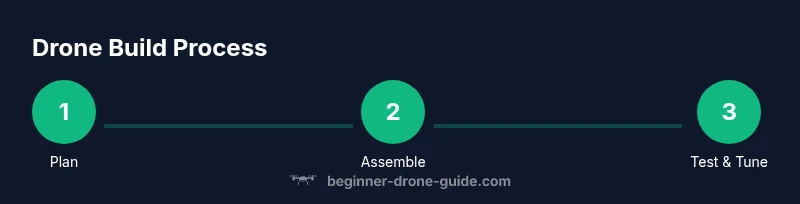
- 1
Plan the build
Outline frame size, motor count, camera payload, and flight controller features. Create a simple diagram to map wiring and weight distribution. This planning reduces rework and balances the center of gravity.
Tip: Draw a quick weight and balance sketch before buying parts. - 2
Assemble the frame
Mount the frame components and secure arms with appropriate fasteners. Ensure the frame is square and all mounting points line up to prevent vibration.
Tip: Use thread-lock on metal screws to prevent loosening during flight. - 3
Install motors and ESCs
Attach motors to the frame and connect ESCs to each motor, keeping signal and power wires tidy. Verify motor directions with a bench test.
Tip: Label each motor by compass direction to avoid confusion later. - 4
Wiring the FC and power system
Connect the flight controller to ESCs and the battery harness. Route wires cleanly and insulate exposed conductors. Ensure proper ground and signal separation to reduce interference.
Tip: Double-check connector polarity before powering. Small mistakes can damage boards. - 5
Attach camera and video link
Mount the camera; connect the video transmitter/receiver or FPV feed if used. Ensure payload balance remains within acceptable limits.
Tip: Test the camera feed on the bench before any flight test. - 6
Calibrate and bench-test
Calibrate the IMU and ESCs, perform a low-power bench test to confirm yaw, pitch, and roll respond correctly. Check for unusual vibrations.
Tip: Start with low throttle; watch for drift and trim adjustments.
Frequently Asked Questions
Is it cheaper to build a camera drone or buy an RTU (ready-to-use) model?
For beginners, building can be cheaper upfront if you reuse parts and learn. However, a ready-to-fly kit offers reliability and support that may save time and money in the long run, especially for first flights and basic footage needs.
DIY builds can save money at first, but RTU kits may be more reliable for your first flights.
Do I need a license to fly a camera drone in most areas?
Regulations vary by country and region. In many places, recreational pilots must register the drone and follow safety rules, while commercial operations may require additional certification. Always check local airspace and licensing requirements.
Check local airspace rules and licensing requirements before flying, as they vary by location.
What type of camera is best for a beginner drone?
Start with a lightweight, compact camera that integrates easily with your frame. Prioritize weight, stability, and a simple mounting option to minimize impact on flight performance.
Begin with a lightweight camera that is easy to mount and balance.
How heavy is a typical DIY camera drone?
Weight depends on the frame and camera choice. Beginners generally aim for a light to mid-weight setup to maintain manageable power needs and stable flight.
Most DIY camera drones fall into a light to mid-weight category to keep control straightforward.
What safety checks should I perform before the first flight?
Inspect prop integrity, secure mounting, battery charge, radio link, and firmware. Do a bench test to verify motor directions and hover behavior before any outdoor flight.
Do a thorough preflight check, including motor directions and a bench hover.
How long does it take to learn basic control of a DIY drone?
Learning varies, but many beginners achieve comfortable control after several practice sessions, gradually increasing flight time and practicing safe takeoffs and landings.
Most beginners reach basic control after several practice flights.
Watch Video
Quick Summary
- Plan first, then choose parts with compatibility in mind
- Safety and legality come first in any build
- Practice bench tests before air testing
- Start simple and iteratively upgrade your drone