How to Build a Drone: A Beginner’s Guide
Learn how to build a drone with a clear, beginner-friendly plan. Safety, tools, build steps, and licensing basics for your first quadcopter in 2026.


This guide shows you how to build a beginner-friendly drone by outlining essential parts, tools, safety steps, and a step-by-step assembly plan. You’ll learn about selecting a frame, motors, ESCs, and a flight controller, plus how to calibrate and test your drone safely. It also covers licensing basics and best-practice tuning for stable flights.
What you’ll build and why this beginner project is accessible
If you’ve ever wondered how to make and drone, you’re not alone. This project is designed for absolute beginners and emphasizes hands-on learning, safety, and gradual skill-building. You’ll start with a modest, open-frame quadcopter that’s easy to assemble, upgrade, and repair. Along the way, you’ll gain a solid grasp of aerodynamics, electrical basics, and flight controller fundamentals without getting overwhelmed. By the end, you’ll understand the core decisions behind every build: frame choice, motor sizing, power management, and tuning. According to Beginner Drone Guide, starting with a simple, modular kit helps new pilots practice in a controlled way and reduces the risk of damage during first flights. This approach encourages curiosity, safe experimentation, and steady progress in 2026.
Core components you’ll learn to assemble and how they fit
Your build starts with a few core subsystems that must work together. The frame provides structure and safety margins; motors generate thrust; ESCs regulate motor speed; a flight controller acts as the brain; propellers convert rotational energy into lift; a power system delivers clean, reliable power; and a receiver links your remote to the craft. In this section, we’ll map each component to its role and discuss compatibility considerations (frame size, motor timing, ESC current rating, and flight-controller firmware support). You’ll learn to read basic specifications and sketch a compatibility checklist before you buy. You’ll also see how modular upgrades (like a more capable flight controller or higher-end ESCs) can be planned without discarding your entire build. This foundation is essential for safe, iterative learning.
Safety foundations for your build
Safety isn’t optional; it’s part of the design process. Before you power anything, plan a safe workspace, use protective gear, and remove props when assembling. Use a bench test setup to prevent accidental rotor motion during wiring and calibration. Be mindful of static sensitivity for electronic components and avoid short circuits by organizing wires and labeling connections. As you progress, you’ll recognize common failure modes and build in safety redundancies to protect both people and hardware.
Workspace setup and tool readiness
A clean, well-lit workspace makes all the difference when wiring a drone. You’ll need a sturdy workbench, a stable surface to hold the frame, and a basic toolkit with screwdrivers, hex wrenches, pliers, and a soldering iron. Set aside a dedicated area for charging and storing batteries, away from flammable materials. Use an anti-static mat and wear eye protection during soldering. Planning your layout ahead of time speeds up assembly and reduces the likelihood of wiring errors that could damage electronics.
Licensing, safety, and regulatory basics for beginners
Even as a hobbyist, you should understand the legal landscape around drones. In many places, hobby flight requires registration for certain weights, adherence to airspace rules, and standard safety practices. Always check local regulations and consult authoritative sources such as the FAA Know Before You Fly program for the latest guidance. This section will outline the general expectations, common exemptions, and where to find official rules, so you can stay compliant as you learn.
Building a practical learning plan
Develop a learning plan that matches your skill level and local rules. Start with a low-risk bench test, then move to incremental flight tests in a safe, open area. Schedule short practice sessions to calibrate sensors, tune the controller, and adjust PID parameters gradually. Keep a log of test results, including unexpected behaviors and changes you made. A clear plan reduces frustration and speeds up mastery, while keeping safety at the forefront.
Tools & Materials
- Drone frame kit(Choose a beginner frame with a 180-230 mm wheelbase for stability)
- Brushless motors (4)(Frame-size compatible)
- Electronic speed controllers (ESCs) (4)(Compatible with motors and flight controller)
- Flight controller board(Look for beginner-friendly firmware options)
- Propellers (set of 4)(Matched to motor size and controller capability)
- LiPo battery(Check voltage and capacity for your setup)
- Battery charger(Balance charger recommended)
- Power distribution board or wiring harness(Keeps power wiring clean and reliable)
- Radio transmitter and receiver(4+ channels for control)
- Soldering iron and lead-free solder(For solid connections)
- Heat shrink tubing and electrical tape(Insulation and strain relief)
- Screwdrivers and hex wrenches(Metric set for common drone hardware)
- Multimeter(Check continuity and voltage at key points)
- Wire cutters/strippers(Precise cuts for clean wiring)
- Velcro straps or zip ties(Cable management)
Steps
Estimated time: 2-6 hours
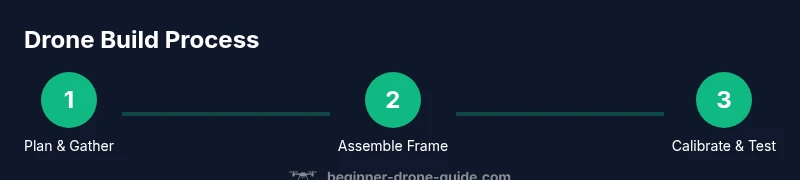
- 1
Plan and verify components
Identify your frame, motors, ESCs, flight controller, and power system. Check compatibility based on frame size, motor mount pattern, and firmware support. Create a simple bill of materials and order replacements before you start.
Tip: Double-check motor-to-propeller compatibility and ensure all components share the same communication protocol. - 2
Assemble the frame
Mount the frame arms and secure the central plate. Ensure all screws are tight but not over-torqued to avoid frame damage. Keep the frame clean and free of debris before wiring begins.
Tip: Use a torque screwdriver if available to maintain consistent screw tension. - 3
Mount flight controller and ESCs
Attach the flight controller to the frame with vibration-damping pads. Secure ESCs to the arms away from the center to minimize vibration coupling. Route wires cleanly to avoid tangling with moving parts.
Tip: Label each motor wire and connector to ease later troubleshooting. - 4
Wire ESCs, motors, and power system
Connect each motor to its ESC, then connect the ESC signal lines to the flight controller. Tie in the power distribution board and battery connector according to your layout. Use heat shrink and electrical tape to secure exposed conductors.
Tip: Verify polarity and orientation before powering up for the first time. - 5
Mount motors and props
Attach motors to their designated mounts and fit propellers, ensuring correct CW/CCW pairing. Confirm propellers are free to rotate with no contact from frame or wires. Do not install propellers until you’re ready to bench test.
Tip: Always install the propellers only after a safe bench test to prevent injury. - 6
Configure firmware and calibrate sensors
Install the flight controller’s firmware and load a basic configuration profile. Calibrate accelerometer, gyroscope, and compass in a controlled environment. Check motor directions and confirm the PID settings align with your frame.
Tip: Begin with conservative PID values and adjust in small increments after test flights. - 7
Bench test and safety checks
Power the system with the propellers removed and verify motor spin directions. Check for unusual hot spots or wire contact. If everything looks clean, reattach propellers with extreme caution and prepare for a controlled test.
Tip: Keep a fire extinguisher nearby and stand clear of the rotor plane during tests. - 8
First flight and tuning
Take the drone to an open area and perform a short hover test at low throttle. Gradually increase throttle while monitoring stability and response. Continue iterative tuning for better yaw, pitch, and roll control.
Tip: Record flight data and revert to safer PID values if you detect instability.
Frequently Asked Questions
What is the easiest drone build for a beginner?
The easiest path is to start with a basic, modular frame and a beginner-friendly flight controller. Use off-the-shelf ESCs and motors matched to the frame, and practice in a large open area to reduce risk. As you gain confidence, you can upgrade components gradually.
A basic modular frame with beginner flight controller is the simplest way to start, then upgrade as you learn.
Do I need a license to operate a hobby drone?
In many regions, hobby drones under a certain weight do not require a formal license, but you must follow airspace rules and safety guidelines. Always check your local regulations and use official resources like Know Before You Fly for accurate requirements.
Check local rules and use Know Before You Fly to stay compliant.
What safety gear should I use during builds?
Wear safety glasses when cutting or soldering, and use heat-resistant gloves if you’re handling hot components. Keep a fire extinguisher nearby when testing battery power for the first time.
Safety glasses are a must, and have a fire extinguisher handy during tests.
How long does a basic build usually take?
A beginner-friendly build typically takes a few hours for assembly and another few hours for calibration and first flight tests. The timeline depends on your familiarity with soldering and wiring.
Expect several hours overall, depending on your experience.
Can I upgrade parts later without rebuilt?
Yes. Start with a frame and controller you can upgrade gradually. Typical upgrades include the flight controller, ESCs, or motors, while keeping the existing frame or power system compatible.
Upgrades are possible by swapping compatible components without rebuilding.
What is the best way to test a new drone safely?
Begin with a bench test with no props to verify motor spin and controller signals. Then conduct short hover tests in an open area, gradually increasing duration and throttle while monitoring response.
Bench test first, then short flights in a safe, open space.
Watch Video
Quick Summary
- Plan components before buying to ensure compatibility
- Assemble with safety in mind and test on a bench
- Calibrate and tune gradually for stable flight
- Learn the regulatory basics to fly legally
- Document changes to track improvements