How to Apply Drone License in India: A Complete Beginner's Guide
Learn the step-by-step process to apply for a drone license in India with Beginner Drone Guide. Explore eligibility, Digital Sky registration, RPAS licensing, and safety practices for compliant flights.


To apply for a drone license in India, you first create a DGCA Digital Sky account, register your drone, and apply for the RPAS (Remote Pilot) license if required for your operation. The process includes confirming your eligibility, completing any knowledge tests, and adhering to safety guidelines. Beginner Drone Guide recommends starting with your Digital Sky profile, gathering required documents, and consulting official DGCA resources.
Overview of India's drone licensing framework
India's drone regulations are administered by the Directorate General of Civil Aviation (DGCA). The Digital Sky platform is the central hub for drone registration, operator UIN, and licensing. For beginners, the process can seem complex, but it becomes manageable when you break it into clear steps and checklists. The emphasis in 2026 remains on safety, accountability, and responsible operation, with higher scrutiny for flights in urban areas or near critical infrastructure. The Beginner Drone Guide team highlights that understanding the distinction between the regulated and unregulated categories helps determine what licenses you may need. In practice, most operations start with registering your drone's unique identity, establishing who will operate it (the pilot), and ensuring you have the right permissions before you take off. Always verify no-fly zones and airspace restrictions for your specific flight location. The Digital Sky portal also hosts training and certification information, so make a habit of revisiting it before each new mission.
Who needs a license and what it covers
In India, licensing requirements hinge on the drone's category, intended use, and operating environment. For many commercial or congested-area flights, an RPAS license is required for the pilot, and the drone itself must be registered with a unique identification number (UIN). Hobbyist or recreational flights in uncrowded areas may fall outside strict licensing in some scenarios, but this is not universal and depends on weight, altitude, and proximity to restricted zones. The core idea is that responsibility and safety come first: pilots must demonstrate basic competency and operate within approved airspace. Beginner Drone Guide emphasizes that the limits can change as DGCA updates rules, so regular checks of official guidance are essential. Always carry valid permissions when flying and avoid areas near airports, prisons, or critical infrastructure.
Prerequisites before you apply
Before starting the Digital Sky application, collect essential documents and confirm you meet minimum eligibility criteria. You typically need to be at least 18 years old, have a valid identity document, and possess basic training or awareness of drone safety practices. Determine your drone's category and whether a license is required based on weight, purpose, and flight area. Prepare your drone details (make, model, weight) and gather proof of ownership or lease. Having these ready reduces delays and helps you submit a clean application on the Digital Sky portal. The Beginner Drone Guide team notes that staying organized and keeping digital copies of documents speeds up the process.
The licensing process at a glance
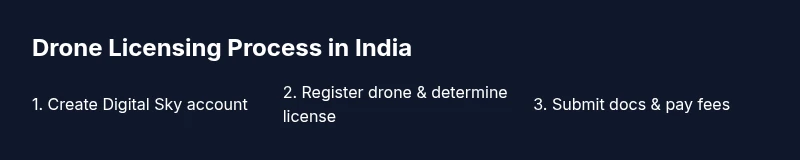
A typical licensing workflow involves several stages: (1) create a DGCA Digital Sky account, (2) register the drone and obtain a UIN if required, (3) determine licensure needs for your operation, (4) complete any required knowledge training or tests, and (5) obtain the RPAS license or related permits. After approval, you must update your license information in the Digital Sky profile and ensure ongoing compliance with airspace rules. This high-level map helps beginners avoid common missteps, such as attempting flights without proper authorization or neglecting airspace restrictions. The roadmap remains consistent, but always verify current forms and processes on official DGCA resources.
Preparing for the knowledge test
The knowledge test is designed to assess piloting competency, safety awareness, and understanding of Indian drone regulations. Start by reviewing DGCA knowledge guidelines, regulatory documents, and any official practice questions provided on the Digital Sky portal. Create a study plan that focuses on airspace rules, privacy considerations, and operational limitations. Practicing with sample questions helps build confidence and reduces exam anxiety. Remember to schedule the test through the DGCA portal or your local authorized testing center if required, and keep your identification handy on test day.
Fees, timelines, and what to expect
Fees and processing times vary by license type and category, and can change with DGCA updates. Applicants should expect a multi-step process that may take several weeks in total, depending on workload and the completeness of submitted documents. It is common to encounter administrative delays if any information is missing or needs clarification. Beginner Drone Guide recommends building in extra time for clearance, and checking the Digital Sky dashboard regularly for status updates. Always refer to official DGCA notices for the latest timelines.
Common mistakes and best practices
Common mistakes include submitting incomplete documents, misclassifying drone weight category, or flying in restricted airspace before approval. To avoid these, double-check all entries, verify airspace permissions, and maintain an up-to-date Digital Sky profile. Create a checklist for each flight that includes the license status, last maintenance, and latest weather conditions. Best practices also include keeping a copy of your license and UIN on both your device and in the drone's documentation.
Real-world tips for safe and compliant operations
Safety comes first. Always perform a pre-flight risk assessment, stay within line-of-sight, and respect privacy when capturing footage. Maintain responsible operation in populated areas, and coordinate with authorities when flying near sensitive sites. Regularly update your knowledge of evolving rules, attend refresher trainings if available, and synchronize your paperwork with your drone's maintenance records. The Beginner Drone Guide team recommends using reputable training resources and validating information against DGCA’s official materials.
Tools & Materials
- Smartphone or computer with internet access(To access the Digital Sky platform and upload documents.)
- DGCA Digital Sky account credentials(For registration, licensing, and tracking.)
- Drone information (make, model, weight in grams)(Needed to determine license category.)
- Identity and address proof(Age proof and address proof as required by DGCA.)
- Proof of ownership or operator authorization(Purchase invoice or lease agreement.)
- Digital copies of documents (PDFs)(Optional but recommended for faster submission.)
Steps
Estimated time: 60-90 minutes
- 1
Create a DGCA Digital Sky account
Visit the Digital Sky portal, complete the registration form, and verify your identity. Establish your profile as a drone operator and link your contact details. This step is foundational for all subsequent licensing actions.
Tip: Keep your email and phone number up to date in the portal to receive status updates. - 2
Determine your license needs based on category
Identify whether your operation falls under Regulated or Unregulated categories and what license (if any) is required for the pilot. This determines the documents you’ll submit and whether a knowledge test is needed.
Tip: When in doubt, review the DGCA guidelines and the Digital Sky help sections before proceeding. - 3
Register the drone and obtain UIN if required
Submit drone details (brand, model, weight) and apply for a Unique Identification Number if the flight category requires it. The UIN links your drone to your operator profile and helps DGCA track compliance.
Tip: Have your drone’s purchase details handy in case you need proof of ownership. - 4
Apply for RPAS license or pilot authorization
Submit the pilot licensing application on Digital Sky and attach required documents. If the category requires, schedule and complete the knowledge test or training as directed by DGCA.
Tip: Ensure all documents are legible and the drone’s technical specs match what you submit. - 5
Prepare for and complete the knowledge test
Study the official DGCA knowledge guidelines and any available practice questions. Complete the test within the allocated window and review results for any areas needing improvement.
Tip: Focus on airspace rules, privacy considerations, and basic safety practices. - 6
Submit supporting documents and pay fees
Upload identity, address, proof of ownership, drone specifications, and any training certificates. Pay applicable fees through the Digital Sky portal and confirm the submission.
Tip: Keep receipts and confirmations for your records. - 7
Complete any required training or practicals
If mandated, attend training sessions or practical flight demonstrations and obtain certificates of completion. These steps reinforce safe operation practices and regulatory understanding.
Tip: Choose recognized training providers and verify certificates on your profile. - 8
Receive license and update your profile
Upon approval, your RPAS license or pilot authorization is added to your Digital Sky profile. Ensure that the license details are correct and accessible during flights.
Tip: Carry a digital or printed copy of your license during operations if required. - 9
Plan for ongoing compliance and renewals
Licenses may require renewals or periodic training. Set reminders to update your records, monitor airspace changes, and stay aligned with DGCA updates.
Tip: Subscribe to DGCA notices and check updates before every major flight.
Frequently Asked Questions
Do I need a license to operate a drone in India?
Yes for most commercial flights and many regulated operations; the license requirements depend on the drone category and where you fly. Always verify current rules on DGCA's Digital Sky portal before flight.
Yes. Most flights require a license, and rules can change based on where you fly. Check DGCA's Digital Sky portal before operating.
What is the Digital Sky platform used for?
Digital Sky is DGCA's central portal for drone registration, UIN assignment, licensing, and airspace permissions. It tracks operator and drone compliance and provides status updates on applications.
It's DGCA's hub for drone registration, licensing, and airspace permissions.
How long does licensing typically take?
Processing times vary by category and workload. Applicants should expect several weeks, with delays possible if documents are incomplete or additional checks are required.
Processing can take several weeks and may be delayed if documents aren't complete.
What documents are needed to apply?
You typically need identity proof, address proof, drone details (make, model, weight), proof of ownership, and any training certificates required by DGCA.
You'll need ID, address proof, drone details, ownership proof, and any training certificates.
Can I fly before obtaining a license?
Only with specific permissions in certain contexts; otherwise, flying a drone without the proper license is not allowed and may be penalized.
Not legally in most cases—get the license and permissions first.
What is RPAS license?
RPAS stands for Remotely Piloted Aircraft System license. It authorizes a pilot to operate drones under defined categories and airspace rules.
RPAS is the license for pilots operating drones under DGCA rules.
Watch Video
Quick Summary
- Register early on Digital Sky and gather documents.
- Identify license needs based on category and operation.
- Complete knowledge tests and keep licenses updated.
- Follow airspace rules and maintain safety at all times.
- Regularly check DGCA updates for compliance changes.