How to Prevent Drone Flyaway
Learn practical steps to prevent drone flyaway with preflight checks, GPS reliability, geofencing, and safe flight planning. A beginner-friendly guide from Beginner Drone Guide.


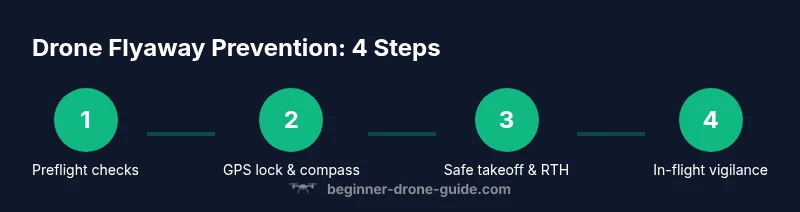
To prevent drone flyaway, begin with strict preflight checks, GPS lock, and geofence enforcement. Maintain line-of-sight, keep within legal limits, and plan a safe flight path before takeoff. Use Return-to-Home wisely and verify battery health, propellers, and firmware updates. According to Beginner Drone Guide, disciplined setup lowers risk dramatically. This approach helps new pilots fly smarter, with confidence.
How to prevent drone flyaway: Why prevention matters
Drone flyaway is not just a minor mishap; it represents a safety risk to people, property, and the drone itself. For beginners, runaway behavior can stem from GPS signal loss, compass misreadings, weather-induced drift, or interference between the controller and aircraft. Prevention starts well before you take off: you select a safe flying area, verify weather conditions, and confirm your device has current firmware, a solid GPS lock, and a known Home Point. By cultivating consistent habits—thorough preflight checks, clear flight planning, and disciplined recovery actions—you reduce the chances of losing control. According to Beginner Drone Guide, proactive prep and structured practice dramatically reduce the likelihood of a loss of control during flight.
How to prevent drone flyaway: Key missteps and how to avoid them
A frequent source of flyaways is operating with weak GPS or after compass recalibration near metal structures. This block explores common failure modes and practical fixes that prevent drift, such as recalibrating away from magnets, ensuring satellite lock before takeoff, and confirming your flight mode is suitable for the environment. Knowing when to abort a flight due to drifting sensors is a core skill for beginners. The guidance here is grounded in real-world practice and emphasizes preventing problems before they escalate.
Preflight checks that stop flyaways
A thorough preflight routine is the best defense against flyaways. Start with a full charge for both the drone and controller, and verify that all firmware updates are installed. Check propellers for cracks or chips and replace damaged blades. Confirm GPS satellite count is high enough for reliable positioning, and perform compass calibration away from metallic surfaces. Enable geofencing and verify the Return-to-Home (RTH) altitude is set appropriately for the area. Finally, review your flight plan to ensure you stay within legal boundaries and maintain a safe buffer from people and structures. These steps significantly reduce the risk of sudden GPS loss or unexpected motor responses during takeoff or hover.
Safe flight planning and geofencing
Effective flight planning hinges on understanding airspace rules, weather, and the environment. Map out a route that avoids crowded areas, airports, and restricted zones. Set a conservative maximum altitude and a defined distance from you to maintain line of sight. Enable and test geofencing features, which help constrain the drone to safe corridors. Create a simple, repeatable mission profile for training flights and gradually increase complexity as you build confidence. The goal is to maintain predictable, controllable behavior even if the drone encounters mild interference or wind gusts.
In-flight controls and stabilization strategies
During flight, stay vigilant. Maintain line of sight and monitor the drone’s attitude and altitude, avoiding rapid throttle or stick inputs. If the drone begins to drift, apply a steady, controlled correction rather than abrupt movements. Favor stable flight modes that emphasize position hold and gentle auto-stabilization. Keep a safe reaction plan in mind: if you sense instability, transition to a hover, check GPS signal, then land safely if conditions deteriorate. Regularly verify battery levels and avoid draining cycles that could trigger unexpected voltage drops.
Responding to drift or anomaly
Anomalies can appear as sudden yaw, drift, or a lag between control inputs and drone response. The recommended response is calm and methodical: reduce speed, switch to a safe mode (e.g., position hold), and track the drone visually. If drift continues, initiate RTH at a moderate altitude and altitude unlocks can be adjusted to reduce wind effects. Always have a preplanned emergency landing spot and avoid chasing a runaway at low altitude where obstacles are more common. After landing, review logs to identify what caused the anomaly and adjust your operation accordingly.
Post-flight care and data hygiene
After every flight, inspect hardware thoroughly for wear or damage, and clean sensitive sensors if needed. Review flight logs to detect trends in GPS quality, battery health, and control responsiveness. Archive data for future reference and adjust maintenance schedules based on usage patterns. Keeping a detailed log helps you notice recurring factors that might contribute to flyaways, such as firmware versions or environmental conditions. Regular maintenance and careful data handling reduce the odds of repeating incidents.
Authority sources
This section provides essential references from authoritative organizations that govern safe drone operation. For ongoing safety, pilots should consult official guidelines and current best practices from recognized authorities. The FAA outlines core rules for UAS, while other federal agencies emphasize safety and accountability in airspace usage. National parks and NASA also publish educational material on drone operations, emphasizing responsible piloting and risk mitigation. These sources underpin practical steps you can take today to reduce flyaway risk and fly smarter.
Training resources and practice drills
The most reliable way to prevent flyaways is deliberate practice. Start with a simple hover drill in a wide-open area, progress to controlled takeoffs and landings, and then perform short, low-altitude missions to build muscle memory. Use simulated environments to rehearse emergency procedures and RTH responses without risking equipment or people. Establish a routine that includes debriefs after each session, noting what worked and what needs adjustment. By treating practice as a core pillar of safety, you’ll become a more confident, capable pilot.
Tools & Materials
- Charged drone battery(Carry at least one spare battery for practice flights)
- Charged controller battery(Keep extra power bank compatible with controller)
- Spare propellers(4 blades in good condition)
- Propeller wrench(For safe blade changes)
- Charger and cables(Wall adapter with appropriate plug)
- Flight log notebook or app(Record preflight checks and flight data)
- Visible daylight gear or safety vest(Enhances visibility in outdoor spaces)
- Device with drone app(Smartphone or tablet synced with the controller)
Steps
Estimated time: 40-60 minutes
- 1
Power on and connect
Power on the drone first, then the controller. Confirm a stable link on the screen and ensure GPS satellites are visible before touching the sticks. This ensures the craft knows its position and can respond reliably.
Tip: If the link degrades, pause and re-establish connection rather than forcing a takeoff. - 2
Lock GPS and calibrate compass
Allow the drone to acquire a strong GPS lock in an open area away from metal objects. Calibrate the compass per manufacturer guidance, preferably away from vehicles and electronics that can cause interference.
Tip: Wait for a full lock (visible satellites) before any movement. - 3
Set Home Point
Set the Home Point to your current location and ensure it updates if you move. This ensures RTH returns you to the correct spot in case of signal loss.
Tip: Confirm Home Point is saved in the app before takeoff. - 4
Enable geofence and RTH
Activate geofence boundaries and configure a safe RTH altitude based on local terrain. This constrains the drone and provides a predictable recovery path if control is lost.
Tip: Set RTH to a height that clears nearby trees and structures. - 5
Inspect hardware
Check propellers for damage and verify all screws and arms are secure. Confirm battery integrity and that the battery is secured properly.
Tip: Replace any damaged propellers before flight. - 6
Test hover
Raise the drone a few feet and test a steady hover. Observe for drift and responsiveness to stick inputs in a controlled environment.
Tip: If drifting occurs, adjust throttle and check GPS signal. - 7
Plan a safe takeoff
Choose an open space free of people and obstacles. Announce intentions if others nearby can hear, and begin with a gentle ascent to the minimum altitude needed for stability.
Tip: Avoid sudden, aggressive climbs which can trigger unstable flight. - 8
Controlled ascent and monitoring
Ascend slowly while monitoring altitude and wind. Maintain a light touch on the controls and stay within line of sight at all times.
Tip: If wind shifts, reduce altitude and adjust orientation gradually. - 9
RTH test and landing
Conduct an RTH test in a safe environment at a low altitude to ensure the feature works as intended. Land slowly and verify conditions for the next flight.
Tip: Always have a planned landing zone and avoid landing on hard surfaces. - 10
Post-flight checks
Power down safely, inspect the aircraft, and document any anomalies. Review logs for any warning codes or sensor drift to prevent repeats.
Tip: Log flight details and schedule maintenance if patterns appear.
Frequently Asked Questions
What is a drone flyaway?
A drone flyaway happens when the aircraft loses stable control and drifts away from the operator, often due to GPS issues, compass errors, or power/propeller problems. It can occur quickly with little warning. The best defense is solid preflight checks, planning, and staying within sight.
A drone flyaway is when the drone drifts off and you can’t control it. It’s preventable with good checks and flight planning.
How does GPS help prevent flyaways?
Reliable GPS positioning provides stable altitude and location data, supports hover, and enables safe RTH. If GPS quality drops, you should pause, re-check sensors, and avoid distant or complex maneuvers.
Strong GPS reduces drift and supports safe returns. If GPS looks weak, don’t fly far and recheck sensors.
Is Return-to-Home reliable in all conditions?
RTH is a helpful safeguard but isn’t perfect in every scenario. It should be tested in safe conditions and configured with a sensible altitude and landing zone. Always be ready to take manual control if winds or interference threaten safety.
RTH is useful but not flawless. Test it in safe conditions and be ready to take manual control.
Do I need special training to prevent flyaways?
No formal license is required for basic safety practices, but hands-on practice, understanding the aircraft’s controls, and following local regulations are essential. Start with simple drills and gradually increase complexity as you gain confidence.
You don’t need special training, but practice and learning the rules are essential.
What should I do if my drone starts to drift away?
Stay calm, reduce throttle, and attempt a controlled return-to-vehicle or hover. If drift continues, land safely in a clear area or trigger RTH if needed. Review flight data afterward to identify the cause.
If drift happens, stay calm, hover or return home, then review what caused it.
Watch Video
Quick Summary
- Perform thorough preflight checks before every flight.
- Keep the drone within visible range at all times.
- Verify Home Point and RTH settings before takeoff.
- Monitor weather, wind, and battery during flight.
- Practice regularly to build safe, repeatable habits.