Can You Track a DJI Drone After a Crash? A Practical Guide
Learn how to locate a DJI drone after a crash using flight logs, GPS data, and account data. A practical, beginner-friendly step-by-step guide to safer recovery.


You can often track a DJI drone after a crash by using flight logs, GPS data, and any linked account information. Start by ensuring your drone is linked to a DJI account and GPS is enabled, and keep handy the serial number and last known coordinates. This quick guide shows the sources and steps to locate safely.
Can you track your dji drone after a crash? What to expect
If you’re wondering can you track your dji drone if it crashes, the answer often hinges on data availability. According to Beginner Drone Guide, most DJI models generate telemetry during flight and store flight logs either on the drone, in the app, or in the cloud when connected to a DJI account. Data retention varies by model and software version, but basic locating information—like last known coordinates and time stamps—tends to be recoverable if you prepared data-sharing settings in advance. In practice, you’ll blend on-device telemetry with cloud data and your own field notes to form a search plan. This section lays the groundwork by outlining what data exists, how to access it, and how to use it effectively in a real-world recovery scenario.
Data sources you can rely on
Locating a crashed DJI drone relies on several data streams. First, flight logs from the DJI Fly/Go app capture flight times, GPS points, altitudes, and battery status. Second, the DJI account cloud can preserve flight records for recent flights, which is especially helpful if the device itself is inaccessible. Third, some models offer a Find My Drone or Locate feature that shows last known location when the device is online. Fourth, reference coordinates from the last flight, along with serial number and model, help verify identity when multiple drones are in the area. Finally, if you enabled data sharing before the flight, third-party tools or community safety networks may aid the search. Based on Beginner Drone Guide analysis, having multiple data sources increases your chances of a quick recovery, especially if one channel drops data during a crash.
Step-by-step workflow for locating a crashed DJI drone
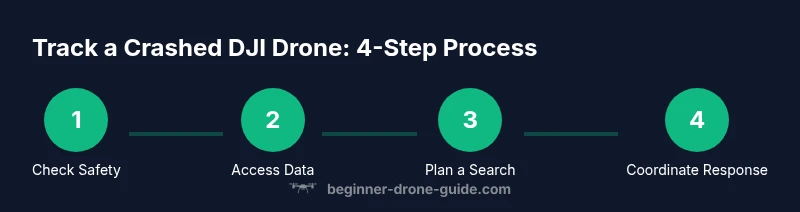
A practical workflow combines data access with a planned field search. Start by gathering the drone’s model and serial number, then verify your DJI account is linked to that drone. Next, open the DJI app to review and export the last few flights for coordinates and timestamps. If available, activate any Find My Drone features to visualize the last known location. Translate the data into a field search plan, or share it with local authorities if needed. Finally, document all findings and adjust your data-sharing settings for future flights. This approach emphasizes data-backed decision making and safe recovery, aligning with best practices for responsible drone ownership. The Beginner Drone Guide team emphasizes safety and legality throughout the process and notes that data gaps can occur, so be prepared with a physical search plan as well as digital traces.
Special cases and troubleshooting
Not every crash yields complete data. If the drone is powered off, out of range, or the battery has drained, live location updates may be unavailable. Data access can also be restricted if the drone isn’t linked to an account, or if you changed devices and forgot to re-link. In such cases, rely on the last known GPS coordinates, flight times, and the model’s general flight behavior. Weather, terrain, and interference can also affect GPS reliability. If data access is limited, broaden the search area gradually and coordinate with nearby property owners or local authorities if the drone is suspected to have landed in public or hazardous spaces. Always follow safety guidelines and respect privacy and property rights during the search.
Best practices for safer recovery
Adopt a data-backed, stepwise approach to minimize risk and improve outcomes. Before flights, enable data-sharing features and regularly back up logs. Maintain up-to-date account credentials and ensure your device’s timestamp is synchronized with a trusted server. When a crash happens, start with the most reliable data source (flight logs and app history) and use last-known coordinates to plan a safe field search. Communicate clearly with any helpers and stay reachable for updates. Finally, document your recovery process for future reference and training, reinforcing a culture of safety and accountability. The Beginner Drone Guide team recommends keeping a pre-flight checklist that includes data-sharing preferences and emergency contacts.
Legal and privacy considerations
Tracking a drone after a crash touches on privacy and local regulations. Do not trespass, and avoid sharing sensitive data publicly without consent. In many places, you must report lost drones or crashes, especially if they involve public spaces or potential hazards. If you suspect the drone landed on private property, obtain permission before entering. Always store flight data responsibly and limit who can access it. When in doubt, consult local aviation authorities or a licensed attorney about data rights and reporting requirements. The Beginner Drone Guide team emphasizes compliance and respect for others’ property and safety.
Tools & Materials
- DJI account credentials(Email and password for your DJI account; enable two-factor authentication.)
- Drone serial number(Find on the drone body or original packaging for identification.)
- Last known coordinates(Record the last location where you operated the drone or saw it.)
- Smartphone with DJI app(Have the latest DJI Fly/Go app version installed and linked.)
- Internet access(Stable connection to access logs and cloud data.)
- Flight logs export (PDF/CSV)(If you saved logs locally or in the cloud.)
- Notebook and pen(For field notes and timestamps during the search.)
- Camera or smartphone(Photograph the crash scene for documentation and reporting.)
Steps
Estimated time: 60-90 minutes (excluding field search)
- 1
Verify safety and immediate risks
Before starting any recovery actions, ensure the crash site is safe for you and others. Do not approach hazardous areas or damaged batteries. Keep others away from the scene until it’s secure.
Tip: Wear gloves and use PPE as needed; mark off the area to prevent further disturbance. - 2
Collect critical identifiers
Gather the drone’s model and serial number, and confirm the drone is linked to a DJI account. This helps pull precise logs and locate the device more efficiently.
Tip: Having the serial number ready speeds up verification with support or logs. - 3
Sign in and verify data linkage
Open the DJI app and verify that your account shows the crashed aircraft in flight history. Ensure location services and data sharing are enabled for future recovery.
Tip: If data isn’t visible, try refreshing in the app and reconnecting to the internet. - 4
Review recent flights
Review the last flights to identify the final GPS points and timestamps. Export or screenshot these logs for your incident report.
Tip: Note the exact time zone to avoid confusion when correlating events. - 5
Activate locating features (if available)
Use Find My Drone or Locate features in the app if your model supports them. These can show the last online coordinates and help guide a field search.
Tip: Some features rely on the drone’s beacon or battery to transmit location; data gaps can occur. - 6
Plan the search route
From the last known point, map a careful search route that accounts for terrain, weather, and local restrictions. Prioritize visible landmarks and safe paths.
Tip: Tell a friend or family member your plan and expected return time for safety. - 7
Coordinate with authorities if needed
If the crash involves public space, hazards, or injuries, contact local authorities and share flight data including the serial number and last coordinates.
Tip: Provide clear contact information and a concise incident summary. - 8
Document and report findings
Photograph the scene, record notes, and update your incident report with times, coordinates, and actions taken. This aids recovery and insurance processes.
Tip: Keep an organized log to accelerate any future claims or follow-ups.
Frequently Asked Questions
Can I track my DJI drone after a crash if the battery is dead?
If the battery is dead, live location updates may be unavailable, but flight logs and app history can still reveal last known coordinates. You may still locate the drone using GPS data from logs.
If the battery is dead, live updates aren’t possible, but logs can help you find the last known location.
What data sources do I need to track a crashed drone?
You’ll typically rely on flight logs, DJI account data, app history, and any cloud backups. If Find My Drone features are available, these can aid locating.
Flight logs and app history are your main sources; if available, use Find My Drone.
Is locating a drone after a crash always possible?
Not always. If data wasn’t captured, or the drone is in a location with no reception, locating it may rely on physical search and reports.
Locating isn’t guaranteed; data gaps can occur.
Do I need to involve authorities to recover a crashed drone?
Only if the crash occurs in public space, involves injuries, or blocks access. Otherwise, you can proceed with a guided search using the data you have.
Only involve authorities if required by safety or legal reasons.
What if my DJI account isn’t linked to the drone?
You’ll need to verify ownership and link the drone to your DJI account; without linkage, data access is limited.
If not linked, add the drone to your account to access logs.
Can I prevent data gaps in the future?
Yes. Regularly enable data sharing, back up flight logs, and review privacy settings to ensure data will be available after a crash.
Regular data sharing helps you recover faster next time.
Watch Video
Quick Summary
- Verify safety first and document the scene
- Use flight logs and app history to locate the drone
- Share data responsibly and comply with laws
- Coordinate with authorities when needed
- Maintain pre-flight data-sharing habits for easier recovery