Why is My Drone Not Taking Off? A Practical Troubleshooting Guide for Beginners
Urgent, beginner-friendly guide to diagnose why your drone won’t take off and how to fix battery, propellers, calibration, firmware, GPS, and safety concerns in 2026.


Power and calibration are the most common culprits when a drone won't take off. Start by verifying a full, healthy battery and secure, undamaged propellers installed in the right orientation. Check that the transmitter is paired, the stick is centered, and the gimbal/IMU calibration is recent. If the drone still won’t lift, perform a safe self-test and rebind the controller.
Why your drone won't take off
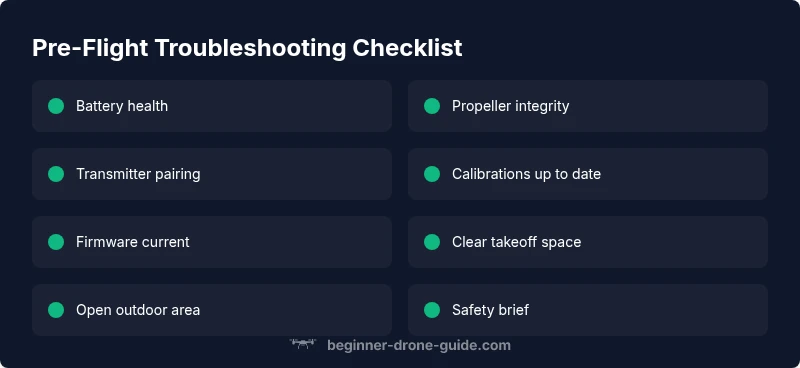
According to Beginner Drone Guide, takeoff issues usually stem from simple, correctable causes rather than mysterious hardware faults. In the hands of a beginner, the decision to lift off becomes a sequence of checks rather than a single button press. If any step is skipped, the drone may refuse to rise or may stall at the pad. In this section, we lay out the most common triggers and how to verify them safely before you attempt another takeoff. Start with the basics: battery health, propeller integrity, transmitter pairing, and sensor calibration. These checks are your first line of defense against a failed lift-off, especially in 2026 when many models rely on smart features to assist or restrict liftoff. A calm, methodical approach saves time and reduces risk. A clean, level surface also helps prevent a sudden slip during initiation.
Power and battery health
The battery is the lifeblood of takeoff. A low or degraded battery can prevent liftoff or cause the drone to power down mid-air. Begin by ensuring the battery is fully charged and seated securely in the drone. Inspect the battery contacts for corrosion or bent pins, and verify that the connectors are undamaged. If you notice any swelling, puffiness, or heat during charging, stop and replace the pack. For many drones, an after-market or third-party battery may show reduced performance; always use an approved battery for your model. If the power system checks out but liftoff still fails, consider a grounded flight test with a basic motor check to confirm the ESCs are responding to throttle inputs. Beginner Drone Guide analysis shows that power issues are a leading cause of lift-off failures, so start here and document the results to track patterns over time.
Propellers and frame integrity
Damaged or incorrectly mounted propellers are a frequent, fixable reason a drone won't take off. Inspect each blade for cracks, chips, or oil residue that could indicate bearing or motor issues. Verify that all props are the correct model for your drone and that they are installed in the proper orientation and tightened securely. Wobbling props at takeoff can signal a bent shaft, loose motor mounting, or a misaligned frame; in such cases, do not fly until the issue is resolved. Clean the prop hubs and ensure there’s no hair or debris tangled in the motors. If you find a problematic propeller, replace it with an identical spare and recheck balance with a prop balancer if available.
Calibration and sensors
Sensor calibration is often overlooked by new pilots, but incorrect IMU or compass data can prevent stable takeoff. Place the drone on a flat, level surface away from metal objects, electronics, or large crowds while calibrating. Initiate IMU calibration if your app or drone prompts you to do so, and perform a compass calibration away from metallic surfaces or magnets. After calibration, power cycle the drone and re-check flight mode defaults. If the drone still won’t take off, confirm that the IMU and compass readings stabilize on the ground before attempting lift-off.
Firmware, GPS, and flight modes
Outdated firmware can deactivate safety checks that damage-limiting sections rely on during takeoff. Check for firmware updates via the official app or desktop utility and install any pending upgrades. A poor GPS lock can also frustrate liftoff, especially in structures or near large metal objects. If GPS is weak, switch to a stabilized mode or acquire an outdoor location with a clear sky view. Ensure your flight modes (GPS, ATTI, hover) are set correctly for takeoff, as the wrong mode can produce unexpected behavior. Always perform a firmware update in a controlled environment and back up current settings if the option exists.
Environmental and weight considerations
Even a healthy drone can fail to lift off if the environment or payload exceeds limits. Check your payload weight against the manufacturer’s recommended maximum; extra weight can reduce lift and require longer clearance for takeoff. Wind gusts, temperature, and humidity can affect motor performance and battery output. Avoid takeoff in rain or dusty environments, which can clog sensors and motors. If you carry additional accessories, remove them during initial testing to isolate the cause.
Safe testing sequence and when to seek professional help
When you’re troubleshooting, always begin with safety. Work in an open area away from people, pets, and obstacles. Use a stable, level surface and keep hands clear of the propellers during power-on tests. Do not attempt a full hover until you’ve confirmed stability at low throttle. If you cannot identify or resolve the issue after following the checks, seek professional help—failing to lift off with a known good battery and removal of weight can indicate motor or ESC failure. The Beginner Drone Guide team recommends documenting every step and test so a technician can quickly diagnose the problem and prevent repeat issues.
Steps
Estimated time: 30-45 minutes
- 1
Power down and prep
Power off the drone and controller. Move to a clear, open area with a flat surface. Remove all loose items and ensure you have a safe, stationary start position before testing throttle response.
Tip: Tip: Keep hands away from propellers even when powered off. - 2
Charge and inspect battery
Connect a known-good charger and verify the battery reaches full voltage on the status indicator. Check for signs of swelling, corrosion, or loose connectors. Re-seat the battery securely in the drone and in the controller if applicable.
Tip: Tip: Use the original charger or a manufacturer-approved equivalent. - 3
Check propellers and mounting
Look for any cracks, chips, or warping. Confirm each blade is matched to its hub and mounted in the correct orientation. Tighten prop nuts or screws evenly without overtightening.
Tip: Tip: Use a propeller balance tool if available for precision. - 4
Rebind transmitter and reset controls
Follow the binding procedure for your model to ensure the controller and drone are communicating fully. Center all sticks and set flight mode to a safe default before attempting lift-off.
Tip: Tip: Do a quick throttle test with the aircraft held firmly in your hands to feel responsiveness before any ground test. - 5
Calibrate IMU and compass
Calibrate on a flat surface away from metal and electronics. Complete IMU calibration first, then perform compass calibration if prompted. Power cycle and test again in a wide space.
Tip: Tip: Calibrations are most reliable after a cold boot and a fresh battery. - 6
Firmware check and GPS lock
Ensure firmware is up to date and observe the GPS status. If GPS is weak, fly in stabilized mode at first and avoid takeoff until a solid lock is achieved. Attempt a controlled hover test in a clear area.
Tip: Tip: Always back up settings before updating firmware.
Diagnosis: Drone won't take off or respond to throttle
Possible Causes
- highPower issue (battery health, connections, or charging)
- highPropeller damage or incorrect mounting
- mediumCalibration or sensor fault (IMU/compass)
- mediumOutdated firmware or GPS lock problems
- lowEnvironmental factors or excess payload
Fixes
- easyCharge battery fully, inspect contacts, and reseat battery
- easyInspect propellers for damage, replace as needed, and confirm orientation
- easyRun IMU/compass calibration on level ground and reboot
- mediumUpdate firmware, reset flight mode, and verify GPS lock
- easyRemove payload, avoid wind, and test in open space
Frequently Asked Questions
Why won't my drone take off even though the battery is charged?
Even a charged battery can fail to lift off if the cells are imbalanced, connectors are loose, or there is propeller damage. Start with a full power cycle, inspect connectors, and verify that the props are undamaged and correctly mounted. If the problem persists, move to calibration and firmware checks.
A charged battery isn't always enough; check connectors, props, and calibration before testing again.
How can I tell if the propellers are damaged?
Look for cracks, chips, or warping on each blade. Spin the propellers by hand to listen for unusual play or rubbing. Replace any damaged blade and recheck balance before attempting lift-off.
Check each blade for damage and replace as needed before flying again.
Is GPS required for liftoff?
Some drones can take off without GPS in a stabilized mode, but GPS provides position hold and safer hover. If GPS is weak, switch to a non-GPS mode and test cautiously outdoors with adequate space.
GPS helps with stable hover, but you can test in non-GPS mode if needed.
Should I recalibrate before every flight?
Calibration is beneficial after certain events (crash, firmware updates, sensor alarms) or when the drone behaves oddly. If everything seems normal, you may skip frequent recalibration but keep an eye on sensor stability.
Calibrate when the drone acts oddly or after updates; otherwise, monitor stability.
What should I do if the drone still won't lift after checks?
Revisit the power system, then inspect for motor or ESC faults with a controlled bench test. If there is unusual heat or abnormal sounds, discontinue use and contact support. Do not attempt risky repairs yourself.
If it still won’t lift, check motors, then contact support if needed.
When should I seek professional help?
If basic troubleshooting doesn't fix the issue, or you hear grinding, see erratic motor behavior, or frequent calibrations fail, seek professional service. A trained technician can diagnose electrical or motor faults safely.
Seek professional help if basic fixes don’t work or you hear motor issues.
Watch Video
Quick Summary
- Always start with power and propeller checks.
- Calibrate sensors and verify firmware before flight.
- Test in a safe, open area with no payload.
- If issues persist, seek professional help promptly.