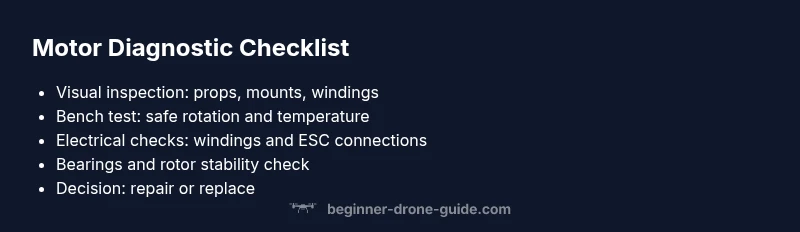
How to Tell If a Drone Motor Is Bad: Quick Diagnostic Guide
Learn practical, beginner-friendly steps to diagnose a failing drone motor. Identify signs, perform safe tests, and decide between repair or replacement with confidence.


Unusual vibration, loss of power, or overheating while the drone is hovering usually indicates a motor issue. Start with a visual check and a safe propeller test using known-good props. If symptoms persist after basic fixes, proceed through the diagnostic steps to isolate the faulty motor and decide between repair or replacement. This quick guide helps beginners act fast and safely.
Quick motor health check
According to Beginner Drone Guide, a quick initial assessment can reveal obvious problems without disassembling the drone. Start by powering off and removing the battery, then perform a gentle wheel-test by manually rotating each motor shaft with the props removed. Listen for grinding or binding sounds and feel for rough resistance. Check the motor temperature after a brief test run; a motor that heats up unusually fast is a red flag requiring closer inspection. This rapid sweep often points to imbalances, propeller damage, or electrical issues in the wiring or ESC. By catching these signs early, you prevent cascading damage and set the stage for a safe, effective diagnosis.
Common symptoms of a failing motor
Motors that are failing often exhibit a predictable set of symptoms. You may notice one or more of the following: persistent vibration that isn’t present in other motors, a sudden loss of thrust or reduced flight time, a motor that becomes very hot to the touch after short flights, or irregular yaw and roll when you apply throttle. In some cases, the drone may even drift or tilt even with proper calibration. If you observe any of these signs, don’t fly aggressively; instead, land safely and begin a targeted inspection to avoid further damage. The key is to differentiate normal performance variations from genuine motor problems, which improves your odds of a successful repair.
Visual and physical inspection
Inspect the motor can, shaft, and bearing area for visible damage. Look for bent shafts, chipped windings, or melted plastic insulation around the motor leads. Spin the motor by hand (with the propellers removed) and listen for grinding, grinding, or rubbing sounds that point to bearing wear or rotor contact. Check the propeller seats and mounts for cracks or looseness, since a damaged prop can overload a motor and trigger symptoms. Examine the wiring harness and ESC connections for loose pins or frayed insulation. A clean, secure setup reduces electrical noise and ensures stable motor performance during flight.
Electrical testing you can safely perform
Electrical testing helps distinguish mechanical from electrical faults. With the propellers removed and the battery disconnected, gently test continuity between motor windings and the ESC using a multimeter (where appropriate for your model). Look for abnormal resistance readings or short to ground. If you have a trusted tool like a heat camera or infrared thermometer, measure surface temperature during a low-throttle test; hotspots can indicate winding faults. If you’re unsure, skip advanced electrical tests and focus on mechanical inspection first to prevent damage.
Rotor, bearings and balancing considerations
Bearings wear over time, leading to increased friction and heat. If you feel unusual resistance when spinning the rotor or hear a gritty noise, bearing wear could be the culprit. Rotor damage from hard landings or debris can also cause imbalance, which strains the motor and ESC. In some cases, a motor that has been consistently overworked will run with a low rpm, creating a sluggish response in throttle control. If bearings are worn or the rotor is damaged, repair is often impractical; replacement is typically the safer, more reliable option.
In-flight vs bench testing: what to test and avoid
Never test a suspected bad motor in-flight. If a motor exhibits suspicious behavior, perform all tests on a bench with the drone secured and a safe propeller arrangement or with propellers removed. Start with ground runs at low throttle to observe stability, then gradually increase to moderate throttle while monitoring temperature and vibration. Avoid long high-throttle runs on a possibly failing motor, as this can cause ESC overload or battery sag. Use this staged approach to pinpoint issues without risking the airframe.
When to replace vs repair
If visual inspection reveals damaged windings, bent shafts, bearing play, or rotor contact with housing, replacement is usually the best option. Some issues can be resolved by replacing the bearings or the propeller adapter, but many motors are sealed and not serviceable. For motors with minor overheating but intact windings and bearings, a rebuild or bearing replacement by a qualified technician may be feasible. Consider the cost, availability of spare parts, and the impact on flight safety when deciding.
Safety precautions you must follow
Always power down, disconnect the battery, and remove props before touching any moving parts. Work in a clean space, away from flammable materials, and wear eye protection. Do not attempt high-throttle tests with the drone unsecured or without a stand. Use a purpose-built test bench or safety enclosure if possible. If you’re unsure about wiring or ESC integrity, seek professional help. Safety first protects you and your investment.
Preventive maintenance to avoid motor problems
Establish a routine to prevent motor issues before they start. Regularly inspect props for nicks or cracks, balance props, and replace damaged ones promptly. Keep motors and housings clean from dust and debris, and periodically check wiring insulation for wear. Calibrate ESCs after motor replacements, and perform gentle ground tests before any flight. By building a simple maintenance habit, you’ll extend motor life and ensure safer, more reliable flights.
Steps
Estimated time: 60-90 minutes
- 1
Power down and secure the drone
Switch off the drone, remove the battery, and place the craft on a stable stand. Ensure no props rotate, and disconnect all power sources before touching any components.
Tip: Always remove the propellers first; verify the battery is safe to handle. - 2
Remove the propellers safely
Use proper tools to unfasten propellers, labeling which motor they belong to. Store props safely to prevent accidental reassembly or injury during inspection.
Tip: Label props to avoid mixing orientations during reassembly. - 3
Visually inspect motors and prop mounts
Check for bent shafts, chipped windings, or debris in the motor housing. Ensure prop adapters and motor mounts are intact and snug.
Tip: Look for heat discoloration or melted insulation around leads. - 4
Test motor rotation by hand
With props removed, gently rotate each motor by hand to detect roughness or binding. Any gritty feel or noise indicates bearing or rotor issues.
Tip: Do not force rotation; stop if resistance is felt. - 5
Bench electrical check
If you’re comfortable, verify continuity and resistance of windings with a multimeter as per your model’s manual. Look for abnormal readings that suggest winding faults.
Tip: Only attempt electrical tests if you know how to interpret meter readings. - 6
Swap and retest with good props
Reinstall a known-good propeller on the suspected motor and run a brief ground test at low throttle. Observe specifically for changes in vibration and temperature.
Tip: Compare against an identical, healthy motor to gauge normal behavior. - 7
Check ESC and wiring
Inspect ESCs for loose cables, damaged insulation, or overheating. Reseat connectors firmly and replace any damaged wires.
Tip: Avoid touching ESCs while the system is powered; static safety helps avoid shorts. - 8
Assess heat and vibration over time
Run a controlled test flight or bench test long enough to observe sustained heat or escalating vibration. Stop the test if signs worsen.
Tip: Keep a log of temps and vibrations for future reference. - 9
Decision and action
If issues persist after the above checks, plan motor replacement or professional service. Reassemble, recalibrate, and conduct a cautious flight test.
Tip: Document your findings to guide the next steps.
Diagnosis: Drone motor stops or runs abnormally, with vibration, heat, or reduced thrust
Possible Causes
- highImbalance or damaged propeller causing excess load on motor
- mediumStator/rotor winding fault or ESC wiring issue causing performance drop
- lowBearing wear or rotor damage from overheating or impact
Fixes
- easyReplace damaged or unbalanced propellers; retest motor feel and balance
- mediumInspect and secure ESC connections; test with a known-good harness or replace damaged wires
- hardIf bearing play or rotor damage is present, replace the motor or consult a service center
Frequently Asked Questions
What are the earliest signs that a drone motor is failing?
Early signs include unusual vibration, increased heat, reduced thrust, and uneven yaw. If you notice any of these, pause flights and inspect the motor, propellers, and wiring before continuing.
Early signs are vibration, heat, and reduced thrust. Pause flights and inspect the motor and wiring.
Can a bad motor damage the ESC or battery?
Yes. A failing motor can cause ESC overload or battery sag, risking further electrical damage. Stop using the drone and address the fault before flying again.
Yes, a bad motor can damage the ESC or battery. Stop flying and fix the motor first.
Is it safe to test motors without props?
Yes, but only for bench tests with the drone secured. Never perform high-throttle tests with props off or with the drone unsecured.
Yes, test on a bench with the drone secured and no props. Avoid high-throttle tests with no props.
How long do drone motors typically last?
Lifespan varies with use, load, and maintenance. Regular inspection and timely replacement when wear appears extend overall reliability.
Motor life varies; regular checks and timely replacement help maintain reliability.
What tools are essential for diagnosing motor problems?
You’ll typically need a basic multimeter, spare propellers, a safe test bench, and access to a service manual for your drone model.
A multimeter, spare props, a safe bench, and the model's service manual are essential.
When should I replace a motor instead of repairing it?
If windings show damage, the shaft is bent, or bearings are worn beyond reasonable repair, replacement is safer and more reliable than repair.
If windings are damaged or bearings are worn, replace the motor for safety and reliability.
Watch Video
Quick Summary
- Identify symptoms early to prevent further damage
- Prioritize mechanical checks (props, mounts, bearings) before electrical tests
- Use bench testing over in-flight testing to diagnose safely
- Replace motors when bearings or windings show wear
- Maintain a routine to prevent future motor problems