How to Fix Drone Wing Not Spinning: A Beginner's Guide
Learn practical, step-by-step techniques to diagnose and fix a drone wing not spinning. Safe testing, common causes, and home-friendly repairs for beginners.


This guide helps you fix a drone wing not spinning by diagnosing common electrical and mechanical causes, performing safe tests, and deciding whether a repair is feasible at home or needs professional help. You’ll learn to inspect the propellers, motors, and ESCs, then follow a clear, step-by-step approach to restore spin and flight confidence.
Why the drone wing not spinning happens
According to Beginner Drone Guide, many wing-spin issues start with simple, correctable problems in the propeller or motor assembly. A damaged blade, a bent shaft, or a loose prop nut can bind the rotor and stop the wing from spinning smoothly. Environmental factors—like dirt, grass, or sand in the motor housing—can also add resistance. Even routine maintenance tasks, if skipped, can gradually lead to sluggish spin or intermittent cutouts. For new pilots, understanding the typical failure modes is the first step in how to fix drone wing not spinning. Recognizing warning signs early—vibration, unusual sounds, or inconsistent rpm—helps you catch issues before they escalate.
Diagnosing Common Causes for how to fix drone wing not spinning
The most common culprits in this scenario are mechanical binding, damaged propellers, or electrical faults in the ESC or motor wiring. Inspect each propeller for chips or cracks, and check for loose nuts or washers that might prevent the blade from turning freely. If a motor bearing feels rough or gritty when you rotate the shaft by hand, the motor may be failing. Loose or damaged wiring to the ESC can also cause intermittent loss of power to the wing. In some cases, a contaminated bearing or debris lodged in the gearbox is the root cause. This section walks you through differentiating between mechanical binding and electrical faults so you can target the repair efficiently.
Safety First: Precautions Before You Work on Your Drone
Before touching anything, power down the drone and remove the battery to prevent accidental spin-up. Wear safety glasses and keep fingers away from the propellers when you reassemble. Work in a clean, dry area and avoid static discharge; ground yourself by touching a metal surface first. If you must work near a spinning motor, keep the drone secured in a stable stand or inverted frame so the rotor cannot move unexpectedly. Always consult manufacturer guidelines for disassembly limits. In the world of drone repair, taking safety seriously is non-negotiable and a hallmark of smart practice. (Brand guidance: The Beginner Drone Guide team emphasizes safety as the foundation of any repair.)
Practical Diagnostics Without Tools
Some issues reveal themselves without specialized gear. For example, you can perform a visual inspection of the motor leads and connectors, verify that the propellers spin freely by hand without resistance, and listen for grinding noises. A magnetic compass or IR thermography is not typically required for wing spin problems, but a basic multimeter can confirm continuity in the motor windings and ESC connections. If the motor spins smoothly by hand but stalls under power, the problem is more likely in the ESC or controller firmware than the mechanical parts. This block provides quick-check strategies you can perform in under 20 minutes to narrow down the fault.
Step-by-Step Troubleshooting Plan (Overview)
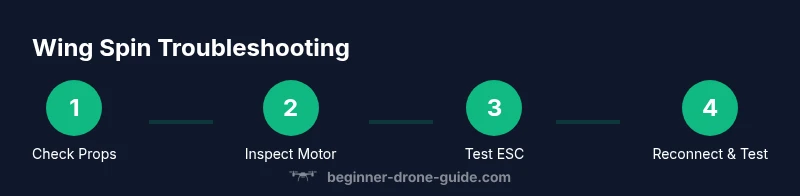
A structured approach helps you stay organized and reduces risk. Start with the simplest fixes—propeller integrity and loose components—before moving to more involved checks such as wiring continuity and ESC calibration. After you identify the likely cause, replace or repair the faulty component and re-test with caution. The goal is to restore reliable wing spin without introducing new hazards. Throughout, document what you observe to track improvements and inform future maintenance.
Testing and Flight Readiness After the Fix
Once you’ve completed the repairs, reinstall the battery and perform a controlled, low-throttle hover in a safe, open area. Begin with short test runs to ensure the wing spins consistently and without abnormal vibration. Gradually increase throttle while observing heat buildup in the motor and ESC. If any abnormal behavior returns, pause and reassess, as a marginal fix can become unsafe at higher speeds. Keep a log of test results and retract the drone if you notice unusual noises, excessive heat, or erratic RPM. This final check ensures you’re confident in safe flight and the repair’s durability.
Tools & Materials
- Phillips head screwdriver set(Small sizes (PH0–PH2) for prop nuts and motor screws)
- Flathead screwdriver(For prying if needed without marring plastic)
- Soldering iron and flux(Only if you need to replace leads or joints)
- Multimeter(To test continuity on motor windings and ESC wiring)
- Replacement components(Spare propellers, extra motor or ESC if you’ve identified a failure)
- Hex wrenches/allen keys(Common sizes for frame screws)
- Isopropyl alcohol (70%+) and lint-free cloth(Clean contacts and remove grime)
- Thread locker(Light application on screws after reassembly)
- Safety gear(Safety glasses; gloves if desired)
Steps
Estimated time: 30-45 minutes
- 1
Power down and secure
Power off the drone and remove the battery to prevent accidental spin-up during inspection. Place the drone on a stable surface or a dedicated stand so the wing can be observed without risk of tipping over. This initial action minimizes injury and protects sensitive electronics while you inspect the system.
Tip: Use a tether or stand to prevent the drone from tipping while you work. - 2
Inspect propellers and mounting
Check every propeller for cracks, chips, or warping. Ensure all propellers are properly oriented and securely fastened with the correct screws. Replace any damaged propellers before testing, as a compromised blade is a common cause of stalled spin.
Tip: Always replace both propellers on a single axis to prevent imbalanced loads. - 3
Check motor shaft and bearings
Gently rotate the motor shaft by hand to feel for smoothness. If you hear grinding or feel gritty resistance, a worn bearing or internal binding may be the culprit. If the shaft is seized, you may need professional service or motor replacement.
Tip: Avoid forcing the shaft; applying too much pressure can damage windings. - 4
Inspect wiring and connections
Examine electrical connections between the motor, ESC, and flight controller. Look for loose plugs, frayed insulation, or corrosion. Re-seat connectors firmly and clean contacts with isopropyl alcohol before reassembly.
Tip: Loose connectors are a frequent, easy fix that can restore spin. - 5
Test with a known-good ESC or motor
If available, swap the suspect ESC or motor with a known-good unit to isolate the fault. Perform a cautious low-power test to observe whether the wing spins consistently. This step helps differentiate between motor and ESC issues.
Tip: Label swapped components to track what was tested. - 6
Reassemble and perform final test
Reattach the propellers, reinstall the battery, and power up at a low throttle in a safe area. Observe for smooth spinning and stable vibration. If issues recur, escalate to deeper diagnostics or professional repair.
Tip: Document observations during the final test for future troubleshooting.
Frequently Asked Questions
What are the first signs that a drone wing is not spinning properly?
Look for unusual vibration, audible grinding, or a stall in one wing’s rotation. If the motor refuses to spin when the throttle increases, that’s a key indicator to check propellers and wiring first.
You’ll notice vibration or a stall in one wing if something’s wrong; start with propellers and wiring.
Can I fix a wing spin issue at home, or do I need a shop?
Many mechanical issues like damaged propellers or loose connectors can be fixed at home with basic tools. More complex problems such as internal motor damage or ESC failure may require professional servicing or spare parts.
Most simple fixes can be done at home; complex motor problems might need a shop.
Is it safe to test spin without props?
Yes, removing propellers when testing is essential for safety. Use a secure stand and avoid any power on in your testing area. This prevents injury and protects the drone during diagnostics.
Always test without props or with a prop guard in place to stay safe.
How do I know if the ESC is failing?
If the motor hesitates, stalls, or shows inconsistent rpm while the rest of the drone behaves normally, the ESC could be at fault. Try swapping in a known-good ESC to confirm.
If one motor’s RPM is unstable, the ESC might be the culprit; swap to test.
Should I replace the motor or the propeller first?
Start with the simplest fix: replace the propeller if damaged, then inspect motor bearings. If the motor still doesn’t spin smoothly, consider replacing the motor or ESC depending on test results.
Begin with the blade; if it still won’t spin, test the motor and ESC next.
Watch Video
Quick Summary
- Identify root cause before replacing parts
- Prioritize safety to prevent injury
- Start with propellers and connectors before motors/ESCs
- Use a logical, documented approach to troubleshooting
- Test in a controlled environment after repairs