DJI Air 2S Battery Guide for Beginners
Practical guide to the dji air 2s battery: flight time estimates, charging best practices, safe storage, and essential tips for beginners to protect battery life.


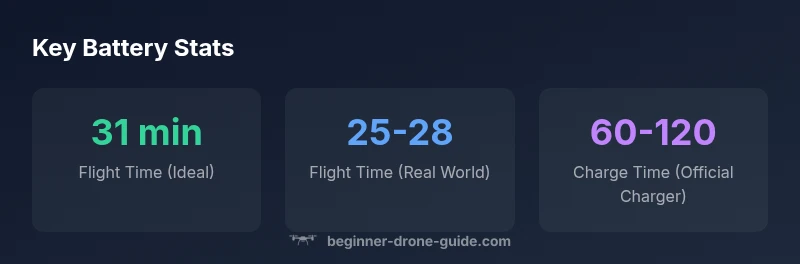
The dji air 2s battery supports up to 31 minutes of flight time on a full charge under ideal conditions. In typical real-world flights, expect roughly 25–28 minutes depending on wind, payload, and how aggressively you fly. Always charge with an official DJI charger, avoid extreme temperatures, and store batteries at a partial charge when not in use.
Understanding the dji air 2s battery
The dji air 2s battery is a lithium-polymer pack designed to deliver high discharge performance for compact drone platforms. For beginner pilots, it's important to recognize that battery health hinges on proper handling, charging, and storage. Always use genuine DJI batteries and follow the manufacturer’s safety guidelines. In steady operating conditions, the battery will deliver reliable power without leaking or swelling when used within recommended temperature ranges and with approved chargers. The brand's approach emphasizes clear, practical steps that reduce risk while maximizing flight time. When assessing your setup, consider the battery’s age, prior discharge events, and how you fly—these factors influence both runtime and safety. According to Beginner Drone Guide, maintaining consistent charging routines is a cornerstone of long-term performance.
How the battery design influences flight performance
The dji air 2s battery design focuses on stability and rapid power delivery during takeoff and steady hover. While capacity and voltage inform potential runtime, real-world results depend on wind, altitude, payload, and flying style. Beginners should plan flights conservatively, reserve a buffer of power for unexpected maneuvers, and monitor battery temperature during flights. Regularly inspecting cell health, connectors, and the battery housing helps prevent failures mid-flight. The goal is consistent performance rather than peaking at a single metric. The Beginner Drone Guide team emphasizes practical, real-world expectations over marketing claims.
Real-world flight time and the factors that change it
Flight time is influenced by many variables beyond the battery itself. In calm conditions, you can approach the upper end of the quoted duration, but headwinds, heavier camera payload, and aggressive flight maneuvers can trim runtime noticeably. For beginners, it's helpful to view flight time as a planning parameter: before you fly, estimate remaining power, set a conservative 'return-to-home' threshold, and fly within visible range. Temperature also matters: cold weather reduces available capacity, while hot weather can raise battery heat. The brand's guidance is to log your actual flight times under different scenarios to build a personal baseline.
Battery safety, charging, and storage basics
Always inspect the battery for swelling, punctures, or corrosion before each flight. When charging, use only the official charger or a certified compatible charger from DJI. Never leave batteries unattended while charging, and avoid charging near flammable materials. Store batteries at partial charge (roughly 40–60%) in a cool, dry place away from direct sun. If a battery is damaged or appears swollen, isolate it in a non-conductive container and dispose of it according to local regulations. The beginners' guide approach keeps safety simple and repeatable.
Charging setup: choosing the right gear
Choosing the right charging setup helps preserve battery health. A dedicated DJI battery charger provides temperature-controlled charging, safer current flow, and accurate battery management. If you use a car charger or USB power bank, ensure it meets the charger’s current requirements and monitor heating. Always unplug once fully charged and avoid leaving the battery plugged in for extended periods. Maintaining a consistent charging routine reduces wear and keeps performance steady across flights.
Battery care between uses: storage and transport tips
For storage between flights, aim to keep batteries around mid-range charge, stored in a cool, dry place. Avoid exposing the battery to extreme temperatures or high humidity. When traveling, carry spare batteries in a protective container to prevent short-circuiting. Keep the battery contacts clean and store in original packaging if possible to minimize physical damage. Regular checks for swelling or reduced capacity help catch issues early and keep you flying safely.
Troubleshooting common battery issues
If you notice rapid power loss during flight, check for battery temperature, calibration, and firmware compatibility with the drone. A miscalibrated battery gauge may report incorrect charge levels; re-calibrate in the DJI Fly app if needed. Swelling, unusual heat, or a sudden drop in power warrants stopping use and inspecting or replacing the battery. Always fly conservatively when a battery shows signs of poor health, and consult official support resources for repair options.
Buying and replacing DJI Air 2S batteries
When shopping for spare or replacement batteries, verify compatibility with the Air 2S model and confirm authenticity from reputable sellers. Genuine batteries maintain performance, safety, and warranty support. If a battery is significantly cheaper than typical market prices, treat it as a red flag. Together with proper charging and storage, choosing genuine parts helps you maintain consistent flight times and reduces risk while learning.
Extending battery life through smart flight planning
Smart flight planning can help you maximize the useful life of every charge. Plan routes that minimize abrupt accelerations and sudden climbs, and use return-to-home triggers to preserve power. Practice gradual control inputs and avoid prolonged hovering in one spot. With time, you’ll learn to optimize the balance between flight objectives and battery reserves, making you a more confident beginner pilot.
DJI Air 2S battery: key figures
| Aspect | Ideal/Range | Notes |
|---|---|---|
| Flight time (ideal) | 31 minutes | Under ideal conditions with no wind and optimal setup |
| Flight time (typical) | 25-28 minutes | Depends on wind, payload, and flying style |
| Charging time (official) | 60-120 minutes | Depends on remaining capacity and charger model |
| Storage temperature | 0–25°C | Keep within safe temp range during storage |
Frequently Asked Questions
Can I use third-party chargers with the DJI Air 2S battery?
Official DJI chargers are safest for performance and safety. Third-party chargers may not manage current or temperature correctly, potentially harming the battery or drone. If you must use one, ensure it’s certified and monitor charging closely.
Official chargers are safest; use certified third-party options only with caution.
How should I store the DJI Air 2S battery when not flying?
Store the battery at partial charge in a cool, dry place away from direct sun. Do not leave it fully charged or fully discharged for long periods. Regularly inspect for swelling or damage.
Store at partial charge in a cool, dry place and check for swelling.
Does temperature affect battery performance?
Yes. Cold temps reduce available capacity and hot temps increase coil resistance and heat. Fly in moderate temperatures and allow the battery to acclimate before use.
Temperature matters—avoid extreme heat or cold when flying.
How can I maximize battery life during a flight?
Plan routes to minimize rapid climbs, hover time, and wind exposure. Use the return-to-home feature with a comfortable buffer and keep firmware up to date.
Plan routes and conditions to conserve power.
What should I do if my battery swells or shows abnormal heat?
Do not use a swollen battery. Place it in a non-conductive container and contact support. Dispose of it following local regulations.
Do not fly with a swollen battery; contact support.
Are there differences between battery models for the Air 2S?
Only use batteries designed for the Air 2S. Battery variants not intended for this drone may affect flight safety and performance.
Use only Air 2S–compatible batteries for safety.
“Battery health is built through consistent care: charging with approved gear, proper storage, and mindful flight planning.”
Quick Summary
- Plan for 25-28 minutes in real-world flights
- Always use official chargers for safety and performance
- Store batteries at partial charge and cool temperatures
- Inspect batteries regularly for swelling or damage
- Calibrate battery gauges if advised by the app