How to Register Your Drone with the FAA: A Beginner Guide
Learn how to register your drone with the FAA, determine if you need registration, and complete the official process with beginner‑friendly steps, tips, and resources for safe, compliant flying.


Today you’ll learn how to register your drone faa with the FAA, whether registration is required for your model, and how to complete the process quickly and safely. You’ll need basic details about your drone, a device with internet access, and a payment method for the modest fee. This quick guide points to official resources and summarizes what you’ll do at each step.
Why Registering Your Drone Matters
Registering your drone is not optional in most common recreational and commercial situations; it helps authorities identify the operator and improves accountability in case of incidents. The Beginner Drone Guide team emphasizes this step as foundational for safe and lawful flying. By registering, you comply with national rules and gain access to resources that help you fly smarter and safer. According to Beginner Drone Guide, the process is straightforward when you follow official steps and keep your documentation handy. The FAA's registration system ties your drone to you, enabling better tracking and easier renewal when needed. For beginners, this early step often prevents headaches later, especially as you expand your kit or plan flights in busier areas. Staying informed about changes in regulations, including Remote ID requirements, is part of good practice. In short, registration is the first pillar of responsible flight and can support troubleshooting with the authorities when needed.
Who Must Register and Why It Matters
Most operators must register if their drone falls within the common hobbyist range and is intended to fly outdoors. The Beginner Drone Guide team found that many new pilots overlook registration until after purchase, which can complicate early flights and lead to rule violations. Registration helps distinguish owners, keeps you compliant with flight rules, and forms the foundation for more advanced topics like Remote ID and safe operations in shared airspace. Remember: registration is tied to the operator, not the drone, and it covers multiple crafts you own if they fall under the same registration category. When you register, you’ll obtain a unique identification number that must be displayed on the aircraft and kept with you during flights. This basic step supports practical uses such as aerial photography and mapping and makes it easier to receive support if something goes wrong during a flight.
How to Determine If Your Drone Needs Registration
To determine whether your drone needs registration, start with the basics: will you fly it outdoors on a regular basis, and does it fall under the common consumer drone category? The FAA’s guidelines emphasize checking the weight and purpose of your aircraft, along with how you plan to operate in real-world airspace. The Know Before You Fly program and Beginner Drone Guide analysis emphasize that most crafts used for hobbyist, instructional, or semi-professional purposes will require registration if flown outside. If you’re unsure, visit the official FAA pages and review the latest rules. This step is essential to avoid penalties and to keep you aligned with safety practices, including proper preflight checks and airspace awareness.
Where to Register and What Information You'll Need
The official registration process takes place on the FAA DroneZone site. Start by creating an account, then add your personal information and your drone’s details, such as make, model, and approximate weight class. You’ll choose whether you are registering as a hobbyist or for commercial operations, and you’ll be guided through selecting a registration category and paying a small, standard registration fee. After completing the steps, you’ll receive a registration number (N-number) that must be displayed on your drone. Keep a digital copy of your certificate and note any expiration or renewal reminders. This block emphasizes using only official channels to avoid scams and ensure that your data is protected, a point highlighted by the Beginner Drone Guide team in our safety resources.
Display, Documentation, and Compliance
Display your registration number on your drone in a durable, legible way and ensure it remains readable throughout typical flight conditions. Carry your registration certificate when you fly and be prepared to present it to authorities if asked. As part of ongoing compliance, review your registration information for accuracy whenever you change your address, ownership, or flight purpose. The FAA’s Remote ID rules may require you to keep certain data accessible and up to date, so stay informed via official channels and trustworthy guides like Beginner Drone Guide. Accurate labeling and current details reduce confusion during inspections and make it easier to coordinate flights with others in shared airspace.
Keeping Registration Active: Renewal, Updates, and Real-World Use
Registration isn’t a one-and-done step. Information changes over time, such as address, ownership, or flight plans, and renewal cycles may require action. The Beginner Drone Guide analysis shows that proactive pilots keep digital records, set renewal reminders, and routinely verify their drone’s details before each flight season. Stay current by checking the FAA’s registration pages before you plan bigger flights, especially those near controlled airspace or in crowded venues. This approach supports safe operations, clearer enforcement when rules change, and smoother experiences during inspections or flight reviews.
Authority Sources
For the most authoritative information on drone registration and safety, refer to official FAA resources and trusted educational sites. The primary requirements come from the FAA DroneZone registration pages, which outline who must register, how to register, and how to display your assigned N-number. Remote ID rules are explained on the FAA site as well, and Know Before You Fly provides practical safety tips for beginners. This article synthesizes those sources and adds beginner-friendly explanations from the Beginner Drone Guide team to help you get started quickly and correctly.
Tools & Materials
- Internet-enabled device (computer, tablet, or smartphone)(Access to the FAA DroneZone and official sources)
- Payment method(Small registration fee; check current amount on official site)
- Drone information (make, model, approximate weight class)(Needed for registration input)
- Printer or device to save digital certificate(Optional for printing certificate)
- Pen and paper for notes(Useful during the process)
Steps
Estimated time: 15-25 minutes
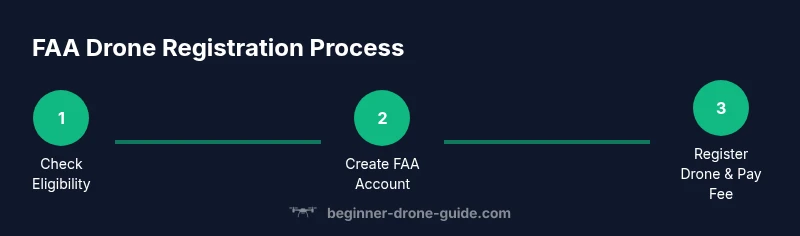
- 1
Check registration eligibility
Review whether your drone is subject to registration by examining its weight range and planned use. If you fly outdoors with a typical consumer drone, registration is likely required. This step helps you avoid penalties and ensures you start with the official process.
Tip: If unsure, start at the FAA's registration page to confirm eligibility before proceeding. - 2
Create your FAA account
Open the FAA DroneZone portal and create a user account with your real name, address, and contact information. A verified account is needed to submit drone details and track renewals.
Tip: Use a secure password and enable two-factor authentication if available. - 3
Add your drone details
Enter the drone's make, model, and your intended use (hobbyist or commercial). This helps determine the correct registration category and ensures you receive the right documentation.
Tip: Double-check spellings and model codes to prevent misclassification. - 4
Choose registration type and region
Select the appropriate registration category based on your use case and location. You’ll be guided toward the standard hobbyist or commercial path and any associated requirements.
Tip: Read the terms carefully to understand your responsibilities under each category. - 5
Submit and pay the fee
Proceed through the payment step to finalize registration. A confirmation screen and digital certificate will be issued after payment is processed.
Tip: Save payment confirmation and the registration certificate in a safe place. - 6
Receive and record your N-number
You’ll be assigned a unique identification number (N-number). Note it exactly as shown and plan how you will display it on your drone.
Tip: Keep a digital copy of the N-number for quick reference. - 7
Display the N-number on your drone
Attach the N-number to your drone in a durable, legible format. Ensure it remains visible during normal flight conditions and is not obscured by accessories.
Tip: Place the label where it won’t be peeled off easily and withstands weather exposure. - 8
Keep records and plan renewals
Save the registration certificate and set reminders for renewals or changes in ownership or address. Regularly review your data to stay current with FAA rules.
Tip: Create a calendar reminder a few weeks before renewal due dates.
Frequently Asked Questions
Do I need to register my drone if I only fly indoors?
Registration rules focus on the aircraft and its outside operation. If you only fly indoors and never go outside, registration may not be required. However, plan to register if you expect to fly outdoors, and always follow official FAA guidance.
Registration is about the drone and its use; indoors-only flying might not require it, but check current FAA rules before any outdoor flights.
Can I register multiple drones under one account?
Yes. You can register multiple drones under a single FAA DroneZone account. List each drone’s details and N-number as needed.
You can manage several drones under one account and add each one’s information separately.
How long does registration last?
Registration remains valid for several years and will require renewal or updates if your information changes or if rules change. Always check the FAA site for the latest renewal guidance.
Registration lasts for several years; you’ll need to renew if your information changes or if rules require updates.
Do I need a Remote Pilot Certificate for hobby flights?
Remote Pilot Certificate is required for commercial operations under Part 107. Hobbyist flights generally do not require the certificate, but you must follow all applicable rules and licensing requirements for your activity.
If you’re flying commercially, you’ll need a remote pilot certificate; for hobby flights, it’s typically not required as long as you follow rules.
What information do I need to start registration?
You’ll need your name, address, contact information, the drone’s make and model, and a payment method to complete registration.
Be ready with your personal details, drone info, and a payment method to finish registration.
Watch Video
Quick Summary
- Register early to stay compliant.
- Display your N-number clearly on the drone.
- Keep registration data up to date.
- Rely on official sources for latest rules.