How to Know If Your Drone Is Registered: A Practical Beginner's Guide
Learn how to verify your drone's registration status, locate proof of registration, and what to do if you can't find it. A step-by-step, beginner-friendly guide to staying compliant and flying safely.


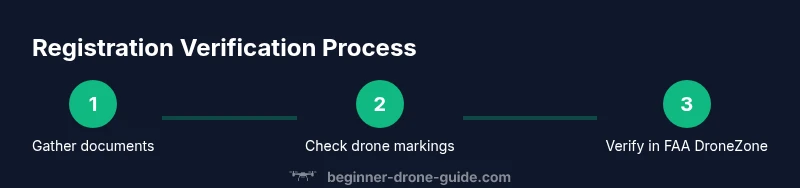
If you’re wondering how to know if my drone is registered, the quick answer is to verify both paper and digital records. Start by locating your FAA registration receipt and check the N-number printed on the drone. Then log in to the FAA DroneZone to confirm the registration is active and linked to your drone. If no proof exists, re-register and keep a digital or printed certificate handy.
Why Knowing Your Registration Status Matters
According to Beginner Drone Guide, staying compliant with registration isn't just a formality—it's a foundation for safe, legal flight. Registration links you to important rules that govern where you can fly, how high you can go, and which insurances may apply if something goes wrong. When you understand your status, you reduce risk for yourself and others and simplify compliance during routine checks or law enforcement encounters. In the United States, the FAA requires registration for most recreational and commercial drone operations in airspace that is accessible to the public. Private or restricted airspace adds further requirements. Your registration record is tied to a unique N-number displayed on the drone and associated with your personal contact information. Keeping these details accurate helps with accountability and gets you back in the air quickly if a permit or update is needed. This article walks you through how to know if your drone is registered, how to verify online, and what to do if you can't find proof. It’s about practical steps that beginners can follow to fly smarter and safer.
Quick Checks You Can Do Before Your Flight
Before you power up, do a quick sanity check that your drone is properly registered and prepared for flight. Start with the obvious: look at the body of the drone for an N-number or registration label; this is often near the battery compartment or the back of the arm. Next, pull up your registration certificate or digital receipt on your phone or tablet and confirm the registration number matches what’s printed on the drone. If your drone supports an in-app registration status, open the companion app and verify that the status shows as active. Finally, keep a digital backup of your proof (PDF or screenshot) and a printed copy in case you’re asked for it by authorities or event organizers. These steps reduce the chance of missing proof during a routine check and help you avoid fines or flight restrictions.
Understanding What Counts as Registered
Registration is more granular than simply owning a drone. In many jurisdictions, the record is tied to your identity and to a unique registration number rather than the drone model alone. That means a different drone you own with a separate serial or N-number requires its own registration, even if both are of similar size. Your proof of registration typically includes an expiration date and may require renewal every few years or more often if you modify the drone’s configuration or use it for commercial purposes. The run-of-the-mill hobbyist registration covers general flight, but commercial operations often carry additional requirements such as operator accounts, remote ID considerations, and flight rules that must be followed. Your job as a pilot is to ensure that the device you’re flying, the registration certificate, and your personal contact details all align. The goal is to have a clear, verifiable link between the aircraft and the operator at the moment you’re airborne. This is how you stay compliant and prepared for inspections.
How to Verify Registration Online (USA)
Verifying your registration online is typically a quick, two-step process. First, access the official FAA DroneZone or the FAA’s UAS registration portal using a secure device. If you have a paper certificate or a digital receipt, locate the registration number (N-number or certificate reference) and confirm that it is associated with your account. The second step is to confirm the status in the system: the listing should indicate that the drone is registered, the registration type (hobby or commercial), and the expiration date. If you’ve changed addresses or contact information, update these records to ensure your personal details remain accurate, which helps authorities contact you if needed. Some pilots also keep a photo of their drone’s N-number on their phone for quick reference. Always ensure you use official channels and avoid third-party sites that promise “quick checks” without official verification.
What to Do If You Can't Find Evidence of Registration
If you cannot locate proof of registration after checking the drone, receipts, and your FAA account, do not fly the drone. Instead, begin the re-registration process through the official portal and verify whether the unit needs to be re-registered under your name or if your email address is incorrect in the records. When in doubt, contact the FAA’s support line or your local aviation authority for guidance. Keep a written record of all attempts to verify the status, including dates and the names of any agents you spoke with. After you complete registration, immediately update any in-app profiles and keep the digital or printed certificate accessible in your flight bag or cloud storage. The key is to resolve the gap before you fly again to avoid penalties and ensure quick legal clearance.
Tips for Keeping Registration Up to Date
- Proactively monitor renewal dates and set reminders well in advance. Registration often has an expiration window, and missing it can create a lapse that takes time to fix.
- Link your drone to one primary account in the official portal so you don’t lose track of the status when devices change.
- Print a copy of the certificate and save a digital backup in a cloud drive you trust. Bring these when you travel or fly in new jurisdictions.
- If you modify the drone (new frame, motors, or camera) or change its identifying information, update the registration to reflect those changes.
- Always carry proof of registration during flights, especially when traveling to events, competitions, or public demonstrations.
- Regularly review the local rules for your flight location, since rules can change with new airspace advisories or technology upgrades.
Beginner Drone Guide recommends keeping your records up to date and reviewing your status before every flight.
Common Mistakes New Pilots Make About Registration
- Flying with an expired registration or without confirming the status after changes is a frequent issue that leads to penalties and confiscation of gear.
- Assuming the drone’s model is automatically registered for you, which is not always true; each device often requires its own registration per operator.
- Not updating contact information after moving or changing email addresses, which means you might miss important notices from the FAA.
- Neglecting to display the N-number on the drone where required or not storing proof of registration in easily accessible places.
- Relying on third-party apps for official proof instead of using the FAA’s own portals, which can lead to inconsistent or outdated data.
- Failing to transfer registration when selling a drone to another user, resulting in ownership confusion and possible liability for the seller.
Keeping these pitfalls in mind helps you stay compliant and fly with confidence.
Quick Reference Checklist
- Locate and verify the N-number on the drone
- Retrieve your FAA registration receipt or digital certificate
- Log into the FAA DroneZone and confirm status and expiration
- Ensure personal information is current
- Have a printed and digital copy of proof ready for travel or events
- Update registration after any hardware changes or address updates
- Do not fly if proof of registration is missing or invalid
Tools & Materials
- Smartphone or computer with internet access(To access FAA DroneZone and check status)
- FAA registration certificate or receipt(Printed or saved on device)
- Drone serial number and N-number(Find on the drone or the registration document)
- Access to the official FAA DroneZone account(For verifying status and updating records)
- Notepad or digital notes(Record updates or questions during support calls)
- Printer (optional)(Print proof of registration if you prefer hard copies)
Steps
Estimated time: 45-75 minutes
- 1
Gather registration information
Collect your FAA registration certificate or receipt and locate the N-number printed on the drone. Having this information ready reduces back-and-forth during checks and helps you verify status quickly.
Tip: Keep a digital copy in cloud storage as a backup. - 2
Inspect the drone for official markings
Physically inspect the drone for the registration number or N-number label. If the label is faded, take a clear photo for reference and ensure it is readable in dim light.
Tip: If the label is damaged, plan to re-label after confirming status. - 3
Access the FAA DroneZone
Open the official FAA DroneZone with a secure device and log in to your account. Ensure you are on the official site to avoid phishing or data loss.
Tip: Enable two-factor authentication for added security. - 4
Verify active registration
Check that the registration shows as active, and confirm the drone’s registration type and expiration date. If the device isn’t linked properly, take notes and proceed to re-link or re-register.
Tip: Document the expiration date for future reminders. - 5
Update or renew as needed
If your status is not current, complete the renewal or re-registration process in the portal and verify the update. Make sure your contact details match where you can be reached.
Tip: Set calendar reminders a month before expiration. - 6
Save proof of registration
Store a digital copy in a secure cloud and carry a printed certificate in your flight bag. This ensures you have proof available during flights or inspections.
Tip: Test access to both digital and print proofs before travel.
Frequently Asked Questions
Is every drone required to be registered?
In the United States, registration is generally required for most consumer drones used for hobby or commercial purposes, depending on the operation and the FAA rules. Always check the latest guidance from official FAA sources.
Most drones need to be registered under FAA rules in the US. Check the FAA website for the latest requirements.
How do I register my drone?
Visit the official FAA DroneZone, complete the registration form, and pay any applicable fees. You will receive a registration number to display on your drone and in your proof of registration.
Go to the FAA DroneZone, register your drone, and obtain your registration number.
What if I bought a used drone with unknown registration?
You should register it under your name if it’s not currently registered in your name. Do not fly until you confirm the status and have proof to present if asked by authorities.
If a used drone has unknown registration, register it in your name before flying.
How can I check my registration status quickly?
Log into the official FAA DroneZone and verify that the drone’s registration shows as active, with the correct expiration date and operator details.
Use the FAA DroneZone to check your drone’s registration and expiration date.
Is there a difference between hobby and commercial registration?
Yes. Hobby registrations cover recreational flying, while commercial registrations involve additional requirements such as operator accounts and possibly Remote ID considerations.
Hobby and commercial registrations have different requirements and oversight.
How do I prove I’m registered if asked by authorities?
Carry your registration certificate or digital proof, and be ready to display the N-number and expiration date. Authorities may request identification and proof of registration.
Carry your registration proof and be ready to show the N-number and expiration date.
Watch Video
Quick Summary
- Verify both paper and digital registration records.
- Keep the N-number visible on the drone and in proofs.
- Use official FAA portals to confirm status and expiration.
- Update records after changes to the drone or contact details.
- Carry proof of registration during flights and travels.