How to Make Drone Music: A Beginner's Guide
Learn how to create drone music from scratch with affordable gear and beginner-friendly steps. Layer tones, textures, and field recordings to craft immersive soundscapes.


In this guide you’ll learn how to make drone music using accessible gear and simple techniques. You’ll build a evolving, atmospheric sound by layering sustained tones, textures, and field recordings, then sculpt with effects and slow modulations. This step-by-step approach is designed for beginners with no prior music production experience. By the end you’ll have a ready-to-mix drone track.
Why drone music resonates and how to think about it
In this article about how to make drone music, you’ll explore a meditative sound practice that emphasizes texture, space, and subtle evolution. According to Beginner Drone Guide, drone music often relies on sustained tones and slow changes rather than fast melodies, inviting listeners to listen closely. You don’t need a big studio to begin; with a few basic gear items and a mindful workflow you can craft immersive soundscapes. The goal is to carve out a sonic atmosphere that remains engaging over minutes, not seconds. Think of drones as slow, evolving waves rather than single notes. This approach rewards patience and careful shaping of dynamics, filters, and reverb to create a sense of movement.
- Key idea: drone music is about texture and space, not flashy riffs.
- Common starting point: a long sustained note or gently drifting harmony.
- Learning outcome: you’ll understand layering, effects, and the role of space in drone compositions.
The core sonic ingredients: drones, textures, and space
Here we detail the essential ingredients: sustaining tones (drones), evolving textures, and the sense of space created by reverb and delay. Start with a base tone—this could be a sine wave, a soft triangle, or a field-recording loop that mutates slowly. Layer additional voices at different octaves to enrich the harmonic field, but keep dissonances subtle so the piece breathes rather than clatters. Use slow LFOs to modulate amplitude or pitch over 1-2 minutes to avoid abrupt changes. Apply EQ to carve space: cut muddiness in the low end and let high harmonics shimmer. Finally, monitor in mono or nearfield speakers to ensure the texture reads on small devices too.
Setting up a beginner-friendly workspace
A focused, quiet workspace reduces distractions and helps you hear subtle changes. Place your monitor at eye level, and keep a comfortable chair. Use a simple signal chain: source sound → interface → DAW → effects. Label tracks clearly, enable auto-save, and organize your samples in a dedicated drone library. If possible, work with headphones for detail, then check on speakers. Clean cables and a minimal setup help you stay creative rather than wrestling with gear. Remember to save frequently; drone music often requires iterative tweaks over long sessions.
Core gear and software for beginners
You don’t need expensive gear to start. A computer with a basic DAW (even a free version) is enough to begin making drone music. A small audio interface improves sound quality and lets you record external textures, like a rain sample or a weathered piano tone. A soft synth or affordable hardware synth can provide stable base tones. A field recorder expands your palette with real-world textures. Reverb, delay, and modulation effects are essential to sculpt space. A simple MIDI controller helps with evolving patches, but you can sketch ideas with your mouse and keyboard as well. Finally, learn a few stock presets to jumpstart ideas.
Crafting your first drone layers: a practical approach
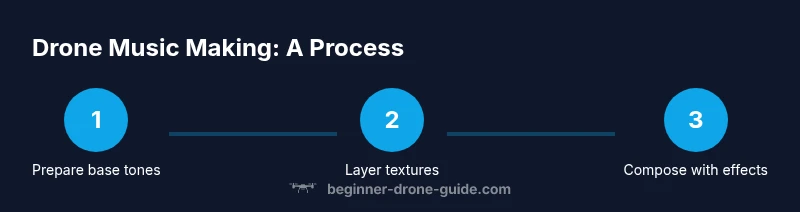
Begin with a single sustained tone and slowly introduce second and third voices at different intervals. The goal is to create a balanced harmonic field without overcrowding. Use long release times on your envelopes to let notes fade gently. Add subtle detuning between layers to create beating and movement. Automate filter cutoff very slowly over 2-3 minutes for a sense of progression. Keep your mix centered; panning can be used sparingly to create space. Save multiple versions to compare how small changes affect the overall mood.
Using effects to sculpt motion and atmosphere
Effects are your primary tools for movement in drone music. Reverb creates depth; plate or hall reverbs provide space. Delay can add rhythmic echo without introducing tempo; set feedback low and keep repeats sparse. Modulation effects like chorus or slow phaser create evolving textures. Filtering with a low-pass or band-pass can carve out tonal color as the piece grows. For a subtle dynamic shift, automate mix levels rather than cranking effects all the way through. Remember to listen in both mono and stereo to ensure the sound holds up on different systems.
Field recording tricks to add organic texture
Real-world textures can make drone music feel alive. Record wind, rain, distant traffic, or rustling leaves with a portable mic. Layer these with your synthetic tones and gently warp them with a time-stretch or granular effect to prevent obvious loops. Normalize levels to avoid peaks that would upset your master bus. Consider using high-pass filters on field recordings to remove low-end rumble that muddies your drone. Always back up your recordings in at least two places.
A sample 20-minute workflow you can follow
- Section 1 (0-5 minutes): Start with a base tone; set a broad spatial image with a long reverb. Keep Level low and listen for natural breathing in your tone.
- Section 2 (5-10 minutes): Introduce a secondary voice at a different octave; apply gentle detune and slow filter sweep.
- Section 3 (10-15 minutes): Bring in a field recording at low level; blend with the synthesized tones to add texture.
- Section 4 (15-20 minutes): Subtly automate volume, filter, and reverb to create gradual evolution.
This flow helps you maintain focus without rushing to finish. You should regularly A/B with earlier versions.
Common mistakes and how to avoid them
- Overloading the mix with too many layers at once. Start sparse and add only when it improves the piece.
- Rushing evolution. Drone music rewards slow, deliberate changes over minutes rather than seconds.
- Neglecting the low end. A muddy bass can ruin a drone track; carve space with EQ.
- Ignoring mono compatibility. Check how your drone translates in mono, as many playback devices sum channels.
Tools & Materials
- Digital Audio Workstation (DAW) with basic features(Choose a beginner-friendly option (e.g., trial or free edition))
- Audio interface(At least 2 inputs if you plan to record external textures)
- Synthesizer (software or hardware)(Soft synth with multiple waveforms and detune capability)
- Field recorder (handheld microphone or smartphone with external mic)(Capture real-world textures like rain, wind, or footsteps)
- Headphones or studio monitors(Crucial for hearing subtle changes in texture)
- Cables and adapters(USB cables, 1/4" instrument cables; keep spares)
- Reverb and delay plugins (built-in allowed)(Essential to sculpt space and depth)
- MIDI controller (optional)(Helpful for live tweaking, not required to start)
- Storage for samples and projects(Organize folders and back up regularly)
Steps
Estimated time: 60-90 minutes
- 1
Set your goal and baseline tone
Define the mood and choose a base oscillator; pick a simple target length and a center pitch. Establish a listening plan for the first 2 minutes to judge clarity and space. This step anchors your drone and reduces drift later.
Tip: Start with a single, long note and listen for its natural resonances. - 2
Layer additional voices gradually
Add second voice at a different octave and small detuning. Keep changes slow and musical; avoid crowding the mix. Compare with the baseline to ensure coherence.
Tip: Mute other tracks while judging each layer's contribution. - 3
Apply subtle effects to create space
Incorporate reverb and delay with long tails. Set feedback low and adjust mix to avoid overpowering the core tones. Use a gentle filter sweep to introduce color over time.
Tip: Use mono compatibility to ensure the space translates anywhere. - 4
Incorporate field textures
Blend captured textures at low levels; time-stretch or lightly process to fit the drone’s pace. Ensure textures support the mood without dominating the base tones.
Tip: Record multiple textures and compare which blends best. - 5
Finalize and export
A/B compare your final mix with earlier versions; apply light mastering (gentle compression or limiter) to level the track. Export in multiple formats for different listening environments.
Tip: Save multiple versions to avoid losing ideas.
Frequently Asked Questions
What is drone music?
Drone music emphasizes long, sustained tones and texture over traditional melodies. It relies on tone color, space, and gradual evolution to create atmosphere.
Drone music uses sustained tones and evolving textures rather than melody to create atmosphere.
Do I need expensive gear to start?
No. You can begin with a basic DAW, a simple synth, and a field recorder. Many successful drone tracks use affordable tools and patient listening.
You can start with affordable gear and grow from there.
How long should a drone track be when starting out?
Begin with a few minutes to practice layering and texture development; as you gain confidence, you can extend to longer pieces.
Start with a few minutes and grow the duration as you get comfortable.
What are common mistakes beginners make?
Rushing evolution, cluttering the mix with too many layers, and neglecting mono compatibility. Pace changes and learn how your textures read in mono.
Watch for rushing changes and clutter, and check mono compatibility.
How can I keep drone music engaging?
Vary texture gradually, use space, and introduce real-world textures sparingly to maintain interest without breaking atmosphere.
Let space breathe and vary textures slowly to stay engaging.
Are there licensing considerations for textures I use?
Use your own textures or properly licensed samples; respect copyright and consider Creative Commons when appropriate.
Use originals or properly licensed textures to stay compliant.
Watch Video
Quick Summary
- Begin with a single sustained tone to anchor the track.
- Layer textures slowly and keep dissonance subtle.
- Space and dynamics are more important than melody in drone music.
- Field textures can elevate a piece without overwhelming it.