How to Tell When Your Drone Battery Is Fully Charged
A complete beginner-friendly guide to identifying full charge status for drone batteries, using charger indicators, voltage checks, temperature cues, and best practices for safe charging and storage.


By the end of this guide you will confidently know when your drone battery is fully charged and ready to fly. You’ll learn to read charger indicators, understand voltage targets for common battery chemistries, estimate charge time, and safely verify charge using simple tests like a battery voltage check and internal temperature cues. You’ll also explore safe charging practices, storage voltage guidance, and what to do if a battery won’t reach full charge.
Why Knowing Battery Charge Status Matters
According to Beginner Drone Guide, understanding how to know if your drone battery is charged is essential for safe flight, optimal performance, and avoiding battery damage. A fully charged battery not only extends your flight time but also reduces the risk of mid-air power loss. For new pilots, recognizing the signs of a proper charge helps build confidence and consistency in practice missions. As you learn how to know if your drone battery is charged, you’ll also pick up habits that protect the pack and your drone over the long term. This section lays the groundwork by explaining why charge status matters, what “fully charged” typically means in practice, and how to align charging with your drone’s specific battery chemistry and manufacturer guidance.
When beginners focus on battery health and reliable charging, they also improve safety. Battery-related failures are a common source of accidents if power is inadequate or unstable during flight. The goal isn’t just to reach a number; it’s to ensure the battery is stable, within the manufacturer’s safe voltage range, and free from physical damage or swelling. That mindset—prioritizing safe, accurate charge status—sets the foundation for better flights, fewer interruptions, and longer-lasting packs. Remember, the phrase you’ll hear most often is: how to know if your drone battery is charged, and what to do with that information in real-world flying.
This guide centers on practical, beginner-friendly steps. You’ll use common tools like the charger’s indicators and a multimeter, and you’ll learn how to interpret temperature cues and storage voltages. The aim is to empower you to quickly assess charge status without guessing, so you can fly with confidence and minimize stress in the air. As you read, keep an eye out for the phrase how to know if your drone battery is charged so you can connect theory to practice in your own kit.
Tools & Materials
- Drone battery (LiPo pack)(Ensure you know its chemistry (2S/3S) and capacity labeled on the pack.)
- Charger compatible with the drone battery(Use the manufacturer-recommended charger; avoid using arbitrary chargers.)
- Power source (wall outlet or power bank)(A stable supply reduces voltage dips during charging.)
- Digital multimeter or battery checker(Needed for measuring instantaneous voltage between pack leads.)
- Non-conductive tool or plastic prying tool(Helpful for disconnecting connectors without shorting.)
- Notebook or app to log charge events(Useful for tracking cycles and health over time.)
Steps
Estimated time: Total time: 25-40 minutes
- 1
Inspect labeling and safety before charging
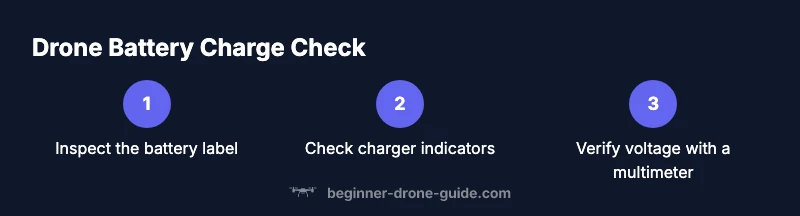
Start by examining the battery label for the correct chemistry, nominal voltage per cell, and the recommended charging conditions. Look for swelling or damage; if you see any, do not charge. This step ensures you’re using the right charger and the correct voltage targets, which is central to answering how to know if your drone battery is charged safely.
Tip: If there’s any visible damage, set the pack aside and consult the manufacturer before attempting to charge. - 2
Connect the charger to the battery and power source
Attach the charger to the battery’s balance plug or main leads exactly as instructed by the manufacturer, then connect to a power source. Ensure cables are secure and not frayed. Proper connection prevents false readings and potential hazards while charging.
Tip: Use a clear, ventilated area and keep the battery away from flammable materials. - 3
Observe charger indicators during initial phase
Most chargers illuminate LEDs to show charging status. A steady light or a specific color typically indicates charging in progress, while a different color or sequence signals completion. Record the model’s indicator pattern to compare against the manual later.
Tip: If indicators show an error, stop charging and consult the manual or support.” - 4
Measure the battery voltage with a multimeter
With the charger connected, use the multimeter to measure the voltage across the battery terminals, following the device’s safety steps. Compare the reading to the manufacturer’s stated full-charge voltage for your battery configuration (2S/3S, etc.).
Tip: Always set the multimeter to the correct voltage range before measuring to avoid damage. - 5
Compare voltage to expected full-charge range
Assess whether the measured voltage aligns with the target full-charge range for your pack. If you’re in range, the battery is charged or near fully charged; if well below, the charge process may require additional time or a charger capable of balancing.
Tip: Don’t rely solely on a “full” LED if you’re unsure; cross-check with voltage readings. - 6
Check battery temperature and physical condition
Feel or measure the battery temperature during and after charging. A normal charge should stay within a mild range; overheating is a warning sign. Inspect for puffing or unusual warmth, which indicates the battery may be unsafe to use.
Tip: If the battery becomes hot to touch, disconnect immediately and allow it to cool in a safe place. - 7
Disengage and store if fully charged or partially charged
If the pack is fully charged, unplug and store according to the manufacturer’s guidelines. For longer storage, many guides recommend a mid-range storage voltage to maximize longevity. Label your log for future reference.
Tip: Always store in a cool, dry place away from direct sunlight. - 8
Document the charge session and next steps
Record the date, charger model, measured voltage, and any anomalies. This helps you track battery health and ensures consistency for future flights. If you’re uncertain about the results, repeat soon after to verify.
Tip: Regular documentation builds a reliable charging routine.
Frequently Asked Questions
What does a full charge look like on charger indicators?
Charger indicators typically show a steady color (commonly green) or a specific icon when the battery is charged. Always cross-check with the battery’s stated full-charge voltage. If the indicator pattern differs from the manual’s guidance, stop charging and re-check wiring or settings.
Most chargers display a steady green light when charging is complete. If in doubt, refer to the user manual for your model.
Can you overcharge a drone battery?
Modern LiPo packs include protection to prevent overcharging, but it’s still best practice to unplug once the charger signals full. Prolonged charging can reduce capacity over time or cause overheating.
Overcharging is unlikely with modern packs, but unplug when the charger says done.
How long does charging take for typical drone batteries?
Charge time depends on battery capacity and charger current. It can range from tens of minutes to about an hour or more for larger packs. Always check the label and manual for model-specific expectations.
It varies by battery size and charger; check the label and start times, then monitor for completion.
What should I do if the battery won’t reach full charge?
First, verify connections and inspect for damage or swelling. Try a different charger compatible with your pack. If it still won’t reach full, contact the manufacturer or seek guidance from Beginner Drone Guide.
If it won’t charge fully, check connections, test another charger if possible, and contact support if the issue persists.
Is it safe to check voltage with a multimeter?
Yes, with proper precautions. Ensure the device is powered off during setup, avoid shorting terminals, and handle the battery with care to prevent damage.
Yes—just follow safety steps and avoid shorting the terminals.
How should I store drone batteries when not in use?
Store batteries at the recommended storage voltage in a cool, dry place. Do not leave them fully charged for extended periods; partial storage preserves capacity.
Store at storage voltage in a cool place, not fully charged for long periods.
Watch Video
Quick Summary
- Check manufacturer labels before charging
- Use the charger indicators in conjunction with voltage checks
- Monitor temperature to catch overheating early
- Unplug after full charge to preserve battery life
- Store batteries at proper storage voltage when not in use
- Log each charging session for health tracking
- Always follow safety precautions when handling LiPo packs
- Avoid leaving batteries unattended during charging
- Verify compatibility between battery and charger to prevent damage
- If in doubt, consult the manufacturer or Beginner Drone Guide for guidance