Controller-free Drone Flight: A Practical Guide for Beginners
Learn how to fly a drone without a traditional controller using apps, gestures, and mission planning. This beginner-friendly guide covers setup, safety, legal basics, and real-world use cases.


According to Beginner Drone Guide, you can begin controller-free drone flight by using the drone’s official control app, gesture-based commands, or pre-programmed flight modes. Start with a safe, open area, enable beginner features, and follow local rules. This quick path helps new pilots gain confidence while keeping safety and legality front and center.
What controller-free flight means
Controller-free flight refers to operating a drone without a traditional handheld remote. Instead, pilots use smartphone or tablet apps, gesture controls, or pre-programmed flight modes to take off, navigate, and land. This approach can be friendlier for beginners who are more comfortable with touchscreens than traditional sticks. It also opens doors to easier automation features, like waypoint planning and automatic return-to-home. As with any new skill, the learning curve varies by drone model and the user’s comfort with mobile interfaces. According to Beginner Drone Guide analysis, many new pilots appreciate the simplicity of app-based control and gesture features, especially for indoor spaces and quick trial flights.
For first-timers, controller-free flight should be treated as a structured learning path. Start in a calm environment, use the drone’s built-in safety features, and gradually introduce more complex maneuvers as your confidence grows. This gradual approach helps you build muscle memory for one of the most important aspects of safe drone operation: situational awareness.
How controller-free flight works across popular models
Most modern consumer drones offer at least one controller-free option, such as an official mobile app or gesture-based commands. Apps typically provide a live video feed, flight mode toggles, and a simplified control scheme, allowing you to yaw, ascend, or move laterally with screen gestures. Gesture control relies on computer vision or motion sensing to translate a hand gesture into a flight command. Some models also include autopilot-esque modes like follow-me, orbit, or fixed-altitude flight. When you combine these features with geofencing and obstacle avoidance, controller-free flight becomes a safer stepping stone into more advanced flying.
Keep in mind that not every drone supports every controller-free feature. Check the manufacturer’s specs and user reviews to confirm which modes are available for your model. If a drone supports both app control and gestures, you can start with app-based controls and practice gesture commands as you gain confidence.
The hardware and software you’ll rely on
To fly controller-free, you’ll mostly interact with two things: the drone and the control app on your phone or tablet. The drone should have a stable GPS lock, reliable obstacle sensing, and a well-tuned return-to-home function. The app will provide the user interface for takeoff, waypoint navigation, and landing. In some cases, a small, dedicated handheld device might still exist, but the majority of beginner-friendly models emphasize app-based control. You’ll want a device with ample screen brightness for outdoor visibility and a stable Wi-Fi or Bluetooth connection to the drone.
Prepare by updating firmware, calibrating compass and IMU sensors, and enabling safety features like geofencing and altitude limits. These steps reduce drift and improve consistency during controller-free flight.
Safety basics and legal considerations that apply to controller-free flight
Safe operation hinges on planning and awareness. Always maintain visual line of sight, fly in legal airspace, and respect privacy. Verify local regulations for drone operations, registrations, and any requirements for flight indoors vs outdoors. Use beginner or caged modes when available, which limit speed and altitude. If your region requires a permit or license for pilot operation, complete those steps before attempting flights beyond hobby use.
In controller-free flight, the risk is less about the pilot’s reflexes and more about app reliability, GPS dropouts, and sensor malfunctions. To mitigate risk, perform a pre-flight checklist, test in an open space away from people, and have a backup plan if the app or connection fails.
Pre-flight planning and area selection for controller-free flight
Choose a spacious, obstacle-free area with a clear view of the drone and ambient light that won’t cast shadows on the camera. Indoors, use high-ceiling rooms with minimal objects and add cushions or mats to create a safe landing zone. Check weather conditions; wind and rain degrade GPS stability and can affect gesture recognition. Ensure your phone is charged, the control app is up to date, and the drone has a fresh battery before starting.
Mark out a simple flight path using the app’s waypoint or follow-me features if available, and set strict altitude and distance limits. A consistent pre-flight routine improves safety and helps you track progress over time.
Step-by-step guide to a controller-free first flight (conceptual workflow)
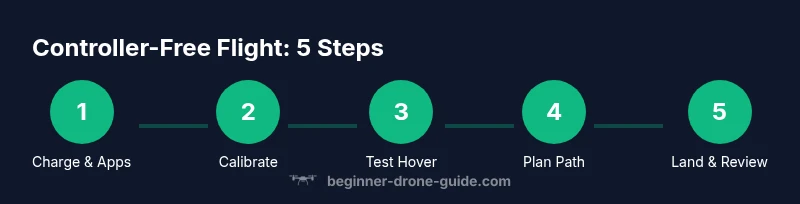
Begin by powering on the drone and synchronizing with the control app. Calibrate any required sensors, then perform a brief test hover to confirm stability. Use the app to take off to a low altitude, verify GPS lock, and slowly move along a short, straight path. Return to home and land smoothly. Finally, review the flight data or logs to identify calibration needs or drift.
Throughout, keep your finger on the screen’s emergency stop plus takeoff/landing controls, and remain prepared to intervene manually if the app misbehaves. Rehearse in short sessions before attempting longer flights.
Troubleshooting common controller-free flight issues
If GPS drops out, switch to a safer mode if available, or hover until a lock is reacquired. App connections can fail due to interference—close other apps, disable VPNs, and ensure a strong signal. Gesture recognition can misinterpret movements; practice at a slower pace and keep gestures within the camera frame.
Battery degradation can lead to unexpected power loss; monitor battery health and land early if voltage drops toward the minimum. When in doubt, abort flight and perform a reset or rebind the drone with the app.
Real-world use cases and practical tips for controller-free flight
Controller-free flight is ideal for quick aerial inspections, casual photography, or education sessions where simplicity matters. Plan routes that minimize exposure to obstacles, and use autopilot modes to maintain stable footage. For beginners, capturing stable video with minimal input helps build confidence while learning to interpret telemetry data from the app.
As you gain experience, you can combine controller-free flying with manual overrides when needed, addressing each scenario’s unique requirements. This balanced approach supports safer, more reliable operation.
The future of controller-free flight and training resources
As sensors and computer vision improve, controller-free flight will become more capable and accessible. Expect smarter obstacle avoidance, more intuitive gesture controls, and expanded automatic flight modes that reduce the learning curve. Seek out official tutorials, community forums, and local clubs to supplement your practice. Regular practice with a controller-free setup will accelerate your progress and deepen your understanding of flight dynamics.
Tools & Materials
- Controller-free capable drone(Check that the drone supports app-based control or gesture modes before buying.)
- Smartphone or tablet with the drone app(Install the latest version and sign in; ensure Bluetooth/Wi-Fi is enabled.)
- Charging gear (cable and power bank)(Fully charge both drone and device before practice.)
- Open, obstacle-free flying area(Outdoor open space preferred; indoors use a large, clear area.)
- Propeller guards (optional)(Useful for beginners in tighter spaces.)
- Spare batteries(Carry extras for extended practice sessions.)
- Flight planning sheet or map (optional)(Pre-plan waypoints and safe landing zones.)
Steps
Estimated time: 25-40 minutes
- 1
Charge and install apps
Fully charge the drone and your control device. Install the official control app and log in. Ensure a stable connection between the device and drone.
Tip: Charge both battery and phone to avoid mid-flight power loss. - 2
Enable safety features
Turn on geofencing, return-to-home, and beginner modes if available. Set altitude and speed limits to safe values.
Tip: Configure a conservative maximum altitude before your first flight. - 3
Plan a safe flight area
Choose an open, obstacle-free space. Identify a clear takeoff and landing zone and note any nearby hazards.
Tip: Create a simple flight plan using the app’s waypoint feature if present. - 4
Perform a controlled takeoff
Use the app's takeoff function and ascend slowly. Keep the drone within your line of sight and monitor telemetry.
Tip: Start at a low altitude and test basic directional inputs first. - 5
Land and review
Return to home or land in the designated zone. Power down safely and review the flight data to identify calibration needs.
Tip: Note any drift or sensor warnings for the next session.
Frequently Asked Questions
What does controller-free flight mean for a beginner?
Controller-free flight uses apps, gestures, or autopilot modes instead of a traditional handheld controller. It’s a gentler entry point for beginners when paired with safety features and clear intent.
Controller-free flight uses your phone or gestures instead of a traditional remote, which can feel more approachable for beginners.
Are controller-free drones safe for beginners?
Yes, when you start in a controlled environment with beginner modes, geofencing, and proper pre-flight checks. Build confidence gradually before more advanced maneuvers.
Yes, with proper safety features and practice in calm spaces, controller-free drones are suitable for newcomers.
Do I need a license to fly controller-free?
Licensing requirements vary by country. Some regions require registration or certification even for hobby flights. Always check local airspace rules before flying.
License requirements depend on where you are; check local drone regulations before flying.
Can I fly indoors without a controller?
Many drones support indoor control via apps or gestures, but ensure a spacious, obstacle-free area and use propeller guards if available.
Indoor controller-free flight is model-dependent; use safe settings and a clear space.
What apps should I use for controller-free drones?
Most manufacturers provide official apps tailored to their drones. Third-party apps are rare and may not support all features or safety protocols.
Use the official manufacturer app for the best compatibility and safety features.
How long does a typical controller-free flight last?
Flight time varies by model and battery. Start with short sessions to learn controls and telemetry before longer flights.
Flight time depends on the drone and battery; start with shorter practices.
Watch Video
Quick Summary
- Choose a controller-free-friendly drone.
- Set up the control app and safety features before flying.
- Practice in open areas with a clear plan.
- Respect airspace rules and local regulations.
- Review flight data after each session to improve.