Drone Deploy: A Practical Step-by-Step Guide for Beginners
This beginner-focused guide covers drone deploy basics, safety, regulatory considerations, planning, and step-by-step execution so new pilots can deploy drones confidently, legally, and safely.


You will learn how to deploy a drone for real-world tasks: plan a mission, confirm airspace and weather, perform a safe preflight, execute the flight, and review data. Key requirements include a compliant drone, registration if required, appropriate licenses for your region, and a clear flight plan. This guide is designed for beginners.
What drone deploy means for beginners
According to Beginner Drone Guide, drone deploy refers to launching and managing a planned flight to accomplish a specific task, such as inspection, mapping, or delivery. For beginners, this means translating a goal into a safe, legal flight plan, a clear flight path, and repeatable procedures. The term 'deploy' emphasizes turning planning into action while prioritizing safety. In practice, a deployable drone mission starts with a clear objective, then builds in checks for airspace, equipment readiness, and environmental conditions. When you adopt a repeatable workflow, you reduce risk and increase the likelihood of getting usable data or successful results. Throughout this guide, we’ll walk through planning, execution, and post-flight review tailored to first-time drone pilots.
Safety-first: regulatory and airspace considerations
Drone deploy is only as good as the safety framework behind it. Beginners should first understand local regulations and airspace restrictions, then confirm the ability to operate legally in the planned zone. In many regions, registration or licensing is required for certain drone weights or missions. Always check weather conditions, wind limits, and visibility before takeoff. Begin with low-risk environments such as open fields away from people, buildings, and airports. As the Beginner Drone Guide analysis notes, most deployments succeed when pilots base decisions on regulatory compliance, clear risk assessment, and conservative flight profiles. This upfront attention protects you, bystanders, and the drone.
Planning your deployment: mission types and requirements
Deployment missions can vary widely. A beginner-friendly approach starts by classifying the mission: inspection (structure or infrastructure), mapping (aerial surveys or 3D models), or simple delivery trials (payloads under lightweight limits). For each mission, write a clear objective, identify required data (photos, videos, coordinates), and set success criteria. Then translate the goal into a flight plan: altitude, speed, sensor settings, and waypoints if applicable. Confirm that your drone supports the payload and sensors you intend to use and build in a margin for safety. This planning phase lays the groundwork for repeatable, reliable results.
Remember to align every deployment with local regulations and the drone’s manual. The goal is to create a safe, predictable workflow that you can replicate on future missions.
Preflight checklist and weather considerations
A robust preflight starts well before powering on. Inspect airframe integrity, check propellers for chips, verify battery health, and ensure SD cards are formatted. Calibrate compass and IMU if your model requires it, and confirm firmware is up to date. Weather matters: avoid strong winds, precipitation, and low visibility. Plan contingencies for power loss, GPS signal drop, or emergency return. A practical habit is to run through a concise checklist aloud to avoid skipping steps. Layered checks—hardware, software, and environment—reduce surprises during deployment. The goal is to catch issues before liftoff, so you can execute confidently.
Executing a deployment: controls and flight operations
With everything checked, begin the mission by taking off in a stabilized hover, then smoothly transition to the planned path. Maintain visual contact and monitor battery drain, signal strength, and sensor readouts. Use mission planning features if your drone supports them, but be ready to take manual control if needed. Keep speeds modest and avoid sudden maneuvers that could overshoot waypoints or degrade data quality. Maintain a conservative approach, especially in unfamiliar airspace or crowded environments. During deployment, stay aware of legal altitude caps and no-fly zones. Consistent, calm operation helps beginners build muscle memory for safe flights.
Data management and post-flight tasks
After landing, download all data promptly and back it up in at least two locations. Review imagery and sensor data for the quality and coverage you planned. Organize files by mission, date, and location to simplify future comparisons. If your deployment included measurements or photogrammetry, process the data using your preferred software and export results in standard formats. Dispose of or recycle any disposable field notes responsibly. A thoughtful post-flight review helps you identify lessons learned and refine future deployments.
Choosing the right drone and accessories for deployment tasks
Your first deployment should match your learning goals and budget. Look for a drone with stable GPS, reliable return-to-home, and sufficient battery life for the typical mission distance. Consider a model with adjustable camera settings, basic thermal or multispectral sensors if you plan specialized tasks, and a payload option for light deliveries or sensors. Accessories like extra batteries, a portable charger, spare propellers, and a basic landing mat make deployments smoother. Begin with a kit that prioritizes safety features and ease of use, then scale up as you gain experience.
Common deployment scenarios: surveying, inspections, agriculture
Deployment tasks span many fields. In surveying and mapping, consistent altitude and overlap are key to accurate data. For inspections, high-resolution imagery and stable gimbal performance matter most. In agriculture, flight patterns optimize coverage and allow for timely data collection on crop health. For beginners, start with one scenario, master the workflow, then gradually expand to other use cases. Each scenario reinforces the core deployment process: plan, operate safely, collect data, and review results. The more you practice drone deploy, the more confident you’ll become in real-world applications.
Practical practice plan for beginners
Create a structured practice plan that slowly increases complexity. Week 1 focuses on basic maneuvers, waypoint creation, and basic data capture in a controlled area. Week 2 adds wind tolerance tests and simple data processing. Week 3 introduces a small-scale mapping or inspection task with stricter criteria. Week 4 consolidates lessons learned into a repeatable Mission Template. Document performance, adjust your preflight and risk assessment, and celebrate small wins. This approach helps you build muscle memory for drone deploy while staying safety-first.
Tools & Materials
- Drone(Support for GPS, stable flight, and any payload you plan to use)
- Controller/remote(Ensure firmware is current and paired with the drone)
- Extra batteries(At least 2–3 spares for longer deployments)
- Battery charger(Portable charger or car charger for field use)
- Micro SD card(High-speed card with sufficient storage)
- Spare propellers(Includes blades compatible with the model)
- Smartphone/tablet(Used for control/telemetry and planning apps)
- Launch pad/landing mat(Optional surface to keep takeoffs/landings clean)
Steps
Estimated time: 60-120 minutes
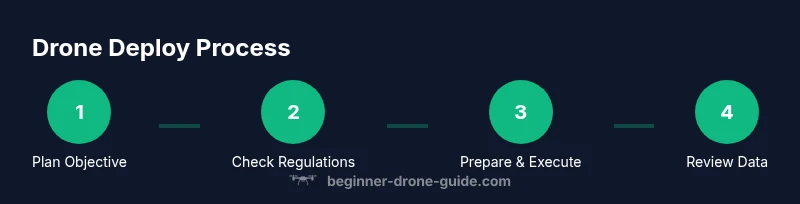
- 1
Define deployment objective
State the mission goal in concrete terms (e.g., inspect wind turbine blades within a defined sector, capture 3D map with specified resolution). Confirm success criteria and expected data types before you begin. Why: A clear objective drives all planning decisions and reduces scope creep.
Tip: Write the objective on a sticky note and place it near your controller before takeoff. - 2
Verify regulatory compliance
Check airspace restrictions, permissions, and licensing requirements for your location and flight. If needed, obtain approvals or file a simple plan with the local aviation authority or airspace service. Why: Non-compliance can ground your deployment and create safety and legal risks.
Tip: When in doubt, choose a safe, unregulated area for practice flights. - 3
Plan mission route and settings
Set your altitude, speed, sensor settings, and waypoints if applicable. Consider active obstacles, wind patterns, and return-to-home triggers. Create a short, testable route first to validate controls.
Tip: Program a conservative mission with a quick-return path to reduce risk. - 4
Prepare the aircraft and payload
Inspect the airframe, verify payload stability, and confirm battery health. Calibrate sensors as needed and attach payloads securely. Double-check memory cards and data recording settings.
Tip: Perform a quick payload secure check to prevent mid-flight shifts. - 5
Perform preflight checks
Review the checklist aloud: firmware, compass, sensors, propellers, and environment. Confirm weather, wind limits, and visual line-of-sight. Engage safety features like geofencing if available.
Tip: Run through the preflight checklist twice before liftoff. - 6
Execute flight with monitoring
Launch smoothly, monitor telemetry, wind, and battery. Maintain control authority and be prepared to abort if conditions worsen. Stay within your planned flight path and altitude.
Tip: Keep your eyes on the drone and your screen; don’t rely on secondary devices alone. - 7
Post-flight data processing and review
Land safely, download data, and back it up. Review imagery to verify coverage and quality. Note improvements for future deployments and archive the data properly.
Tip: Create a quick debrief document summarizing data quality and lessons learned.
Frequently Asked Questions
What does drone deploy mean for a beginner?
Drone deploy means planning and executing a mission with a drone to achieve a specific task, such as inspections or mapping, while prioritizing safety and regulatory compliance. It’s about turning a plan into action with repeatable steps.
Deploying a drone means turning planning into a real flight, with safety and rules in mind.
Do I need a license or registration to deploy a drone?
Most regions require registration or a license for certain drone weights or mission types. Check your national aviation authority guidelines and ensure you have any required credentials before flying.
Yes, often you’ll need registration or a license depending on your drone and where you fly.
How should I plan a deployment mission?
Start with a clear objective, determine data needs, choose a flight path, set altitudes and speeds, and identify potential risks. Use a simple, repeatable template for future missions.
Plan your mission with a clear objective, safe route, and data goals.
What are common safety risks during deployment?
Risks include loss of GPS signal, wind gusts, propeller contact, and battery failure. Always maintain line-of-sight and have a quick-return option.
Common risks are wind, low batteries, and software glitches—plan for safe aborts.
How should I store and share deployment data securely?
Back up data to multiple locations (local and cloud), use strong passwords, and follow your organization’s data governance policies when sharing.
Back up data in multiple places and protect it with passwords.
What’s the best way to practice safely as a beginner?
Practice in a safe, controlled area with a simple mission; gradually increase complexity as you become more confident, always following safety and regulatory guidelines.
Practice in safe areas and build skills gradually.
Watch Video
Quick Summary
- Define a clear deployment objective
- Verify airspace and weather before liftoff
- Follow a repeatable preflight routine
- Plan flight routes with safety margins
- Review data and refine your process