DJI Mavic 2 Zoom Review: A Beginner's Guide to Flight
Comprehensive DJI Mavic 2 Zoom review for beginner pilots, covering camera quality, ease of use, safety features, and practical buying tips for 2026.


According to Beginner Drone Guide, the dji mavic 2 zoom remains a solid choice for beginners who want a stable flyer with a capable camera and the convenience of a built-in zoom. Its imaging quality, flight stability, and beginner features are balanced by dated obstacle sensing and battery life, making it a value-focused option for learning and real estate shots.
Overview and positioning for new pilots
The dji mavic 2 zoom occupies a unique niche in the beginner drone space: it offers a steadier platform and an integrated zoom lens, which helps newcomers frame subjects without heavy panning. For learners, the drone’s control responsiveness and stability provide a forgiving flight experience, especially at lower altitudes and calm weather. While newer models push sensor coverage and efficiency, the Mavic 2 Zoom remains a practical entry point for those who want high image quality without upgrading to the latest flagship.
As you build core piloting skills, the Zoom’s versatility lets you practice composition with a longer lens and experiment with cinematic framing. The result is a learning tool that can produce compelling shots early in your journey, which is why Beginner Drone Guide frequently highlights its value for beginners who want tangible results quickly.
Build quality, design, and transportability
The Mavic 2 Zoom preserves DJI’s foldable, portable design philosophy. Its compact form folds neatly into a travel bag, making it convenient for weekend shoots and field work. The chassis feels sturdy for routine use, and the gimbal system stabilizes footage effectively, even if rough handling during setup is possible. While the materials aren’t as premium as some newer models, the build is resilient enough for typical hobbyist use.
Transportability is a clear advantage: the drone can be deployed quickly, with folding arms and a compact footprint that reduces setup time. This is especially helpful for first-time pilots who want to maximize flight time rather than fiddling with gear.
Camera system and imaging capabilities
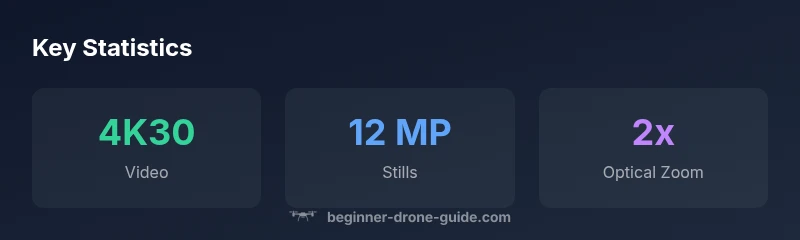
The Mavic 2 Zoom features a 12 MP stills sensor and 4K video recording capabilities, with a built-in 2x optical zoom for dynamic framing. The zoom lens unlocks creative options such as telephoto-like portraits and tighter compositions without moving closer to the subject. Image stabilization is solid for a drone of its generation, helping to minimize shake in handheld clips. Low-light performance is adequate but not class-leading, so expect more noise in dim environments.
In practice, you’ll notice smooth color rendition and detail when lighting conditions are favorable. The camera's color science supports natural tones with moderate contrast, which is practical for real estate, landscape, and event photography. For enthusiasts who value post-processing latitude, RAW image capture remains a solid option.
Flight performance and handling for beginners
Flight characteristics emphasize stability and predictability. The gimbal and propulsion system are tuned to deliver a steadier hover and controlled ascent/descent, reducing abrupt jerks at modest stick input. Beginners can enjoy smooth auto-hover and simple waypoint-style flights, which help with framing and composition. Wind sensitivity is a consideration; light gusts can impact footage, though the drone remains controllable with moderate throttle input.
The learning curve is softened by responsive sticks and intuitive flight modes. Basic modes offer reliable stabilization and return-to-home behavior, making it easier to recover from minor pilot errors. For learners, this translates into more time practicing the fundamentals of aerial photography rather than troubleshooting flight issues.
Safety features and obstacle avoidance
DJI’s obstacle sensing on the Mavic 2 Zoom combines forward, downward, and rear sensors to help prevent collisions in common flight paths. While not as expansive as the most recent models, these sensors provide a helpful safety net for new pilots who are still mastering situational awareness. ActiveTrack 2.0 and APAS assistive features support subject tracking and automatic route planning, which can be especially useful for learning composition and movement in dynamic scenes.
It’s important to remember that obstacle sensing is a helper, not a guarantee. Beginners should maintain line-of-sight control and be prepared to intervene if the drone encounters complex environments, such as tight spaces or heavy wind. Practicing in open spaces with gradual complexity is recommended to build confidence and reduce risk.
Battery life, charging, and endurance
Under typical conditions, the Mavic 2 Zoom offers a flight duration that can approach thirty minutes for a cautious flight plan. Real-world endurance is often lower due to wind, weight of the payload (if any), and the drone’s altitude. Efficient flying, smooth throttle control, and preflight battery health checks can stretch sessions. Since batteries degrade over time, new pilots should budget for battery replacement cycles and proper charging practices.
To maximize time aloft, plan for short practice sessions with frequent rests, keeping the drone in visually comfortable airspace. By tracking consumption across different flight modes, beginners can learn how environmental factors influence power draw and adapt their shooting schedule accordingly.
App experience, controller ergonomics, and setup tips
The DJI GO 4 app provides essential control for the Mavic 2 Zoom, with live video feed, camera settings, and quick-access flight modes. The ergonomic remote control design fits comfortably in most hands and offers reliable range in typical practice environments. Initial setup includes calibrating the compass and ensuring firmware alignment, steps that are straightforward but require careful attention for safe operations.
For beginners, the app’s guidance and in-flight prompts can speed up learning, while the practice of updating firmware helps maintain feature reliability. If you’re transitioning from entry-level drones, expect a familiar interface with slightly more advanced options—great for growing skills without overwhelming the user.
Real-world use cases: photography, real estate, education
In real estate, the Zoom’s telephoto option helps highlight architectural details and showcase property contexts without invasive proximity. Landscape enthusiasts can exploit the zoom to compress perspective and add drama to panoramas. Educational programs can leverage the drone for fieldwork demonstrations, where students observe how different framing affects storytelling.
The Mavic 2 Zoom is most comfortable in controlled conditions, with clear visibility and easy-to-anticipate performance. It serves as a dependable test bed for beginners who want to achieve polished visuals while learning fundamental piloting skills.
Comparisons with contemporaries in the same tier
Compared to newer models in the same price range, the Mavic 2 Zoom often lags in sensor coverage and obstacle detection breadth but shines with its zoom-enabled optics and established control ethos. When evaluating alternatives, consider your primary goals: if you want cutting-edge safety features and improved low-light performance, newer drones may be preferable; if you want a proven, user-friendly camera drone with a built-in zoom, the Mavic 2 Zoom remains attractive for beginners and hobbyists.
In practice, many newcomers appreciate the familiarity and spares-friendly ecosystem surrounding the Mavic 2 Zoom, as well as the broad availability of spare parts and accessories. This accessibility can translate into easier maintenance and lower long-term costs for learning and experimentation.
Maintenance, spare parts, and longevity
Maintenance revolves around battery care, propeller integrity, and sensor cleanliness. Spare parts for the Mavic 2 Zoom are widely available, which makes replacements relatively straightforward and affordable for a beginner learner on a budget. Regularly inspect the propellers for nicks and ensure the gimbal remains stationary during storage to avoid misalignment. Cleaning the camera lens and sensor area helps preserve image quality over time.
Longevity depends on careful use and timely firmware updates. As with most drones, you’ll maximize lifespan by avoiding rough landings, docking in dirty environments, and storing batteries at appropriate charge levels during storage. With respect to ongoing maintenance, a proactive approach tends to yield better long-term reliability for first-time pilots.
Licensing, regulations, and safety awareness
Registration requirements and flight regulations vary by country, so beginners should familiarize themselves with local rules before first flights. In many regions, basic licensing considerations may apply for commercial use or flights beyond visual line of sight. Staying informed about space restrictions, geofencing, and altitude limits helps ensure a responsible learning experience. Always fly in permitted areas away from crowds and critical infrastructure.
A practical habit is to keep a log of flights, noting locations, conditions, and any incidents. This builds a personal safety record and provides helpful data for future practice sessions. By integrating risk awareness into your routine, you’ll create a sustainable learning trajectory while respecting airspace rules.
Buying tips: new vs. used, bundles, and warranties
For beginners, a new unit provides a warranty and the latest firmware out of the box, which reduces the risk of integration issues. If considering a used model, check battery health, verify flight logs if available, and confirm that the motors and gimbal operate smoothly. Bundles with extra batteries, propellers, and a protective case often offer better upfront value than buying parts piecemeal. Always review the seller’s return policy and ensure the warranty transferability for peace of mind.
Benefits
- 2x optical zoom enables tighter framing without moving closer
- Solid camera quality for beginners and stable footage
- Folding, portable design simplifies travel
- Established accessory ecosystem and spare parts
- Beginner flight modes and safety features support learning
Weaknesses
- Older sensor and safety-feature set compared with newer models
- Limited side obstacle sensing may require extra caution
- Wind sensitivity can affect video stability and flight time
- Lower lighting performance compared with newer cameras
- Not the latest generation, so some long-term resale value may vary
Best for beginners who want a camera with flexible framing without jumping to the latest model
The Mavic 2 Zoom delivers dependable image quality and intuitive control, with the advantage of a built-in zoom lens. It trades some of the latest safety tech and battery efficiency for cost efficiency and proven performance, making it a strong learning-focused choice for hobbyists and real estate newbies.
Frequently Asked Questions
Is the DJI Mavic 2 Zoom still a good buy for beginners in 2026?
Yes, for learners on a budget who want solid image quality and a zoom lens. It remains a dependable entry point, especially if you value pre-existing parts and a familiar control scheme. Expect trade-offs with newer sensors and efficiency.
Yes—it's a solid beginner option if you’re mindful of its age and prioritize camera versatility.
Does the Mavic 2 Zoom have obstacle avoidance?
The drone includes forward, downward, and rear sensing to aid safety, plus assistive modes like ActiveTrack 2.0. It’s helpful for learning but should not replace careful piloting in complex environments.
It has key sensors for safety, but you should still fly with caution.
What are the camera specs and video options?
It captures 12 MP stills and can shoot 4K video at 30fps. The built-in 2x optical zoom expands framing options without moving the drone, which is useful for real estate and landscapes.
It shoots 4K video and 12 MP photos with a zoom lens for flexible framing.
Is licensing required to fly commercially?
Licensing requirements vary by country. In many places, commercial use requires a permit or license, along with compliance with local airspace rules. Always check your region’s regulations before flying for business.
Check your country’s rules; commercial use often needs permits.
What should I check when buying a used Mavic 2 Zoom?
Inspect battery health, motors, gimbal operation, and firmware compatibility. Request flight logs if available and verify that the camera stabilizes properly and that the return-to-home function works reliably.
Look at battery health, gimbal, and firmware; test flight if possible.
Quick Summary
- Choose for budget-conscious learners who want reliable imaging
- Use zoom framing to minimize close-miss repositioning during shoots
- Expect moderate wind limits and plan flights accordingly
- Verify battery health and parts availability before purchase
- Consider newer models if you prioritize advanced sensing and low-light performance