How to Remove Hair from a Drone: A Practical Guide
Learn a beginner-friendly, step-by-step method to remove hair from your drone safely, protect bearings and sensors, and keep flight performance high. This guide covers tools, techniques, and safety tips for beginners.


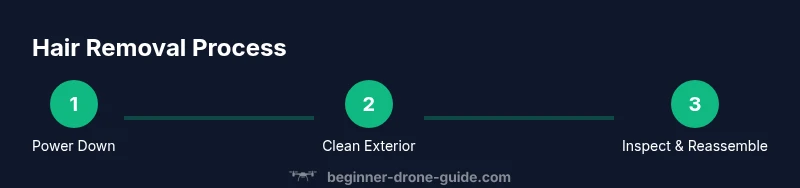
You can safely remove hair from a drone by powering down, removing the battery, and cleaning the airframe with a soft brush. Inspect around the motors for tangles, gently unwind hair with tweezers, then reassemble and test the drone in a safe area. This process protects bearings and sensors.
Hair risks: why hair removal matters
Hair can get tangled in propellers, around bearings, or near sensors. Even a small strand can affect balance, increase drag, and cause vibration that compromises how the drone records video or maintains stable hover. For beginners, removing hair promptly after flights reduces wear on motors and prevents stray strands from interfering with calibration. According to Beginner Drone Guide, regular, careful cleaning is part of a solid maintenance routine that keeps pilots confident and gear reliable. When hair builds up, you may notice jerky motion, shakiness in footage, or slightly off GPS lock in marginal conditions. A tidy airframe also makes it easier to spot other wear and tear during routine checks, which is especially helpful for new pilots practicing in compact spaces or pet-friendly homes.
Safe cleaning protocol for beginners
Before you touch a drone, plan your approach. Power down completely and disconnect the battery, then remove any easily detachable parts like propellers to simplify access. Hair tends to accumulate around the canopy, under guards, and in tight gaps near motors. Start with a soft brush to loosen fibers, then switch to plastic tweezers for stubborn strands. If you need to use moisture, apply a tiny amount of isopropyl alcohol to a cotton swab and gently dab only non-electronic surfaces—never soak connectors or the PCB. Keep all liquids away from electrical components, sensors, and cameras. Work in a clean, well-lit area and rotate the drone as needed to access all sides. Finish with a dry microfiber wipe and a final visual inspection before reassembly.
Final checks before flight
After removing hair and cleaning, recheck every rotor guard, camera mount, and sensor gap for remaining strands. Manually spin the propellers (with the motor power disconnected) to ensure smooth movement and no unusual resistance. Confirm battery contacts are clean and dry, connectors are snug, and there are no loose wires. If you see damaged insulation, frayed cables, or persistent hair buildup in hard-to-reach spots, stop and consult the manufacturer’s guidelines or a trained technician. Regular post-cleaning checks help beginners fly smarter, reducing the risk of unexpected vibrations or motor issues during flight.
Maintenance habits for longer-term reliability
Establish a simple, repeatable cleaning routine: a quick hair check after each flight, a deeper clean weekly in hair-prone environments, and a quarterly inspection of bearings and gears. Keep tools organized in a small kit and store the drone in a dust-free area. If your pet environment generates more fur, consider a protective guard or filter to minimize hair ingress. Document cleaning sessions to identify recurring problem areas and adjust your routine accordingly. With consistent care, hair removal becomes a quick, routine task that supports safer, more predictable flights and longer gear life.
Troubleshooting and when to seek help
If hair remains entangled around the motor shaft or inside tight spaces, stop and reassess. For stubborn cases, use gentle leverage with non-metallic tools and avoid pulling on wires. If resistance or heat is detected during rotation, discontinue cleaning and consult a professional. If you’re unsure about disassembly, refer to the drone’s official manual or contact customer support before attempting further disassembly. In many cases, a properly executed cleaning reduces the risk of future buildup and keeps you flying safely.
Tools & Materials
- Safety glasses(Protect eyes from debris while cleaning)
- Soft brush (microfiber or electronics brush)(Gently lift hair without scratching surfaces)
- Microfiber cloth(For dry wiping and gentle drying)
- Plastic tweezers(Use for stubborn hair near motors)
- Cotton swabs(Clean tight spaces with minimal moisture)
- Isopropyl alcohol 70% or higher(Only if needed for stubborn residues; avoid electronics exposure)
- Small screwdriver (Phillips/Torx)(For canopy/cover screws if you need to inspect internals)
Steps
Estimated time: 20-40 minutes
- 1
Power down and remove the battery
Ensure the drone is completely powered off and disconnect the battery to prevent shorts. If your model uses removable props, take them off for easier access. This step protects you and the drone during cleaning.
Tip: Hold the drone steady to avoid movement while handling the battery or props. - 2
Inspect exterior for hair buildup
Look along the fuselage, under the canopy, around the motors, and in the propeller guards. Hair tends to accumulate where airflow is strongest. A quick visual check helps decide where to target cleaning first.
Tip: Use a bright light to spot tiny hair fragments; they’re easy to miss in dim areas. - 3
Gently brush away loose hair
Using a soft brush, sweep hair away from the body and around the motors. Work slowly to avoid dislodging connectors or wires. Brushing helps loosen fibers without applying force that could bend components.
Tip: Keep strokes light and short; don’t push hair further into tight gaps. - 4
Remove hair from tight spaces with tweezers
For strands stuck near motor shafts or inside guards, use plastic tweezers to lift hair away. Do not tug or twist; hair can entangle bearings if pulled hard. If it resists, pause and adjust angle before trying again.
Tip: Prefer plastic tweezers to avoid shorting electronics if a stray contact occurs. - 5
Wipe and dry sensitive areas with microfiber cloth
Gently wipe exposed metal and plastic surfaces to remove loosened hair and any dust. If you used moisture, ensure all areas are dry before reassembly. Moisture near cameras, sensors, or connectors can cause issues.
Tip: Avoid saturating any area; moisture can seep into tiny gaps. - 6
Reassemble and perform a cautious test flight
Reinstall any removed props and reconnect the battery. Do a slow hover in a safe, open area to confirm there are no vibrations or unusual noises. If everything feels normal, proceed with a short outdoor flight after checking weather conditions.
Tip: Start with low throttle and keep the test close to the ground for safety.
Frequently Asked Questions
Is it safe to use water or solvents on a drone to remove hair?
No. Water or harsh solvents can damage electronics. Use dry cleaning methods first and only use small amounts of Isopropyl alcohol on non-electrical surfaces if necessary.
Avoid water and solvents; use dry cleaning first.
Should I remove the battery before cleaning?
Yes. Always power down and disconnect the battery before cleaning to prevent shorts.
Always unplug the battery before cleaning.
What if hair is tangled around the motor shaft?
Power down, gently unwind with plastic tweezers. If resistance is felt, stop and reassess to avoid damaging bearings.
If hair is tangled, be gentle and stop if you feel resistance.
How often should I check for hair buildup?
Check after flights in environments with pets or hair sources, and do a quick visual clean routinely.
Check after flights in hair-prone environments.
Can I test fly immediately after cleaning?
Do a cautious hover in a safe area after a visual inspection to confirm no debris remains.
Do a slow hover test in a safe area after cleaning.
Watch Video
Quick Summary
- Turn off power and remove the battery before cleaning
- Use soft tools to avoid damaging components
- Inspect motors and sensors for hair tangles after cleaning
- Test flight in a safe area before regular use