What Causes Drone to Lose Signal: A Practical Troubleshooting Guide
Urgent, practical troubleshooting guide to diagnose why a drone loses signal. Learn common causes, quick checks, and a step-by-step flow to restore link safety and flight confidence.


Short answer: signal loss is usually caused by interference, distance, or a weak link between controller and drone. Start by checking the controller battery and antennas, ensuring a clear line of sight, and confirming GPS lock. If the link still drops, follow the diagnostic flow below for a quick, safety-first fix. This is crucial for safe flight.
What Causes Drone to Lose Signal
When pilots ask what causes drone to lose signal, the short answer is that the link between the remote controller and the aircraft is disrupted by interference, distance, or a hardware fault. According to Beginner Drone Guide, the vast majority of RC or video-link drops happen far more often in busy RF environments, at the edges of range, or when the drone's antennas aren't optimized. The consequence is a sudden freeze, lag, or a return-to-home command you didn't initiate. The good news is that most signal-loss events are predictable and preventable with systematic checks before flight and a quick diagnostic flow during flight.
In practice, a practical approach combines understanding your drone's control frequency (2.4 GHz vs 5.8 GHz options), environmental awareness, and proper hardware maintenance. Before each flight, note nearby Wi‑Fi networks, cordless devices, and the presence of tall buildings or dense foliage that can reflect signals. During flight, monitor your telemetry, keep the drone within visual range whenever possible, and confirm that GPS or GLONASS is locked. This section will walk you through the most common culprits and how to address them safely. According to Beginner Drone Guide, building a habit of preflight checks and understanding RF basics dramatically reduces occurrences of what causes drone to lose signal.
Why the Controller Connection Fails
The controller is the primary source of the RF link; if it's not sending a clean signal, the drone will appear to lose connection even when the aircraft is in range. Start with the simplest checks: replace or recharge the controller battery; a weak voltage can cause intermittent pings that the drone interprets as a signal drop. Inspect the antennas: ensure they are firmly attached, oriented correctly, and not damaged. Many pilots forget to adjust the antenna angle for optimal reception when holding the transmitter at chest height. If the RC device supports external antennas, make sure they are compatible and properly secured.
Pairing and channel selection matter too. If you recently re-bound or changed frequencies, rebind using the official app or transmitter menu; improper pairing can produce unstable links. Physical damage at the gimbal or radio jack can also degrade signal quality. Finally, check if there are any deliberate or accidental transmitter settings that limit power or switch to a secondary control mode. Restoring factory defaults or performing a fresh bind often resolves stubborn link problems.
Environmental Interference and RF Band Realities
Radio frequency environment shapes how reliably a drone stays connected. The most common bands used by consumer drones are 2.4 GHz and sometimes 5.8 GHz for video links. Dense urban environments with many Wi‑Fi routers, Bluetooth devices, and other RF sources create competing noise, which can cause drops even within nominal range. Weather, line-of-sight obstructions, and metal structures can also reflect or absorb signal, creating multipath effects that degrade quality. According to Beginner Drone Guide analysis, interference from nearby networks and devices remains a leading cause of signal instability. To minimize risk, operate away from crowded networks when possible, switch to a less congested channel if your aircraft allows, and avoid flying near large metal structures or inside metallic canyons where radio paths struggle.
Keep the drone’s firmware up to date, and ensure your controller uses the recommended frequency and power settings for your model. When you suspect RF interference, a quick field test away from interference sources—such as parking lots with dense Wi‑Fi or stadiums with large crowds—can reveal if the issue is environmental or hardware-related.
Range, Distance, and Line of Sight Considerations
The farther you push the range, the more critical every link quality factor becomes. Even in open space, the line of sight (LOS) between your transmitter and drone matters. Obstacles like trees, buildings, hills, or even moving vehicles can cause brief fades or bullet-like drops in signal. Multipath reflections from glass, water, or metal surfaces create ghost signals that confuse the receiver, increasing the chance of a disconnect. If you must fly long-range, plan routes that maximize LOS, avoid tight canyons, and test new routes at lower altitudes and slower speeds. Beginner Drone Guide emphasizes keeping a safe buffer around no-fly zones and ensuring you always stay within visual range to maintain a controllable link. Remember: proximity to power lines and tall towers can intensify interference, so chart your course with a preflight map.
As a precaution, set up a safe failback—alternate control methods or a return-to-home path—so the drone can safely return if the link weakens.
Power, Battery Health, and Link Stability
Battery health directly impacts link stability. A drooping controller battery or a deteriorating drone power system can create intermittent drops that feel like signal loss. Always inspect battery ages, cell counts, and connector wear before flights. A soft or loose connection at the battery could lead to momentary power loss, which the flight controller might interpret as a signal scare. Ensure that the power distribution system is clean, connectors are tight, and there are no signs of corrosion. Lower battery sag during high-draw maneuvers can also help prevent voltage dips that disrupt link quality. In addition, keep a spare battery and a reliable charger on hand for longer sessions to avoid voltage sag that compounds signal issues during critical moments.
If you notice sudden signal gaps during rapid throttle changes or aggressive maneuvers, pause and land to reassess power health, antenna orientation, and firmware state.
Firmware, Hardware, and Accessories
Outdated firmware can introduce or mask signal instability. Check both the drone and transmitter for the latest stable releases and perform a clean rebind after updating. Inspect antenna elements for cracks, bends, or loose fittings; replace damaged components and reseat all RF connectors to ensure solid transmission paths. If you use third-party accessories such as boosters or external modules, verify compatibility and avoid over-torque on connectors that could loosen internal RF paths. Remember that improper installation or low-quality components can masquerade as signal loss when the real issue is degraded RF integrity. Regular maintenance and standard calibration keep the link robust over time.
After updates, perform a ground test and verify telemetry data shows a steady link before taking off.
Real-World Scenarios: Step-by-Step Quick Fixes
In many cases, the simplest interventions restore a stable link. Start with the basics: check the controller battery and reset the link, ensure antennas are correctly oriented, and perform a fresh bind with the drone and controller. If the problem persists, move to a controlled test in a wide open area to rule out environmental causes. Try switching to a different channel or frequency if your model permits; a busy RF environment is a common culprit. If you experience repeated disconnections at the same location, document the scenario and test at alternative altitudes and distances. With stubborn issues, a firmware update or factory reset may be necessary, followed by a careful rebind.
Always practice safe flight protocols and land if you observe unpredictable control. If none of these steps resolve the issue, seek professional inspection for potential hardware faults in the transmitter or receiver.
Prevention and Best Practices for Stable Links
Preventing signal loss boils down to proactive planning and consistent maintenance. Before every flight, perform a quick preflight that includes battery checks, antenna alignment, firmware verification, and a LOS assessment. Create a mental map of RF hot zones in your typical flying environments, such as urban centers or stadiums, and plan routes that minimize interference exposure. Use a channel plan and rotate channels to avoid persistent noise sources. Calibrate compass and GPS after firmware updates to keep navigation accurate, as misalignment can complicate loss-of-signal events. Document flight logs to identify patterns and adjust your settings accordingly. The objective is to fly with a robust link, maintain situational awareness, and be prepared with a safe landing plan should interference spike unexpectedly. The Beginner Drone Guide team emphasizes that consistent preflight checks and mindful RF awareness lead to safer, more reliable flights.
When to Seek Professional Help
If you consistently experience signal loss despite following best practices, it’s wise to consult a professional. This could indicate a hardware fault in the transmitter, receiver, or antenna assembly that requires diagnostic testing with specialized tools. A certified technician can test RF paths, verify calibration, and replace faulty components while ensuring compliance with local regulations. Meanwhile, never fly a drone with known hardware faults; land safely and avoid risky maneuvers. Professional service can provide a long-term fix and peace of mind, especially for critical operations or premium equipment.
Steps
Estimated time: 60-90 minutes
- 1
Power check and battery health
Power up the controller and drone separately. Check battery levels and look for any warning indicators. If the controller or drone voltage is low, replace or recharge before testing again.
Tip: Charge both devices fully before testing in a safe area. - 2
Inspect antennas and connections
Visually inspect all antenna elements for damage. Ensure connectors are tight and antennas are oriented correctly for your controller model. Loose or damaged parts are common culprits.
Tip: Gently reseat connectors—do not overtighten. - 3
Bind and firmware checks
Verify firmware versions on both transmitter and drone. If updates exist, perform them and rebind the link as directed by the manufacturer.
Tip: Back up settings if the app allows before updating. - 4
Test in a controlled area
Take off in a wide-open space with minimal interference. Observe telemetry and watch for any intermittent drops. If a drop occurs, note the location, altitude, and nearby RF sources.
Tip: Keep a safe line-of-sight and ready return-to-home. - 5
Channel/frequency adjustments
If your system supports channel changes, switch to a less congested frequency and re-test. Some models offer automatic interference avoidance; enable it if available.
Tip: Document which channel worked best for future flights. - 6
Power cycle and reset
Power down both devices, disconnect the battery, wait briefly, then reconnect and rebind. A clean reset can clear latent link issues.
Tip: Do not perform multiple resets in rapid succession. - 7
Calibration and checks
Recalibrate compass and GPS if prompted after firmware updates or hardware changes. Miscalibration can indirectly affect link stability.
Tip: Follow manufacturer steps exactly for calibration. - 8
Decide on professional help if unresolved
If the link remains unstable after all troubleshooting, consult a certified technician to inspect the RF path and hardware integrity.
Tip: Document symptoms and test results to speed up diagnosis.
Diagnosis: Drone loses signal during flight
Possible Causes
- highPower issue in the transmitter or receiver
- highRadio interference from nearby networks or devices
- mediumOut-of-date firmware causing link instability
- mediumAntenna damage or misalignment
- lowObstructions or multipath reflections
Fixes
- easyCheck and recharge/replace controller and drone batteries; inspect voltage stability
- easyInspect antennas and reseat connectors; reorient for clear line-of-sight
- mediumUpdate firmware on both transmitter and drone; perform a fresh bind
- easyTest fly in open area; switch to a clean channel if possible
- mediumReplace damaged antenna or connectors; consider professional service if damaged
Frequently Asked Questions
What is the first thing I should check when the drone loses signal?
Begin with the controller battery and antenna integrity. Then verify GPS lock and perform a quick preflight stability test in a safe area.
First check the controller battery and antenna, then verify GPS lock and run a quick stability test.
Can weak batteries cause signal loss?
Yes. Low voltage on the controller or drone can disrupt the RF link and create apparent signal drops. Charge fully and monitor voltage during flight testing.
Yes, weak batteries can cause the link to drop; ensure full charges before flights.
Do metallic buildings affect signal?
Yes. Metal and glass structures can reflect and absorb RF energy, causing multipath and intermittent link loss. Plan routes to avoid tight canyons and dense facades.
Metal and glass can reflect signals, causing flaky connections; plan your flight path to avoid them.
Is it safe to fly with a damaged antenna?
No. A damaged antenna degrades the link and can cause sudden losses. Replace the antenna and test the link after installation.
No, don’t fly with a damaged antenna; replace it and test the link.
Will firmware updates fix signal loss?
Firmware updates can fix known RF issues and improve stability. Always update from the official source and rebind afterward if required.
Firmware updates can improve stability; update and rebind as needed.
What should I do to prevent signal loss during flights?
Preflight checks, operating away from RF clutter, keeping LOS, and regular firmware maintenance are the best preventions. Have a safe return path ready.
Do preflight checks, avoid RF clutter, stay in LOS, and keep firmware up to date.
Watch Video
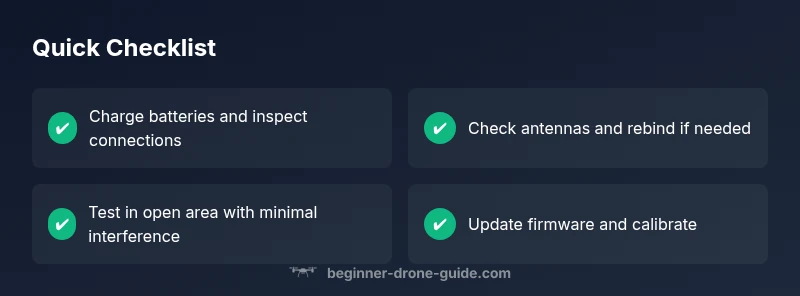
Quick Summary
- Start with power and antenna checks.
- Minimize RF interference and maximize LOS.
- Update firmware and rebind if needed.
- Test in open space and document results.