What Drone Has Thermal Imaging: A Practical Guide for Beginners
Learn which drones offer thermal imaging, how infrared cameras work on drones, and practical steps for beginners to select, fly safely, and start collecting usable heat data.


The drone that has thermal imaging is usually either an integrated system on a commercial platform or an add‑on thermal camera for a compatible drone. In practice, many enterprise drones include built‑in thermal sensors, while hobbyist setups rely on attachable cameras. When you ask what drone has thermal imaging, compare packages by data quality, weight, and software compatibility.
What thermal imaging is and why it matters for drones
Thermal imaging uses infrared radiation to visualize heat differences in a scene. When mounted on a drone, a thermal camera translates heat patterns into a color map that pilots can interpret in real time. For many beginners, the question the phrase 'what drone has thermal imaging' is common, because the technology used on drones has moved from niche equipment to mainstream tools. Thermal drones open opportunities in low-visibility conditions where the human eye struggles—nighttime operations, through smoke, or behind foliage. A key distinction for newcomers is whether the camera data is radiometric (temperature readings per pixel) or non-radiometric (relative heat visualization). Radiometric systems enable temperature measurements and more repeatable analysis, while non-radiometric cameras are simpler for visual interpretation. According to Beginner Drone Guide, incorporating thermal imaging into your flight plan amplifies what you can detect and map, whether inspecting infrastructure, locating people, or tracking wildlife. Pair the thermal feed with a daylight camera for context, and plan flights that balance safety, battery life, and data needs.
Types of thermal cameras used on drones
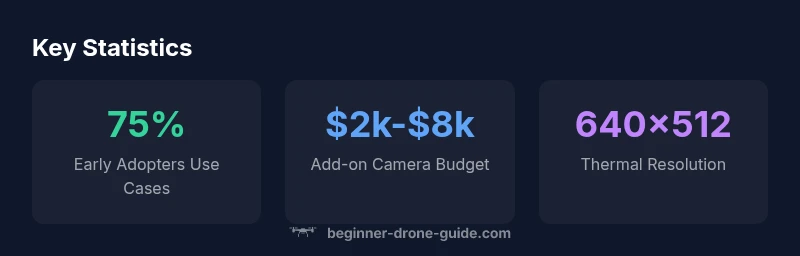
Drones with thermal imaging come in two broad flavors: integrated systems built into the airframe and external, add-on cameras that attach to a host drone. Integrated solutions are convenient for busy operators because everything is calibrated to fly together, while add-ons give you flexibility to swap cameras or upgrade later. In both cases, the core sensor is an infrared detector that converts heat into an image. Common resolution ranges include 320x256 and 640x512, with higher-end setups offering more detailed data but demanding more power and heavier payloads. Many cameras also include radiometric data (per-pixel temperature) that can be exported for precise analysis, while others provide a simpler heat map for quick interpretation. For beginners, a simple, self-contained system that’s easy to learn with often beats a high-end setup that requires a steep learning curve. Ensure your choice supports the flight controller and the software you plan to use for analysis and reporting.
Where thermal imaging fits: platform choices and configurations
In the market, you’ll find both integrated platforms and add-on thermography kits. Integrated options place the infrared camera on the drone itself and are common on mid-range commercial drones, simplifying flight control and data pipelines. Add-on cameras attach to consumer or enterprise drones and let you start with a standard platform and upgrade later. When evaluating options, consider compatibility with your existing controller, the software you plan to use for temperature mapping, and how the heat data will be used in your workflow. Many manufacturers partner with thermography specialists to provide calibrated calibration and temperature measurement features. For beginners, a package that includes flight safety features, easy-to-use software, and solid after-sales support is often more important than the highest native resolution.
How thermal imaging works on a drone
A thermal camera detects emitted infrared radiation from objects and converts it into a visible image. Because heat is carried by infrared wavelengths, the camera can reveal temperature differences even in darkness. Key concepts for beginners include radiometric versus non-radiometric data, emissivity, reflectivity, and calibration. Radiometric cameras record precise temperatures for each pixel, enabling trend analysis and temperature thresholds, which is valuable for building diagnostics or search operations. Non-radiometric cameras deliver color-coded heat maps, which are easier to interpret in the field but lack exact temperatures. Drones must manage weight and power: heavier cameras require stronger batteries and can reduce flight time. Operators should plan missions that allow for steady flight, stable imaging, and sufficient overlap for stitching and analysis. The software you use will transform raw sensor data into actionable insights, such as heat signatures, hotspots, and trends over time.
Use cases and practical tips for beginners
Thermal imaging on drones enables several practical tasks. In search and rescue, heat signatures can locate people in low visibility areas. In facilities and electrical inspections, hot spots reveal faulty equipment before a failure occurs. In firefighting support, thermal data can help map hot zones while maintaining a safe distance. For beginners, start with controlled, short flights to learn how heat patterns respond to distance, angle, and weather. Keep a log of conditions, altitudes, and battery life to improve interpretation. Finally, ensure you obey local regulations and practice safe operations to protect people and property.
Licensing, regulations, and safety considerations
Regulatory requirements for using thermal imaging with drones mirror general drone operations. In many jurisdictions, you’ll need a remote pilot license or certification (for commercial work) and to follow altitude, distance, and privacy rules. When flying near critical infrastructure, water features, or wildlife, additional permissions or waivers may be required. Safety considerations include wearing protective equipment where appropriate, maintaining line of sight, and avoiding overheating the camera in direct sun. If your operations are intended for business, check whether you need to register for a commercial drone program and how to document thermal data properly. The FAA in the United States, for instance, regulates commercial drone use under Part 107 and related exemptions; other regions have their own schemes. Always stay current with regulations, as rules evolve with technology.
How to choose a drone with thermal imaging
Start by defining your use case, budget, and required data quality. For beginners, an all-in-one platform with an integrated thermal camera and straightforward software reduces setup complexity. If you already own a drone, consider add-on thermal cameras that fit your airframe, but verify weight limits and center of gravity. Key specs to compare include pixel resolution, frame rate, spectral range, and whether the camera records radiometric data. Also examine image processing software, export formats, and ease of post-processing. Consider flight time under load, weather tolerance, and calm wind handling—thermal imaging often reduces battery life. Finally, evaluate the vendor’s training resources and support, since learning to interpret heat data correctly is essential for reliable results.
Maintenance and setup: Getting reliable data
Reliable thermal data starts with careful setup. Before every flight, ensure the camera is calibrated and the lens is clean; dirty optics degrade image quality. Check emissivity settings for common materials you inspect; inaccurate emissivity translates into erroneous temperature readings. During flight, keep the platform stable, avoid abrupt maneuvers, and maintain consistent altitude to prevent thermal drift. After landing, process the data with your software, look for hotspots, and document findings with heat maps and temperature readings if your camera supports radiometric data. Regularly update firmware and software, and maintain spare parts for critical components. Finally, review mission logs with a critical eye, refining your flight plans based on what you learn from each session.
Costs and value: typical price ranges and budgeting
Costs for thermal imaging on drones vary widely, depending on whether you choose an integrated system or an add-on camera. In general, an add-on thermal camera paired with a mid-range drone can range from roughly two thousand dollars to eight thousand dollars, while fully integrated platforms with thermal imaging tend to sit in a higher range due to hardware and software integration. Expect to pay more if you require radiometric data, higher resolution, or higher frame rates. Budget for software licenses, payload balancing, and training to get the most value from your investment. Consider total cost of ownership, including accessories, batteries, and field data storage. The goal is to balance data quality with operational practicality for your typical projects.
Quick-start plan for a new buyer
- Define your top two use cases and acceptable data quality. 2) Decide between integrated vs add-on based on weight and flight time. 3) Set a realistic budget and compare two solid options. 4) Verify software compatibility and radiometric capabilities if temperature data matters. 5) Schedule a test flight in safe conditions and practice reading heat maps. 6) Practice regulatory compliance and obtain any needed licenses. 7) Start with a small project, document results, and iterate.
Comparison of thermal imaging configurations for drones
| Option | Camera Type | Typical Use | Pros/Cons |
|---|---|---|---|
| Integrated System | Built-in thermal camera | All-in-one solution for beginners | Less flexible, heavier |
| Add-on Thermal Camera | External camera module | Flexible upgrades | Requires compatible drone and calibration |
| Non-thermal Visualization | Basic heat map | Budget-friendly | No temperature data |
Frequently Asked Questions
Can I add a thermal camera to my existing drone?
Yes, if your drone can carry the weight, has a compatible gimbal, and supports the camera interface. Check manufacturer specs before buying.
Yes, you can add a thermal camera if your drone can carry the weight and has a compatible gimbal and interface.
Do thermal cameras require radiometric data?
Not always; radiometric data is essential for precise temperature readings, but many hobby-level tasks can use a heat map.
Radiometric data is not always required, but needed if you require exact temperatures.
What is the learning curve for using thermal imaging on drones?
Moderate. Basic interpretation is straightforward, but accurate temperature analysis and mapping take practice.
There is a learning curve; you’ll improve with hands-on practice.
Are thermography drones legal to fly in urban areas?
Regulations vary by country. Generally you need permissions, airspace compliance, and privacy considerations.
Legality varies by location—check local drone laws.
What budget should beginners plan for?
Budget for the camera, drone, software, and training; ranges vary by setup. Include batteries and storage.
Budget for hardware, software, and training; plan for extra batteries.
“Thermal imaging unlocks heat-based insights that standard cameras miss, and a well-chosen setup helps beginners build confidence quickly.”
Quick Summary
- Identify your primary use case and budget first
- Choose radiometric data if you need precise temperatures
- Prefer an integrated system for beginners to reduce complexity
- Always verify regulatory compliance and safety
- Practice with field data and document results