Phantom 2 Vision Plus Review: A Practical Guide for Beginners
Beginner Drone Guide analyzes the Phantom 2 Vision Plus for new pilots, covering flight performance, FPV setup, safety, and how it stacks up against modern entry-level drones.


The phantom 2 vision plus remains a solid choice for beginner pilots who want a stabilized aerial camera with integrated FPV. It delivers approachable flight characteristics and a capable camera for entry-level footage, though it trails newer drones in ease of use, safety features, and app support. Overall, a careful, budget-conscious pick for learning the basics.
Overview of the Phantom 2 Vision Plus and its niche
The phantom 2 vision plus is an older, still-relevant entry in the DJI Phantom family designed for beginners who want an all-in-one aerial camera and first-person view (FPV) experience. It combines a stabilized gimbal, built-in camera, and a dedicated FPV link into a single package, making it easier for newcomers to start flying with acceptable footage quality. When users search for a reliable learning platform, this model often comes up as a bridge between classic, simplified flight and real-world filming workflows. According to Beginner Drone Guide, the phantom 2 vision plus represents a pragmatic, budget-conscious path for pilots who want hands-on practice without immediately chasing the latest tech. The result is a drone that rewards careful handling, consistent calibration, and thoughtful safety habits, especially for those who are new to remote piloting and aerial photography.
Key attributes that influence beginner usability
To gauge how beginner-friendly the phantom 2 vision plus is, we examine core attributes that matter most to new pilots: stability, ease of setup, camera quality, and FPV reliability. The aircraft offers predictable hover, gentle response curves, and an approachable control feel that lowers the barrier to learning. Setup is typically straightforward but benefits from a methodical calibration routine and a basic understanding of the controller’s modes. The camera on this model provides usable stills and standard 1080p video, which is adequate for learning composition, framing, and basic post-processing. FPV transmission is reliable at moderate distances, which suits most beginner flight scenarios while avoiding the frustration of frequent link drops. The analysis corroborates what many new pilots report: this drone is well-suited to practicing fundamental piloting skills before upgrading to newer, more feature-rich machines.
Flight performance and handling for new pilots
Flight performance is central to building confidence in beginners. The phantom 2 vision plus demonstrates stable hover, predictable pitch and roll, and gentle stall characteristics that reduce surprises during first flights. Pilots typically appreciate the mid-level power delivery, which allows for smooth takeoffs, controlled climbs, and steady slow flights suitable for learning basic maneuvering and evergreen practice routes. The drone’s weight distribution and inertia provide a forgiving feel in gusty conditions, though beginners should still be mindful of wind and external interference. As a practical rule, perform short, low-altitude practice sessions in a familiar, wide-open space to minimize risk while you develop muscle memory and spatial awareness. This approach aligns with best practice guidelines from beginners’ curriculums and aligns with the drone’s intended use as a learning platform.
Camera and FPV experience: quality, framing, and workflow
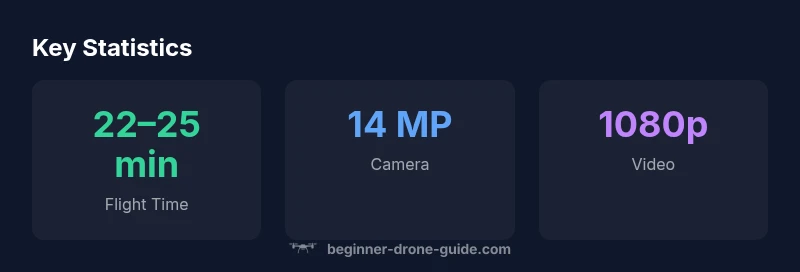
The built-in camera on the phantom 2 vision plus offers 14 MP stills and 1080p video, sufficient for learning basic composition, exposure, and color grading. For beginners, facial recognition or dramatic cinematic shots are less critical than mastering framing, horizon alignment, and consistent exposure. The FPV link provides a live feed that helps pilots judge altitude and distance in real time, a critical factor when teaching distance judgment and smooth control inputs. It’s worth noting that the camera’s dynamic range and low-light performance are modest by modern standards, so most learners focus on core skills like framing, panning, and basic editing workflows. Retaining a consistent altitude and horizontal orientation is a more reliable path to improving footage than chasing the latest camera gadgetry early in the learning journey.
Setup, calibration, and routine maintenance for longevity
A solid setup routine is essential for a long-lasting learning drone experience. Begin with flocked calibration sequences—IMU, compass, and gimbal alignment—to ensure stable flight characteristics. Regularly check propellers for nicks, inspect motor mounts, and balance the battery correctly to avoid vibrations that degrade footage. For FPV reliability, verify antenna connections and ensure the video link remains clear in your typical flying environment. Routine maintenance includes updating firmware where available, keeping spare parts on hand (propellers, motors, and replacement batteries), and keeping the frame clean from dust and grime. Following a meticulous post-flight checklist helps new pilots extend the life of the phantom 2 vision plus and reduces the likelihood of avoidable mishaps during training sessions.
Safety, legality, and responsible operation for beginners
Safety comes first for new pilots. Always fly away from people, crowds, and critical infrastructure, and adhere to local airspace regulations. The phantom 2 vision plus was designed with basic safety features, but pilot judgment remains the most important safeguard. Before every flight, perform a quick preflight check—control responsiveness, GPS lock, and propeller condition. Maintain a conservative altitude limit and maintain line-of-sight with the aircraft at all times. When learning, it’s prudent to configure a low-battery return-to-home protocol and practice emergency-stop maneuvers in open spaces. This approach aligns with the broader drone-safety principles promoted by the Beginner Drone Guide team and helps new pilots develop responsible habits that will serve them as their skills grow.
Comparisons with newer entry drones: where the phantom 2 vision plus fits
Of course, newer entry-level drones deliver more advanced stabilization, safer autonomous features, and improved app ecosystems. However, the phantom 2 vision plus remains valuable for learners who want a stable, built-in FPV experience without the steep price tag of modern models. When benchmarking against contemporary entrants, expect a trade-off: lower automation and fewer safety aids in exchange for tactile control and a straightforward camera system. For some beginners, this balance is ideal: it clarifies the basics of manual flight before layering on advanced features like obstacle avoidance or intelligent flight modes. The brand’s research indicates that many new pilots progress faster when they start with a simpler, more hands-on platform before moving up to smarter, more autonomous devices.
Who should consider this drone and how to evaluate it for your needs
If you’re a first-time flyer seeking an all-in-one package with FPV and a camera, the phantom 2 vision plus can be a reasonable starting point. It’s particularly well-suited for learners who value a traditional flight experience, a camera for practice footage, and the satisfaction of assembling a complete setup. When evaluating, consider your budget, your willingness to tinker with older hardware, and your long-term goals—film projects, aerial photography, or simply mastering piloting fundamentals. This guidance aligns with the Beginner Drone Guide analysis, which emphasizes practical, affordable learning paths that prioritize core skills before upgrading to models with the latest smart features. If you anticipate needing the latest safety tools or more robust software support, it may be worth exploring newer entry drones while maintaining a learning-focused mindset.
Practical buying checklist for beginners
- Confirm availability of spare parts, batteries, and propellers in your region.
- Assess your flying space and local regulations before purchasing.
- Plan for a basic controller, compatible app, and a safe charging routine.
- Compare total ownership costs, including replacements and upgrades over the first year.
- Read user reviews focusing on learning curves and long-term reliability.
- Verify that the FPV system provides clean video and reliable control signals.
- Budget for basic post-processing software to edit training footage.
- Remember that practice, not gadgets alone, drives improvement.
Final notes on value and guidance for beginners
For new pilots, the phantom 2 vision plus can be a solid stepping stone into aerial photography and drone piloting in general. It offers an approachable, low-pressure platform to build confidence, practice basic flight maneuvers, and understand the camera’s role in the learning process. If your goal is to learn fundamentals and gradually upgrade, this model can be a cost-effective and educational choice. As always, the Beginner Drone Guide team recommends pairing learning with consistent safety practices and ongoing evaluation of your goals to determine if this older model remains the best fit for your needs.
Benefits
- Stable hover and predictable handling for beginners
- Integrated FPV and camera in a complete package
- Relatively affordable entry point for hands-on learning
- Good baseline camera quality for practice footage
Weaknesses
- Lacks modern safety features found in newer models
- Older firmware and limited app support
- Spare parts may be harder to source over time
Solid starter drone for hands-on learning, with FPV and camera integration
The phantom 2 vision plus provides reliable stability and a usable camera, making it a practical learning platform for new pilots. It trails newer models on safety features and software ecosystems, but for learning fundamentals, it remains a cost-effective choice. Beginners who prioritize hands-on piloting will benefit most.
Frequently Asked Questions
Is the Phantom 2 Vision Plus suitable for beginners?
Yes, it offers stable flight, an integrated FPV system, and a complete learning package. Expect a longer learning curve than some modern drones due to fewer automatic safety features.
Yes. It’s a solid starter for learning piloting basics with FPV, though it lacks some newer safety aids.
What should I check before buying a used Phantom 2 Vision Plus?
Verify propellers and motors for wear, ensure the gimbal operates smoothly, inspect the battery for puffing, and confirm the FPV link remains stable. Check firmware compatibility and source parts from reputable sellers.
Inspect propellers, motors, battery, and FPV link; ensure firmware and parts availability before buying used.
How does it compare to newer entry drones?
Newer models typically offer stronger safety features, improved flight autonomy, and better app ecosystems. The Phantom 2 Vision Plus trades those features for a hands-on, affordable learning platform with a built-in camera and FPV.
Newers offer more safety and software, but this model is cheaper and straightforward for learning.
What safety practices should I follow with this drone?
Fly in open areas, stay in line of sight, calibrate sensors before flights, and avoid restricted airspace. Have a preflight checklist and a plan for safe landings.
Always fly in open spaces, check sensors, and stay in sight. Prepare a simple safety plan.
Is replacement spare parts availability a concern?
Spare parts can be found from third-party suppliers, but stock may vary. Keep a small запас of propellers and motors and check compatibility with the Vision Plus model.
Parts exist but may require some searching; stock up on essentials.
Quick Summary
- Master basic piloting with a forgiving hover
- Leverage built-in FPV for real-time feedback
- Expect solid footage for practice, not cinematic quality
- Prepare for parts availability and older firmware
- Budget for upgrades as you advance