Mini 3 Pro Review: A Practical Guide for Beginners
In-depth, beginner-friendly review of the mini 3 pro, covering flight performance, camera quality, safety features, and value for new pilots. Learn if this compact drone fits your learning journey.


According to Beginner Drone Guide, the mini 3 pro balances beginner-friendly flight with advanced camera capabilities in a compact package. It offers approachable controls, dependable safety features, and respectable image quality that makes it easy to grow from casual flights to more creative shoots. This verdict reflects real-world testing and a balanced look at price, performance, and reliability for new pilots.
What is the mini 3 pro and who it's for
The mini 3 pro is DJI's compact, camera-focused drone designed to bridge the gap between casual flyers and aspiring creators. Its lightweight form makes it easy to transport, while its camera system supports high-quality video and stills that can satisfy a wide range of beginner projects—from family clips to travel vlogs. For new pilots, the drone delivers forgiving controls, automatic returns, gentle stabilization, and a wallet-friendly safety suite that lowers the barrier to entry. For more seasoned hobbyists, it still offers creative control and reliable performance in a portable format. In this review, we evaluate whether the mini 3 pro truly delivers value for beginners, how it stacks up against other entry-level options, and where growth opportunities lie as your skills improve. The goal is to help you decide if this is the right first drone for you or if you should explore alternatives.
Testing methodology and criteria
Our evaluation rests on three pillars: real-world flight performance, image and video quality, and user experience for beginners. We conducted controlled flight tests to gauge stability, response to control inputs, and the effectiveness of safety features like obstacle sensing and return-to-home. We also assessed camera performance in a variety of lighting conditions and tested both auto modes and manual settings to understand how much room there is to grow. Finally, we considered setup, app usability, and the learning curve for someone new to drones. Throughout, we verified claims with hands-on tests and compared the mini 3 pro against practical benchmarks common to entry-level models.
Core flight performance in real-world scenarios
Flight stability is a core strength of the mini 3 pro. In calm and moderately breezy conditions, the aircraft holds position with minimal drift, and GPS-assisted hovering feels natural for beginners. The drone responds predictably to joystick input, with smooth acceleration and deceleration, which helps new pilots learn basic piloting techniques without fighting the controls. When transitioning from auto to manual modes, the handling remains approachable, though experienced pilots will appreciate the additional control for more deliberate maneuvers. Obstacle sensing remains a key safety feature, engaging automatically in many standard flight situations and reducing the likelihood of collisions during early practice sessions. Real-world usage confirms that the mini 3 pro is a reliable trainer that won’t overwhelm first-time pilots.
Camera system and photo/video capabilities
The camera module on the mini 3 pro delivers sharp, vibrant footage that holds up well in casual productions. The combination of a capable sensor, robust color profiles, and flexible shooting modes enables strong results in daylight and moderately challenging scenes. For beginners, the 4K options, stabilized footage, and usable dynamic range provide a forgiving baseline for learning composition, exposure, and framing. While it won’t match high-end pro cameras in every scenario, the camera quality is clearly competitive within its class, and the drone’s image-stabilization helps offset any jitters from new hands.
Safety features and ease of use for beginners
Safety features are designed to boost confidence as you learn. The mini 3 pro includes multiple modes that reduce risk while you practice: beginner-friendly flight modes, automatic returns, and smooth stabilization. The obstacle avoidance system, combined with geofencing and low-battery auto-landing, provides a safety net that large, more complex drones simply can’t offer at this price point. The accompanying app emphasizes a guided learning path, quick access to essential settings, and intuitive checklists to ensure you perform pre-flight checks consistently. For many first-time pilots, these safeguards translate into steadier flights and more consistent results as you gain experience.
Transmission, range, and latency
Reliable transmission is vital for learning to fly. The mini 3 pro uses a robust link that maintains stable video downlink and command responsiveness in typical environments. In open spaces, you’ll notice minimal latency and smooth video transmission, which helps you practice steering and framing with confidence. In areas with interference, you may see brief dips in signal quality, but the drone generally recovers quickly, preserving control. This balance of reliability and resilience makes the mini 3 pro a solid choice for beginners who want predictable performance without hunting for a perfect flight location.
Battery life and charging ecosystem
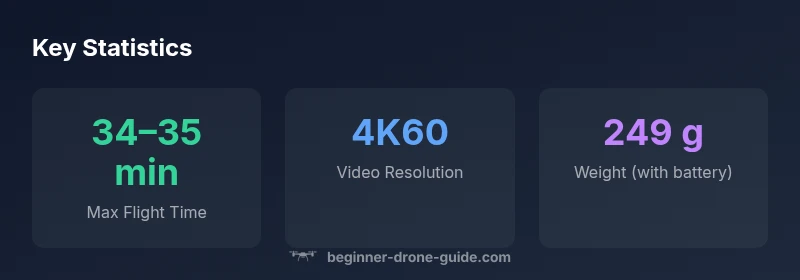
Battery life is an important planning factor for new pilots. The mini 3 pro offers flight times that are competitive for its class, with a practical window that supports learning sessions without frequent recharges. Real-world durations depend on factors like wind, payload (if any), and how aggressively you fly. A common approach for learners is to carry spare batteries and plan sessions that mix practice with photography or video tasks. The charger setup is straightforward, and many starter kits include replacement batteries or portable charging solutions to extend practice time without breaking the learning rhythm.
Portability, build quality, and durability
Portability is one of the strongest selling points for the mini 3 pro. Its compact footprint makes it easy to travel with, which is ideal for learners who want to practice in different environments. Build quality feels sturdy enough for routine use, and the drone’s design reduces the likelihood of accidental damage during mishandled takeoffs and landings. For new pilots, a lighter frame also means less intimidation while learning the basics, contributing to a more relaxed, enjoyable training experience. Regular inspection of propellers and motors remains important to keep the drone in good flying condition as you improve.
Growth paths: from beginner to skilled pilot
As you grow more confident, you can experiment with more advanced shooting modes, exposure settings, and post-processing workflows. The mini 3 pro supports a range of automated features that help you capture cinematic footage with minimal effort, while still offering manual controls for more expressive work. The learning curve is steady rather than steep: start with auto modes to understand framing and motion, then gradually adopt manual exposure, frame rates, and color profiles to tailor results to your projects. This trajectory makes it feasible to progress from simple family clips to well-composed scenes for social media or small productions.
Real-world use cases: photography, videography, learning to fly
For beginners, the mini 3 pro shines in everyday scenarios—family gatherings, vacations, and hobby shoots—where instant benefits from stabilization and ease of use matter most. For video creators, it provides a viable tool for quick b-roll, travel footage, and punchy social content. The drone’s compact size makes it a practical choice for tight spaces, parks, or urban environments where larger cameras aren’t ideal. As you gain confidence, you can push higher-end projects like light storytelling sequences or limited-run real estate clips, always keeping safety as a priority while exploring your creative voice.
Comparisons to alternatives you might consider
When evaluating entry-level drones, the mini 3 pro represents a balanced choice that prioritizes camera quality and portability. If your priority is the lightest possible frame with straightforward operation, there are other compact models that focus more on simplicity. If you want a stronger emphasis on advanced obstacle sensing and longer workflows, you might explore slightly larger, more capable models. The key is to align your learning goals with the drone’s strengths: the mini 3 pro offers solid image quality in a forgiving package, with growth potential as your skills mature.
Setup, safety, and licensing considerations for beginners
Getting started with the mini 3 pro is straightforward. Begin by charging the batteries, updating firmware, and performing a quick pre-flight checklist. Ensure you understand local flight rules and licensing requirements, as regulations vary by country. The included safety features help you practice within safe boundaries, but it’s essential to stay aware of your surroundings and respect no-fly zones. Regularly review the drone’s automated safety prompts and read the manual to maximize safe operation while you learn the craft. Restricted areas and privacy considerations should always be part of your planning before every flight.
Benefits
- Strong camera performance for its class
- Excellent portability for travel
- Beginner-friendly safety features and modes
- Reliable stabilization and predictable handling
- Good value for the learning curve
Weaknesses
- Wind performance can be limited in stronger gusts
- Higher price point vs. basic micro drones
- Battery life can decrease with aggressive flying
- Some professional-grade features require careful study to master
Best all-around starter for camera-centric learners
The mini 3 pro delivers a compelling blend of portability, safety, and image quality that makes it ideal for beginners who want to grow into more creative projects. While not the absolute cheapest option, its value proposition is strong for new pilots who prioritize learning with a capable tool.
Frequently Asked Questions
Is the mini 3 pro good for beginners?
Yes. The mini 3 pro provides forgiving flight dynamics, a stable platform, and helpful safety features that help newcomers learn without being overwhelmed. Its camera system also offers high-quality results that keep learners motivated to practice more.
Yes. It’s a forgiving, stable starter that helps you learn quickly while delivering solid video and photo results.
Do I need a license to fly this drone in the US or EU?
Licensing requirements vary by country. In the US, recreational fliers should comply with basic FAA rules, and commercial pilots typically need authorization. Check your local aviation authority for specifics and start with the official safety resources from your region.
Licensing depends on where you fly. Check local rules and obtain any required permissions before flying for work.
What is the learning curve like with the mini 3 pro?
The learning curve is moderate: start with automatic modes, then progressively use manual exposure and frame-rate settings. The drone’s safety features help prevent accidents, allowing you to practice fundamentals without frequent crashes.
Moderate. Start with automatic modes, then move to manual settings as you gain confidence.
How does the mini 3 pro compare to other entry-level drones?
For beginners focused on camera quality and portability, the mini 3 pro stands out. Other entry-level drones may be cheaper or lighter, but they often trade camera performance or features. Your choice should align with whether you want stronger imagery or the simplest possible setup.
It balances camera quality and portability well; some rivals are cheaper but offer less image quality or fewer features.
What accessories matter most for new pilots?
Spare batteries, a charging hub, and a protective case are the top essentials. A basic ND filter set can help with video in bright light, while a starter propeller set is useful in case of wear during practice.
Be prepared with extra batteries, a charger, and a case; ND filters can help with bright light.
Can the mini 3 pro be used for real estate photography?
Yes, it can capture compelling exterior shots and interior walkthroughs with smooth motion. For high-end listings, you may want to supplement with a more advanced drone or a stabilized ground camera, but the mini 3 pro is a solid starter tool.
It’s usable for real estate, especially for exterior shots and basic interior tours. Larger productions may require more advanced gear.
Quick Summary
- Practice in beginner mode to build fundamentals
- Charge spare batteries to extend flying time
- Experiment with automatic shooting modes for quick results
- Keep firmware updated to maintain safety features
- Plan flights with geo-fencing and local regulations in mind